












New Customer Accounts vs. Legacy: What Changes for Login, Passwords, Apps and Order History
July 31, 2026
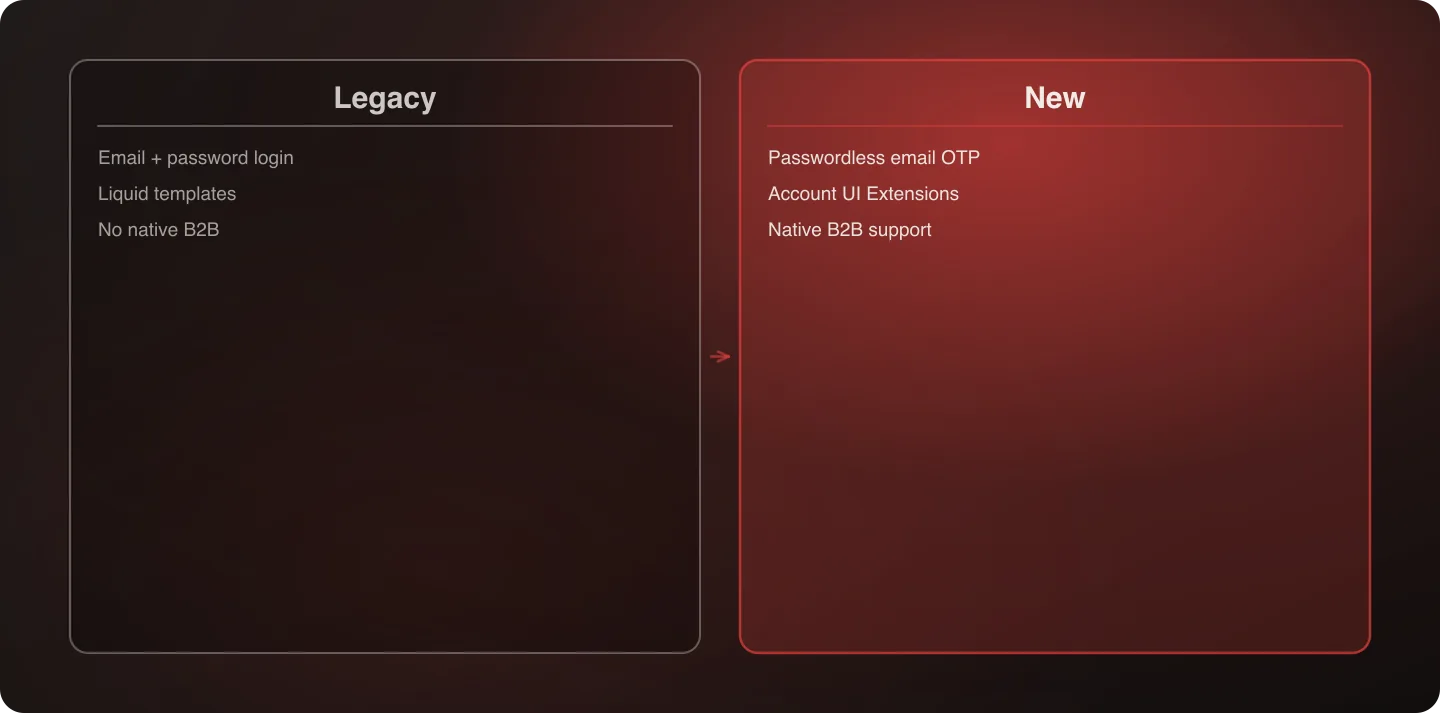
The core change is authentication: legacy accounts used email + password; the new system uses passwordless email OTP. Beyond login, order history, app compatibility, and customization all work differently. Here's what actually changes, side by side.
Last verified: September 6, 2026.
Side by Side
| Legacy Customer Accounts | New Customer Accounts | |
|---|---|---|
| Login method | Email + password | Passwordless email one-time code (OTP) |
| Customization model | Liquid templates (customers/account.liquid, etc.) | Customer Account UI Extensions |
| Order history | Standard list, theme-dependent formatting | Native, generally more detailed by default |
| B2B support | Bolted on via custom development | Native support for company accounts |
| Store credit / returns | Required a third-party app in most cases | Native self-serve support |
| App compatibility | Apps hook into Liquid page structure | Apps need Customer Account UI Extensions to integrate |
| Availability to new stores | Not available — deprecated Feb 26, 2026 | Default and only option for new stores |
| Support and updates | None — feature-frozen | Actively developed |
What This Means for Login Specifically
The password-to-OTP shift is the single most customer-visible change. A returning customer with a saved password will land on an unfamiliar flow. This isn't a visual redesign — it's a different mental model for “logging in,” and it's worth treating as a customer-communication event, not just a backend swap.
The upside is real: OTP login removes the entire category of “forgot password” support tickets, which for many merchants is a meaningful share of account-related support volume. The transition cost is front-loaded (customer confusion in the weeks after migration); the ongoing benefit (fewer password-reset tickets, better security posture) is continuous. → For the full communication and testing plan, see the migration plan for Plus stores.
What This Means for Apps
Any app that previously integrated with customer accounts by hooking into the Liquid template structure needs its own Customer Account UI Extension to keep working under the new system. This is a real compatibility gap, not a formality — an app without an extension simply doesn't appear in the new account experience, regardless of whether it worked fine under legacy.
Before migrating, check with each app vendor (loyalty, subscriptions, store credit, wishlist) on whether they've shipped an extension — most major players have, but confirm rather than assume, and get a specific answer rather than a vague “yes we support the new system,” since “support” can mean anything from a fully-built extension to a roadmap item.
What This Means for Order History
Generally an improvement out of the box — the new framework's native order history tends to show more detail by default than a stock legacy template did, including clearer status tracking and better mobile rendering. Custom formatting or filtering built into the old templates, though, doesn't carry over automatically and needs to be rebuilt as an extension. If your store relied on a specific custom view (subscription orders grouped separately from one-time purchases, for example), plan for that as a distinct build item rather than assuming it comes along for free.
What This Means for B2B Specifically
This is one of the more genuinely positive changes in the comparison. Legacy customer accounts had no native B2B support — any company-account functionality, multi-user access, or approval workflow was custom-built, usually at real expense. The new framework supports company accounts natively, which for many B2B-heavy merchants means retiring custom development that used to be necessary just to have basic B2B account functionality at all.
What Customers Will Actually Notice
Not every change in this comparison is equally visible to a customer. Ranking by how much a returning customer will notice:
- Login method — the most noticeable change by a wide margin. Every returning customer encounters this on their very next login.
- Order history layout — noticeable but usually perceived as neutral-to-positive, since the default presentation tends to be clearer than a stock legacy template.
- New self-serve features (returns, store credit) — noticed favorably by customers who use them, invisible to those who don't.
- Everything else in this table — largely invisible to customers; these are backend/developer-facing differences that don't surface in the account experience itself.
This ranking is useful for prioritizing where to spend communication effort: customers need to hear about the login change specifically, in plain language, well before they encounter it.
What Developers Need to Know
The shift from editable Liquid templates to a fixed extension model is the core technical change underlying every row in the comparison table. Under legacy, a developer could open customers/account.liquid and modify markup directly. Under the new system, customization happens by building a Customer Account UI Extension that renders at a defined location — conceptually similar to the shift checkout.liquid customization went through with Checkout Extensibility, and for the same underlying reason: fixed extension points survive platform updates in a way that direct template editing never did.
This has a real implication for planning: a developer estimating migration effort based on “how much Liquid code exists today” is using the wrong unit of measurement. The right question is “how many distinct extension points does our customization touch, and how complex is the data each one needs to display.”
What to Tell Your Customers
A short, plain-language explanation works better than a technical one. Customers don't need to know about Customer Account UI Extensions or OTP mechanics — they need to know: “We've upgraded our account system. You'll now log in with a one-time code sent to your email instead of a password — no password to remember or reset.” That single sentence, sent ahead of the change and reinforced briefly on the login page itself in the weeks after, covers the overwhelming majority of what a customer actually needs to understand.
The Practical Takeaway
If your account pages were mostly stock, this comparison is mostly academic — the migration will be close to automatic, and in several respects (order history detail, B2B support, eliminating password-reset tickets) a genuine upgrade with no real downside. If you built custom views, especially for B2B or loyalty display, the differences in this table are exactly the gaps that need engineering time before Shopify sets a hard sunset date. Either way, the login change deserves a communication plan regardless of how simple or complex the technical migration turns out to be.
Frequently Asked Questions
Is the new customer accounts system better than legacy?
For most stores, yes — native B2B support, self-serve returns, and store credit are meaningful upgrades over what most stores had to build custom on legacy. The tradeoff is a real change to the login experience customers are used to.
Do all my apps still work after migrating?
Only if they've built a Customer Account UI Extension. Confirm with each app vendor rather than assuming compatibility carries over, and get a specific answer rather than a general “yes.”
Does order history look different to customers after migrating?
Generally yes, and usually more detailed by default — but any custom formatting or filtering you had built needs to be rebuilt separately as an extension.
Will switching to OTP login reduce support tickets?
Often yes, over time — “forgot password” is typically a meaningful share of account-related support volume, and OTP login removes that category entirely. Expect a short-term increase in login-confusion tickets immediately after migration that settles once customers adjust.
How should we explain the login change to customers without confusing them?
Keep it to one plain-language sentence — that the account system was upgraded and login now uses a one-time code sent by email instead of a password. Customers don't need the technical explanation, just clear notice of what to expect on their next login.
Not sure what changes for your specific setup? Talk to an architect.