












Shopify Legacy Customer Accounts Are Deprecated: The Migration Plan for Plus Stores with Customized Account Templates
July 29, 2026
Legacy customer accounts are deprecated as of February 26, 2026, with no fixed sunset date announced yet. For Plus stores with customized “My Account” templates, migrating means auditing every customization, mapping it to a Customer Account Extension equivalent, and rebuilding what can't migrate automatically — all before Shopify sets a hard deadline. Here's the full plan.
Last verified: September 6, 2026.
Why This Can't Wait for the Sunset Announcement
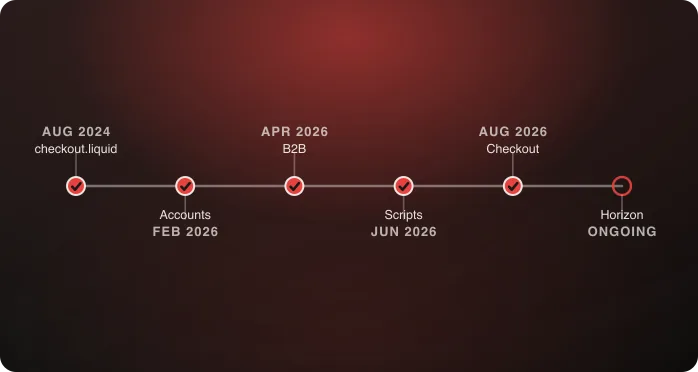
Shopify has said the final sunset date for legacy customer accounts is coming “later in 2026” — and recommends building in 2–3 months of buffer once it lands. That means the runway between announcement and enforcement could be short, and every store racing that same short window at once means agency and internal dev capacity gets scarce exactly when you need it most. Stores that wait for the date to start auditing are choosing to compress a multi-week project into whatever window Shopify gives them, competing with every other merchant doing the same thing at the same time. → For the full timeline and how this fits with Scripts, checkout.liquid, and Horizon, see Shopify's 2026 Deadlines.
There's a second reason not to wait: the deprecation already means no new features, no bug fixes, and no technical support for legacy accounts. Any issue that surfaces between now and the sunset date is one you're troubleshooting without vendor support, on a system that's already frozen in its current state.
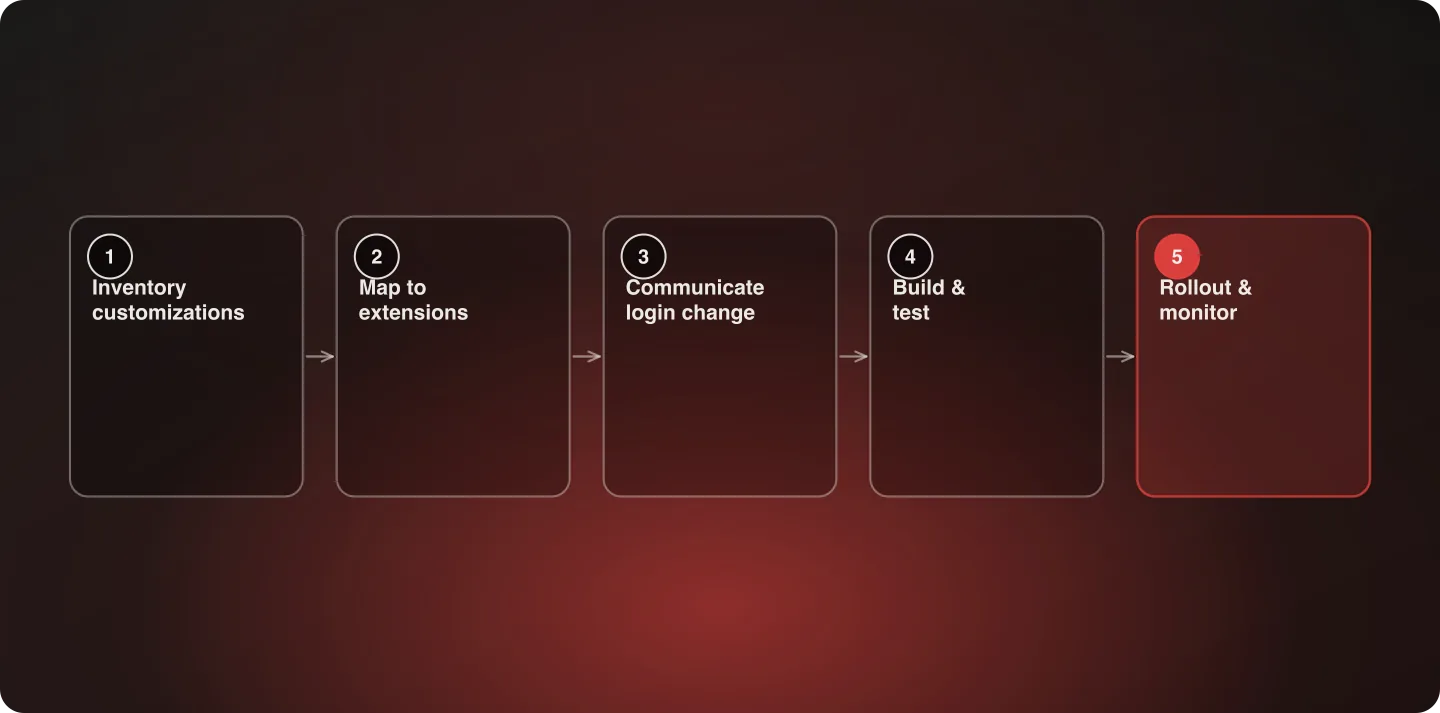
Step 1: Inventory What's Actually Customized
Before touching anything, catalog every piece of the legacy account experience that isn't stock Shopify behavior. This inventory is the single most important step in the whole project — teams that skip straight to “let's migrate” without a real inventory consistently discover missed customizations mid-project, which is far more expensive than finding them up front. Common customizations we see on Plus stores:
- Custom order-history formatting or filtering beyond the default list — filtering by status, custom date ranges, or grouping by subscription vs. one-time orders
- Loyalty program point balances or tier status displayed directly on the account page, usually pulled from a third-party loyalty app's API
- B2B-specific views — company account switching, net-terms balance display, purchase approval workflows, multi-user company access
- Custom fields on the account or address forms — tax ID fields, PO number fields, delivery instruction fields that don't exist in stock Shopify
- Visual styling that goes beyond a theme's default account templates — custom layouts, branded account dashboards, embedded marketing content
- Third-party app integrations that hook directly into the legacy account page structure — subscription management widgets, wishlist displays, store credit balances, referral program status
For each item, note not just that it exists but who built it (an app, or custom development) and how business-critical it is — a cosmetic styling choice and a B2B approval workflow are not the same priority, even though both are “customizations.”
Categorize each as stock (built entirely through standard theme/app behavior — migrates automatically) or custom (hard-coded into the legacy Liquid templates or dependent on the old page structure — needs rebuilding).
Step 2: Map Each Customization to Its Customer Account Extension Equivalent
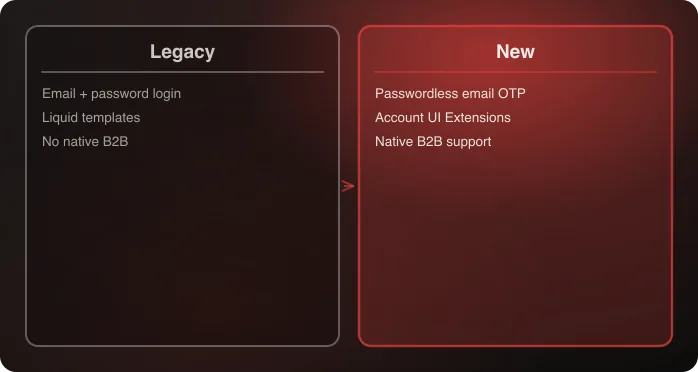
The new framework isn't a 1:1 replacement — it's a different extension model built around Customer Account UI Extensions rather than editable Liquid templates. This distinction matters more than it sounds: a direct “find and replace” mentality doesn't work here, because the new system's extension points are fixed locations, not an open canvas. What migrates cleanly, and what needs real rework:
| Legacy customization | New framework equivalent | Migration difficulty |
|---|---|---|
| Order history display | Native, often improved out of the box | Low — usually no work needed |
| Store credit / loyalty balance | Customer Account UI Extension pulling from the app's API | Medium — app needs an extension built if it doesn't have one already |
| B2B company/account switching | Native B2B account support in the new framework | Low-to-medium, depending on how custom the old view was |
| Custom fields on account/address forms | Metafield-backed extensions | Medium |
| Hard-coded visual styling | Rebuilt within the extension's supported styling options | Medium-to-high if the old design was highly bespoke |
| Multi-user company access / approval workflows | Native B2B support handles basic cases; complex approval chains may need a custom extension | Medium-to-high |
| Referral program display | Extension pulling from the referral app's API, if the app supports it | Medium, contingent entirely on app vendor support |
| Password-based login flows a support team relies on | Passwordless OTP — no equivalent; this is a genuine behavior change, not a migration | N/A — plan for it, don't try to replicate it |
The pattern across this table: anything that was primarily display of data from elsewhere (order history, a loyalty balance) tends to migrate cleanly, because the extension model handles data-rendering well. Anything that was primarily custom business logic hard-coded into a Liquid template is where the real engineering work concentrates.
Step 3: Handle the Login Change Explicitly
This is the one piece that isn't a technical migration so much as a customer-communication problem. The new system uses passwordless email OTP login. Customers who have a saved password (or a password manager entry) will hit a flow they don't expect on their next login. This is worth treating with the same seriousness as any other customer-facing UX change — arguably more, since login is the one interaction almost every returning customer has with your account system.
Plan for:
- An email to existing account holders ahead of the change explaining the new login flow, sent with enough lead time that it isn't the first they're hearing of it mid-checkout
- Updated help-center/FAQ content for customer support to reference, written in plain language rather than technical migration terms
- A support-team briefing before rollout, since “why can't I log in with my password” will be the first wave of tickets, and a support team that's never seen the new flow will struggle to reassure a confused customer quickly
- A short in-product explanation on the login page itself for the first few weeks post-migration, since not every customer reads a pre-migration email
Step 4: Build and Test
For each customization categorized as “custom” in Step 1, build the Customer Account Extension equivalent. Test against the actual old behavior, not against documentation — specifically:
- Log in as a returning customer with order history, saved addresses, and (if applicable) B2B company access, and confirm every view still shows correct data
- Test the OTP login flow end to end, including the edge case of an email that's also used across multiple customer accounts if your store allows that
- If using the
shopify-accountweb component auto-redirect for stores without legacy files, confirm it's actually redirecting correctly rather than assuming it works — test this from a fresh, unauthenticated session, not just an already-logged-in browser - Test on mobile specifically — account pages are disproportionately viewed on mobile, and extension rendering can behave differently across viewport sizes
- If you have B2B customers with multi-user company access, test the full approval/permission chain with more than one test user, not just the primary account holder
Testing checklist before rollout
- Every “custom” item from Step 1's inventory has a working extension built
- OTP login tested end to end, including the “email used across multiple accounts” edge case if applicable
- Order history displays correctly for accounts with a long order history, not just a fresh test account
- B2B views (if applicable) tested with more than one user role
- Mobile rendering confirmed for every custom extension
- Customer communication drafted and scheduled
- Support team briefed with a reference doc for common post-migration questions
Step 5: Rollout
Roll out with a monitoring window, not a single cutover moment. Watch support ticket volume closely in the first two weeks — login confusion tends to spike immediately after rollout and settle within that window if the customer communication in Step 3 was done well. Keep a rollback plan documented even if you don't expect to need it; a migration this central to the customer experience deserves that safety net regardless of how thoroughly it was tested.
Common Mistakes We See
- Treating this as a pure engineering project with no customer communication plan — the login change is the most customer-visible part of this migration, and skipping the communication step is the single most common cause of a support-ticket spike after go-live
- Migrating cosmetic customizations first and business-critical ones (B2B views, approval workflows) last, on the theory that cosmetic work is “easier to get out of the way” — this inverts the actual risk profile
- Assuming an app vendor has built a Customer Account UI Extension without confirming directly — some vendors are further along than others, and finding out mid-project that a critical app has no extension yet is a serious timeline risk
- Testing only with a fresh test account rather than an account with real order history, saved data, and (if applicable) B2B permissions — issues specific to accounts with real historical data are easy to miss otherwise
Data Migration Considerations
Beyond visible customizations, confirm what happens to the underlying customer data during migration — this is easy to overlook because it isn't visually apparent the way a broken page layout would be. Saved addresses, default payment methods, and any custom metafield data attached to a customer record all need to carry forward correctly. Specifically:
- Saved addresses — confirm multiple saved addresses per customer migrate with correct default-address flags intact, not just the single most recent one
- Order history linkage — confirm historical orders remain correctly associated with the customer record after migration, particularly for customers who've changed their email address at some point
- Custom metafields — any custom data attached to a customer record (loyalty tier, referral source, internal notes from a CRM sync) needs an explicit migration path, since metafields don't always carry over automatically depending on how they were originally attached
- Saved payment methods — vaulted cards should migrate, but verify this directly with a test account rather than assuming, particularly if a third-party payment gateway is involved rather than Shopify Payments alone
Sequencing When You Have Multiple B2B Customization Needs
Larger B2B operations often have several distinct customizations bundled into the “legacy account” umbrella — a company-switching view, an approval workflow, and custom pricing display, for instance. Rather than treating this as one monolithic rebuild, sequence by dependency: company-switching typically needs to exist before an approval workflow can be tested meaningfully, since approvals are scoped within a company context. Build and validate the foundational pieces first, then layer the more specific workflows on top, rather than attempting to build and test all three in parallel and discovering integration issues only at the end.
Vendor Readiness: What to Ask Each App Provider
For every app that touches customer accounts, ask three specific questions rather than accepting a general assurance of compatibility:
- Is there a published Customer Account UI Extension available today, or is this on a roadmap? A roadmap item is not the same as something you can build against now.
- What data does the extension expose, and does it match what your legacy integration showed? An extension that technically exists but only surfaces a subset of the old data still requires additional work to close the gap.
- Has the vendor's extension been tested at the scale of your store — order volume, customer count — or only in a demo environment? Vendor-provided extensions can have their own performance characteristics worth validating before committing to a launch date around them.
How This Fits into a Broader Plus Upgrade or Replatform Project
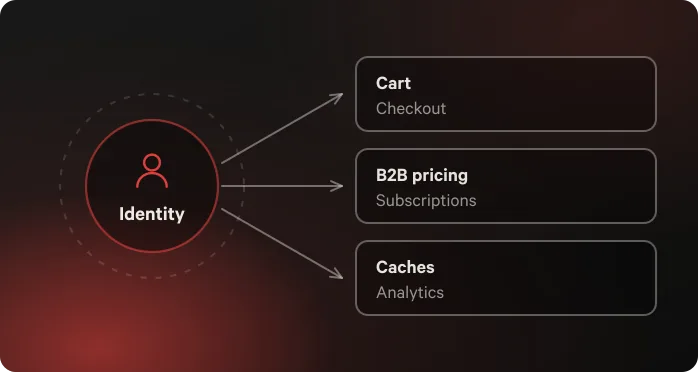
If this migration is happening alongside a larger initiative — a Plus upgrade, a Horizon re-theme, or a full replatform — sequence it deliberately rather than treating it as an afterthought bolted onto a bigger project. Customer account migration touches login, a surface every returning customer interacts with, which makes it a poor candidate for being the last thing tested before a combined launch. If multiple workstreams are converging on the same launch date, this one deserves its own dedicated QA pass rather than sharing a compressed testing window with unrelated changes. If your storefront is headless rather than theme-based, the identity dependencies run deeper than a theme-based migration — see What a Shopify Customer Accounts Migration Actually Costs You on a Headless Build.
What This Actually Costs
Effort scales almost entirely with how customized your legacy account experience was, not with store size. A store with stock account pages migrates in days. A store with a custom B2B account portal built directly into legacy templates is a multi-week project comparable to a moderate feature build, not a quick patch. Budget accordingly, and budget the customer-communication work as its own line item — it's easy to account for the engineering time and forget that the comms plan takes real time too.
Frequently Asked Questions
Do I need to migrate immediately since there's no sunset date yet?
Yes, practically. Shopify has said the runway between the sunset announcement and enforcement could be short (2–3 months is the buffer Shopify itself recommends), so starting the audit now rather than waiting for the announcement is the safer sequencing — especially since every merchant will be racing the same window at once once the date lands.
Will migrating break my customers' saved logins?
Customers move from password-based login to passwordless email OTP — this is a real behavior change customers will notice, not a backend-only migration. Plan customer communication around it specifically, including support-team briefing.
What's the hardest part of this migration for most Plus stores?
Custom B2B account views and hard-coded visual customizations built directly into the legacy Liquid templates. Stock account pages migrate close to automatically.
Can I keep using legacy customer accounts until the sunset date is announced?
Technically yes, but legacy accounts receive no further updates or technical support as of February 26, 2026, and you'll be racing a short buffer window once the sunset date lands. Auditing and rebuilding now avoids that compression.
Do all my third-party apps still work after migrating?
Only if the app vendor has built a Customer Account UI Extension. Confirm directly with each app vendor (loyalty, subscriptions, store credit, referrals) rather than assuming compatibility carries over automatically.
How long does this migration typically take?
It depends entirely on how customized your account experience was. Stock account pages can migrate in days. A heavily customized B2B account portal is comparable in scope to a moderate feature build — often several weeks, not a quick patch.
What happens to saved addresses and payment methods during migration?
They should carry forward, but verify directly with a real test account rather than assuming — check that multiple saved addresses retain correct default flags, and that vaulted payment methods migrate correctly, particularly if a third-party gateway is involved.
Should we migrate customer accounts at the same time as a Horizon re-theme or Plus upgrade?
Only with deliberate sequencing — customer account migration touches login, which every returning customer interacts with, so it deserves its own dedicated testing window rather than sharing a compressed one with unrelated launch-day changes.
Talk to an architect about your customer accounts migration.

Related