












What a Shopify Customer Accounts Migration Actually Costs You on a Headless Build
September 3, 2026
Shopify has deprecated legacy customer accounts. If you run a Liquid theme, the upgrade is mostly a configuration change and some template work — see the migration plan for theme-based Plus stores if that's your build. If you run a headless storefront, you are looking at a dependency migration wearing an authentication migration’s clothes, and the estimate your team gives you in the first planning meeting is probably wrong by a factor of three.
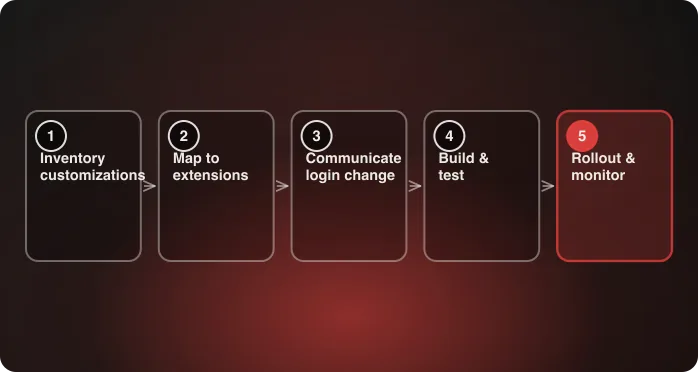
We recently took a production headless storefront through this migration end to end: off legacy Storefront API customer sessions, onto OAuth-based Shopify Customer Accounts, in controlled slices, with rollback available the whole way. Traffic moved first. A compatibility layer stayed up for about six months while we watched real behavior. Then we deleted the old path entirely.
What follows is the planning model we’d use again, framed as the decisions you have to make rather than the order we happened to make them in. The implementation details are generalized — client names, internal routes, and proprietary business rules are omitted.
The part teams underestimate
Customer authentication reads like a contained feature. Accept credentials, store a token, guard some account routes. Four or five files.
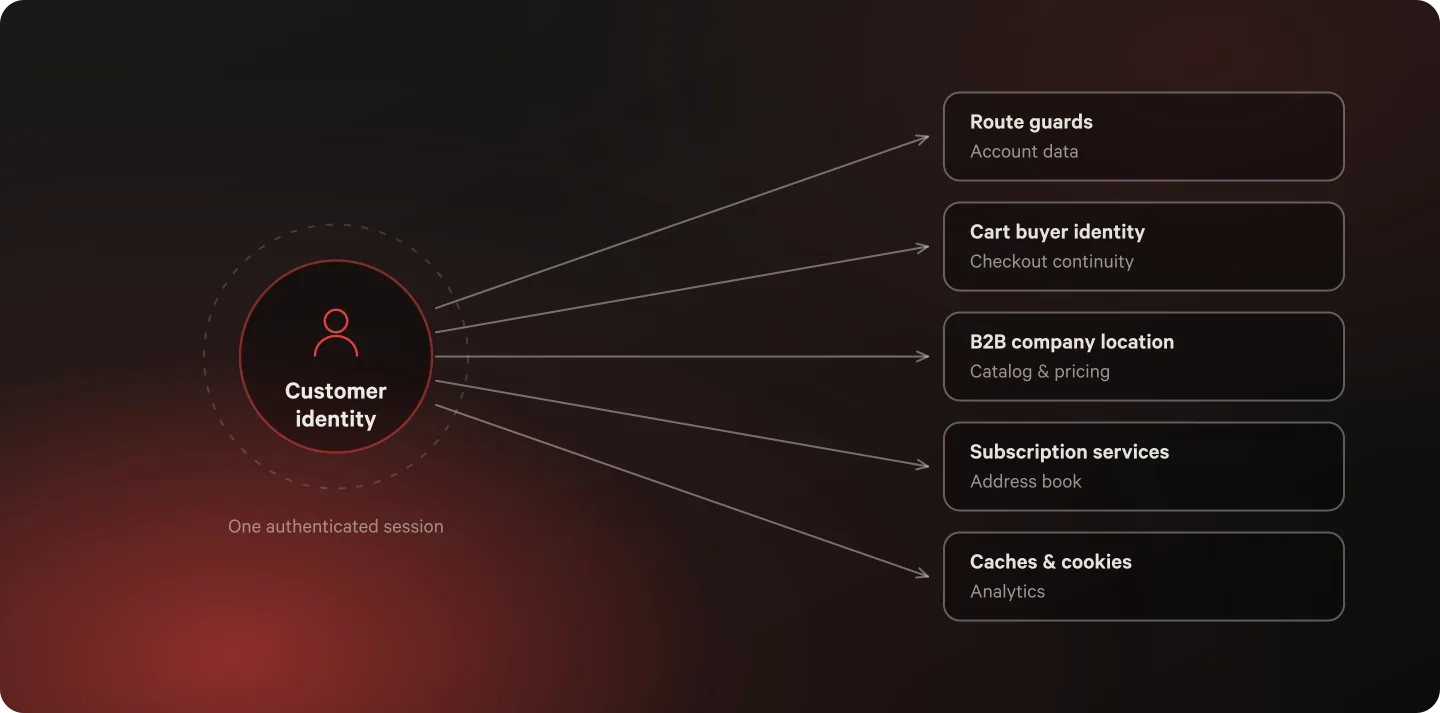
On a headless build, identity is not contained. It reaches route guards, account data, cart buyer identity, checkout continuity, company-location pricing, subscription services, address management, redirects, caches, analytics, and session cookies. That produces a specific and expensive failure mode: login succeeds, and the customer quietly loses context somewhere downstream. Nobody catches it in staging, because staging doesn’t have a cart that rotated three weeks ago or a B2B buyer whose location assignment changed.
The target platform is also genuinely different from the old one, not a drop-in replacement:
| Legacy customer accounts | Customer Accounts | |
|---|---|---|
| Auth mechanism | Storefront-owned password exchange | OAuth 2.0 / OpenID Connect |
| Token ownership | Storefront customer access token | Server-managed access + refresh tokens |
| Customer data source | Legacy Storefront customer query | Customer Account GraphQL schema |
| Commerce context | Token used directly | Token projected into Storefront and cart |
| B2B | Not supported in this model | Requires authenticated customer and authorized company location |
Hydrogen’s createCustomerAccountClient handles the protocol — login, code exchange, refresh, logout, queries. That is the part you don’t have to build, and it is the smaller part. Your application still owns the canonical customer model, which session is valid on a given request, how refreshed tokens reach the browser, how the cart receives buyer identity, how B2B location affects authorization and pricing, and what happens to sessions the old system created.
Question one: how many things consume identity?
This is the number that determines your timeline, and you can get it before committing to an approach. Run the inventory first. Not a list of pages — a list of everything that reads, writes, caches, or infers customer identity.
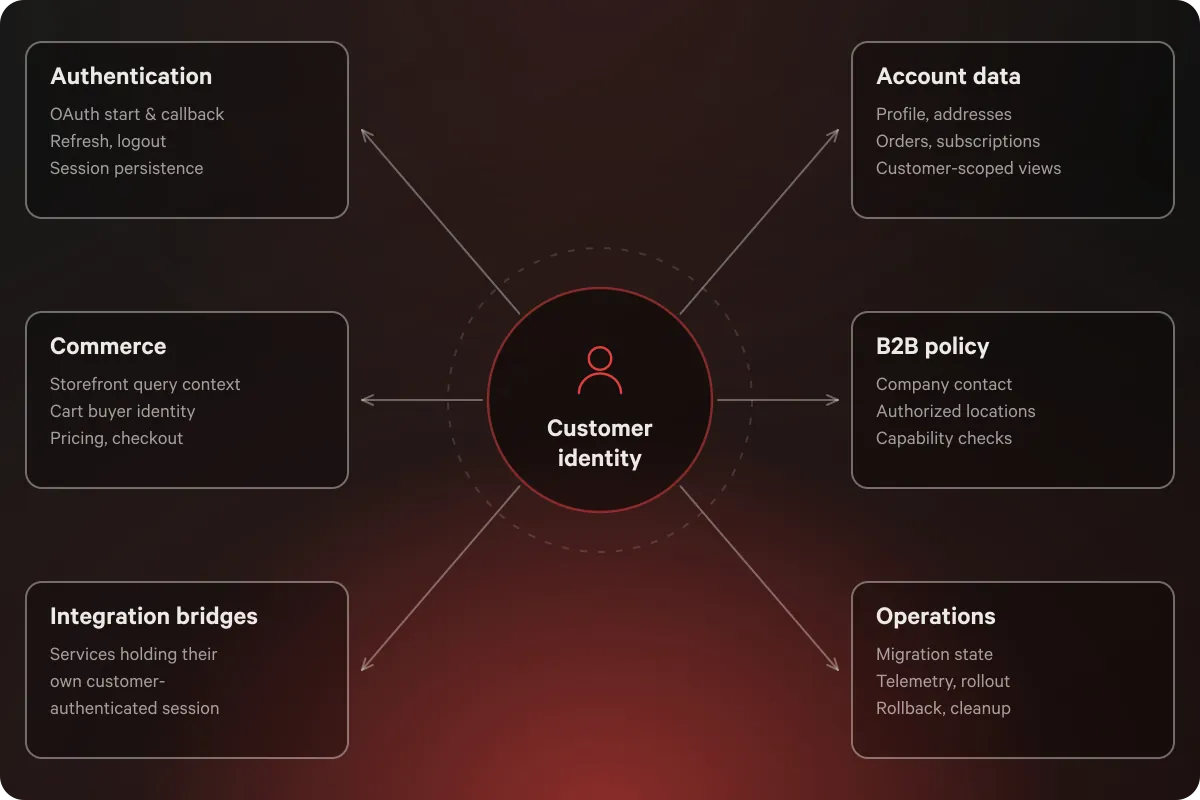
On our project it landed in six domains:
- Authentication — OAuth initiation, callback validation, refresh, logout, session persistence
- Account data — profile, addresses, orders, subscriptions, customer-scoped views
- Commerce — Storefront query context, cart buyer identity, catalog visibility, pricing, checkout
- B2B policy — company contact, authorized locations, selected purchasing location, capability checks
- Integration bridges — external services needing their own customer-authenticated session
- Operations — migration state, telemetry, rollout, rollback, cleanup evidence
The inventory is worth doing carefully because of one trap that catches almost everyone: a route can read customer data from the new API while still calling a nested service that requires the old token. It looks migrated. It renders. It is not migrated.
So track dependencies rather than pages, and define what “complete” means per surface before you start:
| Surface | Identity dependency | Commerce or integration dependency | Complete when |
|---|---|---|---|
| Account reads | Auth guard + customer adapter | Orders, account aggregation | Normalized output and persisted session |
| Account mutations | Auth guard + new API mutation | Address, subscription bridge | Success, empty, and upstream-error paths tested |
| Cart and checkout | Storefront buyer token | Latest cart, checkout URL | Identity reconciled after cart recovery |
| B2B | Company contact + authorized locations | Catalog, pricing, cart | Location validated server-side |
| Logout | Active auth session | B2B, integration, restricted cart state | All identity-derived state cleared |
If that table comes back with two rows that matter and no B2B, your migration is a couple of sprints. If it comes back looking like the one above, keep reading.
Some scoping questions worth answering in the same pass, because each one moves the estimate:
- Does any external service (subscriptions, loyalty, address validation) establish its own customer session from your token?
- Is B2B in scope now, or on the roadmap inside 12 months?
- How many caches, cookies, or session keys are derived from the current customer token?
- Do your tests construct legacy sessions directly? Those are migration work too.
- Who owns deleting the transitional code, and by when?
That last one is not a formality. We’ll come back to it.
Question two: which rollout model fits?
Shopify’s platform direction settles the destination. The real decision is how you get there, and there are three defensible answers.
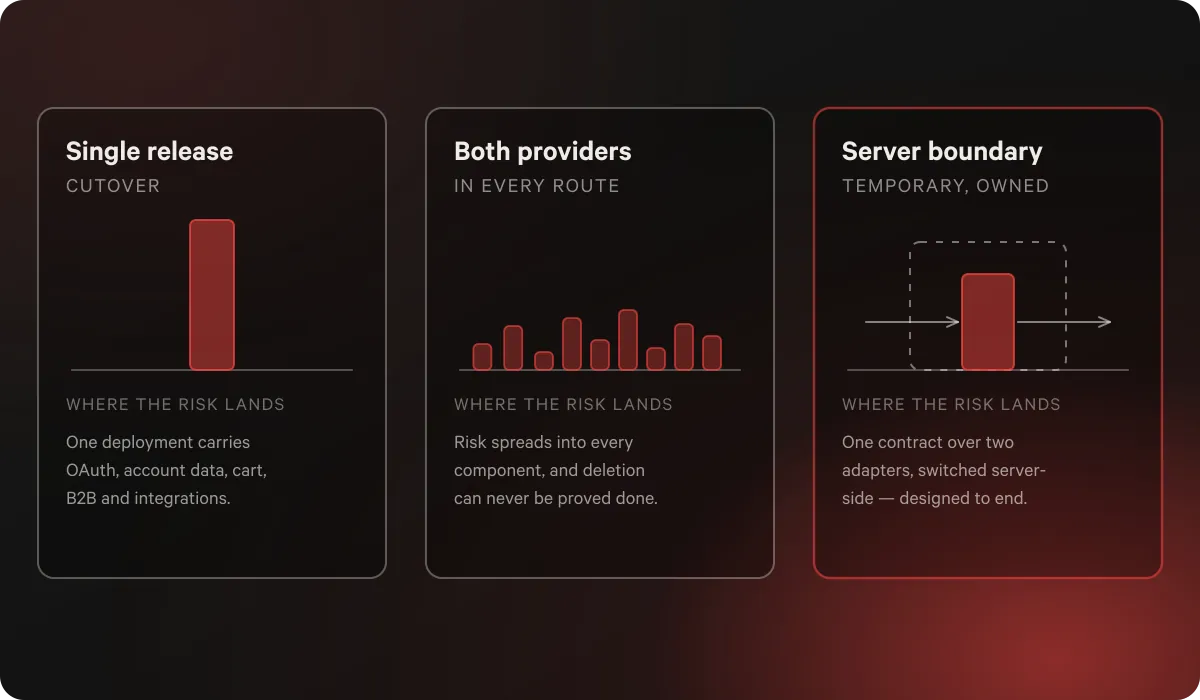
Single-release cutover. Replace every consumer at once. Shortest window of temporary code, and genuinely the right call for a shallow account area. It concentrates OAuth, account data, cart, B2B, and integration risk into one deployment, and rollback means restoring several contracts together.
Teach every route both providers. Each team migrates on its own schedule. It also multiplies UI states, leaks provider concerns into components, and makes deletion nearly impossible to prove complete. Reasonable only if supporting multiple identity providers is a permanent product requirement.
A temporary server-side boundary. One application customer contract sitting over two provider adapters, with a server-only switch choosing the active provider per request. This is what we used. It bought route-by-route migration, production rollback, and behavior-level comparison between two Shopify schemas. It cost roughly six months of dual-mode code.
The third option is only safe under three conditions, and if you can’t meet them, pick the first:
- Provider selection stays centralized. Resolved at the request boundary, consumed by shared identity helpers, never leaking into components. It controls which login flow is available, which session contract is valid, which API supplies customer data, and which token reaches the cart. It does not control layout or copy.
- The compatibility surface is measured. You know exactly which surfaces still touch the old adapter, at any moment.
- Deletion criteria exist before cutover. Written down, with an owner.
The thing that makes a temporary boundary work is that it was designed to end. Without that, rollback infrastructure becomes permanent architecture by accident, and every feature you build for the next three years inherits two auth systems.
The five failures that show up in production
These are the ones that cost us real debugging time, in rough order of how surprising they were.
1. An auth “read” writes your session. This is the one to internalize. Hydrogen documents that a logged-in check can refresh an expired token, and that the session must be committed for the refresh to persist. Access-token retrieval does the same. So: a protected loader checks auth, the client refreshes in memory, the loader returns data without committing, and the next request presents stale credentials. The customer appears randomly logged out. It’s intermittent, which is what makes it expensive. The fix is architectural, not diligence — make session persistence part of the shared auth boundary so no route author has to remember it.
2. Identity attached at login instead of at checkout. Customer Account data and Storefront commerce data are separate API domains. You have to project the authenticated customer into Storefront buyer context, and the moment that matters is after recovering the latest cart, not at login. Attach it only at login and you miss cart rotation, token refresh, and company-location changes. Attach it to a stale cart ID and you update the wrong cart. The order is: get the latest cart, resolve the current buyer, update buyer identity against that cart, treat Shopify’s returned cart as authoritative, then read the checkout URL.
3. Sessions that outlive a mode switch. If rollback is available, a browser can hold a valid session for yesterday’s provider while the server expects today’s. Unhandled, that means redirect loops, false authenticated states, stale integration sessions, and a B2B location attached to an identity that no longer authorizes it. Three details matter: clean up state before redirecting, or the next request arrives identical; use 303 See Other for non-idempotent requests so the browser can’t replay an account mutation after cleanup; and don’t treat an indeterminate compatibility check as confirmed invalidity, because an upstream hiccup is not evidence a good session should be destroyed.
4. Two schemas describing the same person differently. Legacy Storefront and Customer Account data disagree on nested versus scalar email and phone, marketing-subscription representation, address shape, timestamp names, pagination structure, and how metafields are exposed. Teaching every component both schemas doubles your surface area. One adapter per provider, normalizing into a single application customer type, keeps the difference in one file — and gives you a test oracle, since both adapters producing the same contract means you can compare normalized behavior instead of raw GraphQL.
5. A company location that outlives its authorization. In B2B, a token identifies a person, but that person acts for one or more company locations with their own catalogs, pricing, and order visibility. The selected location has to live in the server session and be validated against the customer’s currently authorized set on every relevant request. Shopify’s headless B2B guidance requires both the customer token and a companyLocationId, and cart queries don’t inherit buyer context from @inContext — the cart has to be told explicitly.
Deciding your failure policy before you need it
There is no universal fallback rule for this migration, and reaching for one is how teams end up either blocking checkout over a cosmetic lookup or shipping the wrong price to a wholesale buyer. Set the policy by the cost of being wrong.
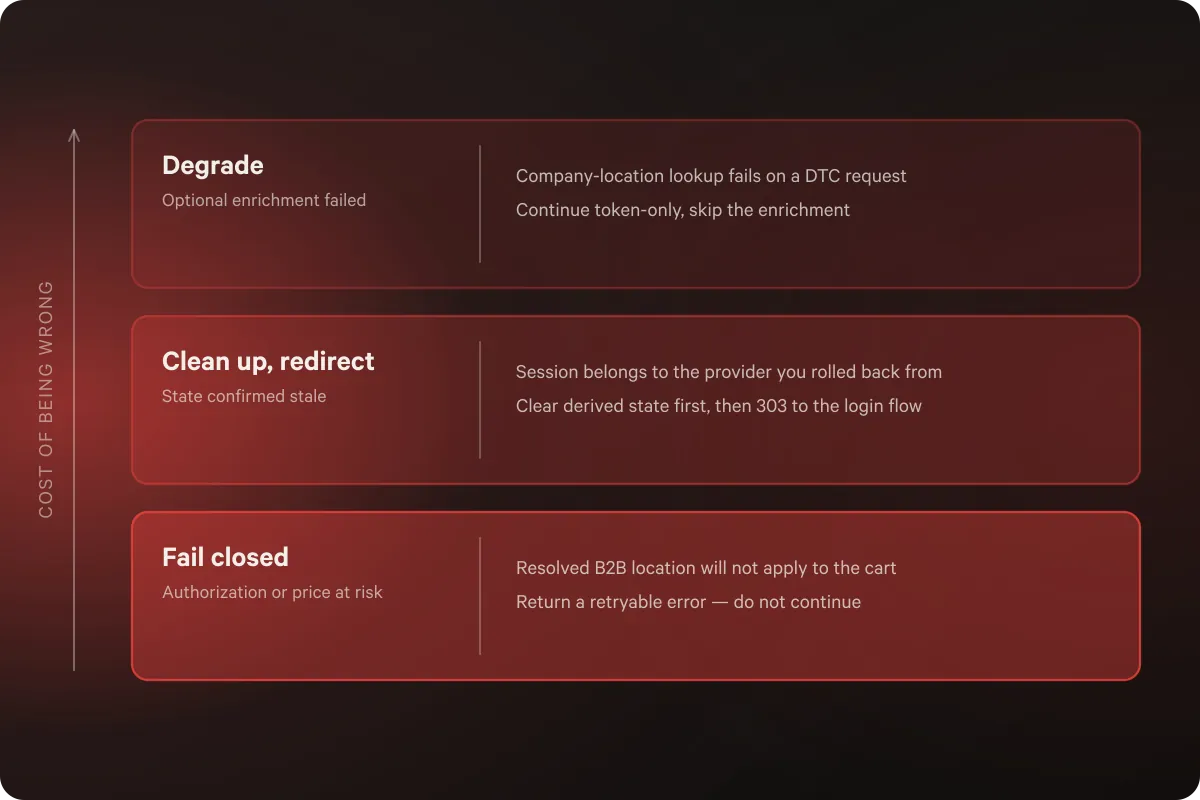
| Situation | Risk if you get it wrong | Policy |
|---|---|---|
| Company-location lookup fails on a DTC request | Cosmetic at worst | Continue token-only, skip the optional enrichment |
| Rich B2B context query fails | Overstated permissions | Fall back to a narrower location query with restricted capabilities |
| Auth status can’t be determined | Destroying a valid session over a transient blip | Preserve state, emit a signal, let authorization-sensitive operations enforce their own checks |
| Session confirmed to belong to the old provider | Redirect loops, false auth, stale derived state | Clear identity-derived state, then redirect with method-safe semantics |
| Resolved B2B location can’t be applied to the cart | Wrong catalog or wrong price at checkout | Return a retryable error, do not continue |
The asymmetry is the point. Optional enrichment degrades. Confirmed stale state gets removed. Uncertainty is not proof of invalidity. And an established B2B purchasing context does not disappear silently at the boundary where it determines what someone pays.
Getting evidence for any of this requires telemetry that can’t leak customer data. Keep the dimensions low-cardinality: active auth mode, route group, session compatibility outcome, refresh attempted or failed, selected location valid or fallback or missing, cart buyer-identity update result, integration cache outcome, normalized upstream error category. Email addresses, tokens, company names, and raw GraphQL payloads stay out. The questions you’re answering are operational — which surfaces still reach the old adapter, whether session resets cluster on one route group, whether B2B fallbacks are expected or symptomatic.
What “done” means, and how to prove it
Here’s the part most migrations skip. Moving traffic is a cutover. The migration is finished when the new system owns every supported responsibility and no runtime mechanism can select the old one.
Deleting the old path is not cleanup. It’s a validation phase, and it surfaces things the compatibility layer was masking:
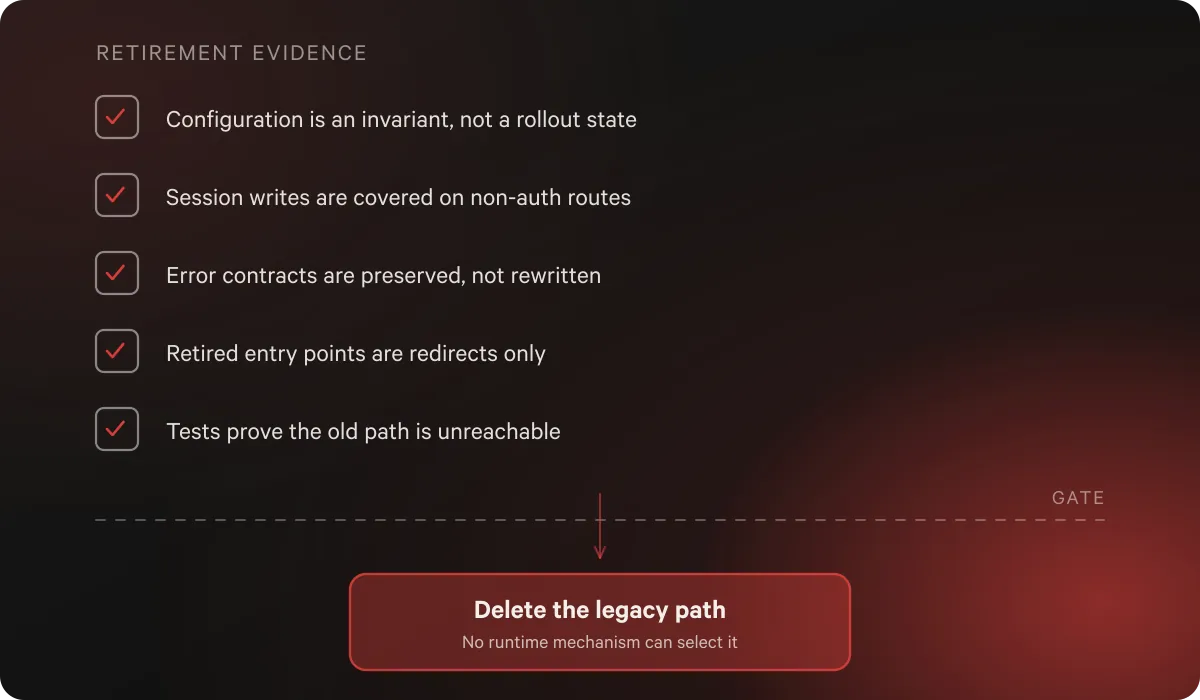
- Configuration becomes an invariant. With two modes, a missing OAuth client is a rollout state. With one, it’s invalid wiring. That needs startup validation and request-context assertions, or a config mistake silently downgrades authentication.
- Session persistence has to cover non-auth routes. Removing the old session code exposed refresh-capable calls inside cart and account actions. A request can be “about cart” and still mutate the auth session.
- Error contracts stay put. Attaching a session cookie to every possible failure would mean converting thrown failures into returned responses, which changes established error-boundary behavior. Don’t smuggle a behavioral rewrite into an auth deletion.
- Redirects are not implementations. Retired registration, recovery, activation, and reset entry points can survive as redirects to the canonical login flow — without keeping password mutations, recovery tokens, classic sessions, or a second customer model. Navigation compatibility, zero architectural compatibility.
- Tests prove absence. Not just that the new path works. That the deprecated one is unreachable. A migration isn’t done while a new feature can still accidentally bind to it.
The resulting architecture is deliberately less flexible than what it replaced, and that’s the return. The application stops asking every new account or commerce feature to understand a migration that already finished.
What to budget
Three things that don’t usually make it into the estimate:
The observation window is engineering time, not waiting. Ours ran about six months, and during it we updated cart actions to persist refresh-capable session writes, added restricted B2B fallbacks in place of all-or-nothing failure, made integration retry and negative-cache semantics explicit, and converted obsolete account paths into redirects. Budget it as active work at a lower intensity, not as a monitoring period.
Deletion is its own scoped phase. Give it a ticket, an owner, and a date, decided before cutover. Transitional code with no expiry mechanism becomes permanent, and the cost compounds quietly: every subsequent feature inherits two auth systems, two session contracts, and two customer models.
Tests are part of the migration surface. Any test that constructs a legacy session directly is migration work. So is every GraphQL fragment, because similar field names don’t make Storefront and Customer Account fragments interchangeable, and they need validating against their own schemas.
What this does not buy you is atomic consistency across the Customer Account API, cart state, and external services. Nothing does. You coordinate them with explicit ordering, retries, validation, and failure boundaries, and you accept that the seams are managed rather than eliminated.
When to skip all of this
A staged migration with a six-month compatibility layer is the wrong answer for plenty of stores, and we’d rather say so than sell the complicated version.
Do the single-release cutover if your account area is shallow, no external service derives its own session from your customer token, B2B isn’t in scope now or soon, and you have a tested rollback path. The temporary boundary buys risk reduction at the price of temporary states, extra tests, telemetry, and cleanup. If there isn’t much risk to reduce, you’re just buying the price.
And if you’re on a Liquid theme rather than a headless build, this whole article is about a problem you don’t have. Your upgrade path is meaningfully simpler.
If you’re working out which of those you actually are, that’s the conversation we have with merchants most often right now. This is core work for our composable commerce and system replatform teams — talk to an architect, or see how we built customer account infrastructure for 80,000+ Vuori members and retired the Nuts.com homegrown platform for Shopify Plus in six months.
Frequently asked questions
Are Shopify legacy customer accounts being deprecated?
Yes. Shopify has marked legacy customer accounts as deprecated and recommends moving to customer accounts, which use OAuth 2.0 and OpenID Connect with a server-managed Customer Account API session. Plan the migration rather than waiting for a forced cutover.
How long does a headless Customer Accounts migration take?
It depends almost entirely on how many systems consume customer identity, not on how many account pages you have. A shallow account area with no B2B and no external identity consumers can be a couple of sprints. A build where identity reaches cart, checkout, B2B pricing, subscriptions, and external services is a multi-quarter project, and the traffic cutover happens well before the migration is actually finished.
Does Hydrogen handle the migration for me?
Only the protocol. Hydrogen’s Customer Account client covers login, authorization-code exchange, token refresh, logout, and queries. Your application still owns the canonical customer model, session validity per request, how refreshed tokens reach the browser, how the cart receives buyer identity, and how B2B location affects authorization and pricing.
Why do customers appear randomly logged out after migrating?
Almost always because a refreshed token was never persisted. A logged-in check or access-token retrieval can refresh an expired token in memory, and if the response doesn’t commit the session, the browser carries the old session into the next request. Make session persistence part of the shared auth boundary instead of a per-route convention.
What does Shopify B2B require in a headless storefront?
An authenticated customer token derived from the Customer Account API plus an authorized companyLocationId. Keep the selected location in the server session and validate it against the customer’s authorized set on every relevant request. Cart queries don’t inherit buyer context automatically, so buyer identity has to be applied to the cart explicitly.
Can we roll back mid-migration?
Only if you designed for it. Flipping the active provider isn’t enough — the previous provider’s derived state has to be cleared, and redirects have to make forward progress or customers land in loops. Rollback capability is also the thing most likely to become permanent by accident, so give the transitional code an owner and a deletion date up front.
References

“Thanks so much for a successful build! I'm ecstatic to see our difficult problems addressed in a viable way.”
Chris Clark, Co-Founder & CDO, Grove Collaborative
Read now
Retiring a legacy platform of your own? See how Nuts.com moved to Shopify Plus in six months.

Related