




















Architecture & Tech Stack16 minute read
What Is Headless Commerce? Pros & Cons for Mid-Market DTC Brands
Published Last updated
Headless commerce separates the storefront your customers see from the ecommerce platform that runs your products, orders and payments. As of November 2026, most mid-market direct-to-consumer (DTC) brands don’t need to go fully headless. Shopify’s own Hydrogen framework and Oxygen hosting have closed most of the performance gap that used to be the strongest argument for headless commerce.
A well-built Shopify Plus or Horizon theme can now match a headless storefront on speed, while keeping the integrations, checkout and admin tools that a headless build makes your team rebuild. A custom headless storefront on Vercel and Next.js remains the right call mainly for brands that are already technology-first.
Here’s what you’ll find on this page:
- What headless commerce is, and how a headless store differs from a traditional ecommerce platform
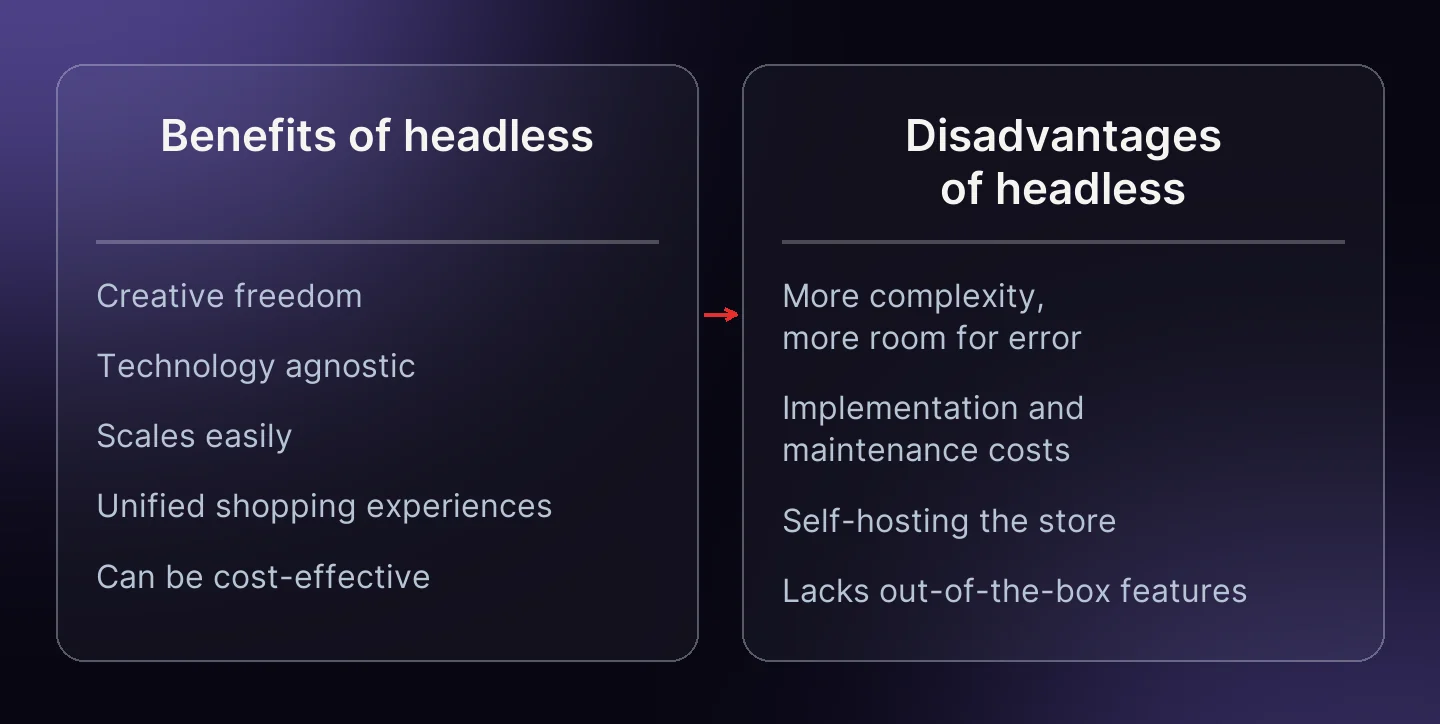
- The 5 benefits and 4 disadvantages of headless commerce
- Whether a headless storefront is faster than Shopify Plus
- How Shopify Hydrogen and Vercel change headless commerce in 2026
- How headless compares with composable, modular and microservices architecture
- Headless CMS vs. traditional CMS
- Who should go headless, when not to, and where to invest instead
What Is Headless Commerce?
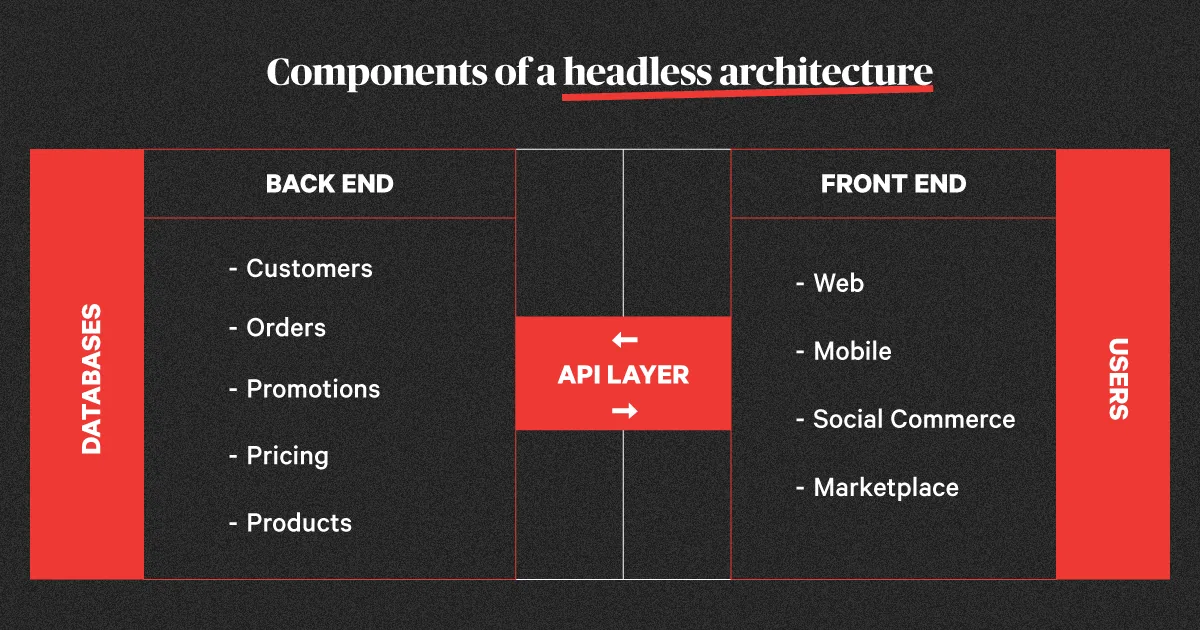
Headless commerce is an ecommerce architecture that separates the front-end presentation layer (the storefront) from the back-end commerce functions (inventory, orders, payments and admin). In a headless commerce build, the storefront and the back end communicate through application programming interface (API) calls instead of sharing one codebase.
A headless commerce system splits an online store into a “head” and a “body” that operate independently:
- The head is everything a customer interacts with while shopping: landing page content, add-to-cart buttons, banners and every other visual part of the storefront.
- The body is everything that runs in the background to keep the store working: inventory management, security, and order and payment processing.
Because the head reaches the body only through APIs, one back end can serve several storefronts, such as a website, a mobile app and an in-store kiosk. Shopify Plus, BigCommerce, Salesforce Commerce Cloud and Adobe Commerce (formerly Magento) each offer a headless option.
Headless vs. Traditional (Monolithic) Ecommerce Platforms
The main difference between a headless and a traditional ecommerce platform is how tightly the storefront is tied to the back end. A traditional, or monolithic, platform packages the front end and back end together, so a change on one side often has to be accommodated on the other. A headless platform decouples the front end and back end, so each side can change without redeploying the other.
Monolithic platforms got their name because every feature ships in one package. On Shopify, that package now includes a theme editor marketing teams can use without developers, plus a headless path through Hydrogen, so the coupling costs a brand less than it did in 2019.
| Factor | Traditional (monolithic) platform | Headless commerce |
|---|---|---|
| Architecture | Front end and back end are one tightly coupled system | Front end and back end are separate systems connected by APIs |
| Front-end design | Design works within the platform’s theme framework | Any framework or design; the brand builds every storefront component |
| Changes | A back-end change can require front-end work, and the reverse | Each side can be updated without redeploying the other |
| Third-party apps | Apps install from the platform’s app store | The front-end part of each app has to be built and integrated |
| Hosting and uptime | The platform hosts the store | The brand hosts the storefront, unless it runs on Shopify Oxygen |
| Analytics | Platform analytics and tagging work out of the box | Every tag is rebuilt and cross-checked by the brand’s team |
| Channels | Built mainly for one website | One back end can feed a website, an app and other channels through APIs |
| Team needed | Marketing runs day-to-day changes; developers handle custom work | A dedicated engineering team or an agency on retainer |
| Running cost | Platform subscription plus apps | Platform subscription plus hosting, custom integrations and ongoing engineering |
Top 5 Benefits of Headless Commerce
Headless commerce has 5 main benefits: control over design and URLs, freedom to choose the technology, independent scaling, consistent experiences across devices and markets, and, in some cases, lower cost. Each benefit comes from the same source: the storefront is separated from the commerce back end.
1. Full Control of Design and URL Structure
On a headless storefront, designers aren’t restricted by a platform’s templates or themes. Designers have full control over how the storefront captures the brand’s identity, and can change the front end without affecting the back end.
Headless commerce also gives full control over URL structure. Shopify requires /products/ and /collections/ in product and collection URLs, while a headless storefront can use any URL hierarchy, which can help SEO. A new URL structure has its own cost: every old URL needs a redirect, and a migration that misses redirects can lose rankings.
2. Freedom to Choose the Technology
Headless commerce lets a development team use its preferred frameworks and tools, such as React or Vue. Developers can also replace individual parts of the tech stack with best-of-breed applications without replatforming the whole store.
3. Independent Scaling and Updates
Headless commerce lets each part of the tech stack scale on its own. On a monolithic platform, components are bundled together, so scaling one part means scaling the platform. Updates to a headless store go through API calls, so adding a feature doesn’t require rebuilding the whole site.
Headless commerce is often sold as a way to “future-proof” a tech stack. A headless build is future-proof only if your team can maintain the extra systems, and the Top 4 Disadvantages of Headless Commerce section covers that cost.
4. Consistent Shopping Experiences Across Devices and Markets
Because a headless storefront is API-driven, one back end can serve a website, a mobile app and other channels, so customers get the same brand experience on every device.
Headless commerce can also simplify international expansion. In 2019, before Shopify Markets existed, Anatta took AG1 headless so that customers saw one brand experience on one domain, managed through a single content management system (CMS) for translation and currency. As of November 2026, Shopify Markets handles most of that localization work natively, without a headless build.
5. Lower Cost, in Some Cases
Headless commerce can lower costs for a brand that runs several storefronts or apps. In a headless build, business logic lives in one place, the API, so a change is made once instead of in every website or app. For a brand with a single storefront, the savings rarely cover the extra build and maintenance cost.
Top 4 Disadvantages of Headless Commerce
Headless commerce has 4 main disadvantages: more complexity, higher build and maintenance costs, the burden of hosting, and the loss of out-of-the-box apps and analytics. For many mid-market DTC brands, these 4 disadvantages outweigh the benefits.
1. More Complexity, More Room for Error
A headless store relies on APIs, multiple systems and custom integrations, so managing a headless store takes technical expertise. The more third-party services in the tech stack, the harder it is to find where an error starts. Downtime and bugs caused by that complexity hurt the customer experience and cost sales.
Headless commerce also changes security risk rather than removing it. On any platform, third-party app scripts can expose customer data when the small teams behind those apps don’t patch regularly. A headless build can cut some app scripts, but adds custom APIs, hosting and integrations that your team has to secure.
2. Higher Implementation and Maintenance Costs
A headless build costs more to build, extend and maintain than a Shopify theme. A custom headless build can cost about as much as a full replatform, and the ongoing engineering to maintain a headless storefront adds to that cost every year.
Routine platform changes also cost more on a headless build. A Shopify customer accounts migration on a headless build is a good example, because the account interface is yours to rebuild instead of Shopify’s to ship.
Headless commerce also raises the bar for the team that builds and maintains the storefront. What to look for in a Shopify Plus agency sets out how to evaluate the engineering depth a headless build assumes.

3. The Burden of Hosting a Headless Store
A headless storefront needs its own hosting. Platforms like Shopify Plus and Salesforce Commerce Cloud host the store for you, but on a headless build, hosting costs and uptime fall back on your team.
If your brand was once on Magento, you know the balancing act of keeping a self-hosted site up. Shopify removed self-hosting risk, and a headless build brings that risk back, unless the storefront runs on Shopify’s Hydrogen and Oxygen.
4. No Out-of-the-Box Apps or Analytics
A headless storefront doesn’t inherit the platform’s front-end features. Apps with a storefront component don’t work out of the box, so your developers build, integrate and maintain each one. When an app breaks on a headless store, your team fixes it.
Analytics work the same way. Shopify provides analytics and tagging natively, while on a headless build your team rebuilds every tag you had in Google Tag Manager or Elevar and cross-checks the data for accuracy.
Is a Headless Storefront Faster Than Shopify Plus?
A headless storefront is not automatically faster than a Shopify Plus store, because site speed depends on how the store is built, not on whether it is headless. Headless was once the only way to get page load times under 1 second, and that is no longer the case.
Shopify closed the speed gap itself. As of November 2026, Shopify’s APIs are fast and reliable, and Shopify supports modern front-end technologies, including its own React-based Hydrogen framework.
App weight is a bigger speed factor on Shopify than architecture. Every app that adds scripts to a storefront slows the storefront down, so a Shopify store with fewer apps loads faster. Replacing an app with lightweight custom code, such as a product quiz built from an open-source library, can speed up a Shopify store without going headless.
A headless build carries no speed guarantee either: a headless storefront that isn’t built carefully from the start can load slower than a Shopify theme. How to improve ecommerce site speed covers how to measure and fix speed on either architecture.
Free, no call required
Considering a change of architecture?
Get a free written read of where the move is most likely to break.
Shopify Hydrogen, Vercel and Headless on Shopify in 2026
As of November 2026, Shopify offers its own path into headless commerce, so going headless on Shopify no longer means building entirely outside the platform. Brands that go headless on Shopify usually choose between Shopify Hydrogen and a custom Next.js build on Vercel.
Hydrogen is Shopify’s React-based framework for headless storefronts. Hydrogen pairs with Oxygen, Shopify’s edge hosting, and with the Storefront API, which is built on GraphQL. A Hydrogen storefront keeps access to Shopify’s admin, checkout and order management, and Shopify hosts the storefront, maintains the framework and ships updates to it.
Vercel and Next.js are the other common path: a custom Next.js storefront, hosted on Vercel, that talks to Shopify only through the Storefront API. A Next.js build on Vercel is the more fully headless of the 2 paths. Your team owns the framework, the hosting and the deployment pipeline, and Shopify becomes a commerce back end instead of a platform you build inside. A Next.js build on Vercel also leaves your team the most engineering to maintain.
Neither path changes the core trade-off. Hydrogen makes headless on Shopify cheaper and better supported than it used to be, but a Hydrogen storefront still means running 2 systems instead of 1. For what AI shopping agents change on a headless store, see agentic commerce on a headless Shopify store.
Headless vs. Composable vs. Modular vs. Microservices Commerce
Headless, modular, composable and microservices architectures all decouple parts of an ecommerce store and connect those parts through APIs; the difference between the 4 architectures is how far the decoupling goes.
- Headless commerce decouples the storefront from the commerce back end.
- Modular commerce also decouples the back-end systems from each other, so systems such as search, the CMS and order management connect through APIs and can be replaced one at a time.
- Composable commerce builds the store from Packaged Business Capabilities (PBCs): software modules, such as a cart that includes both its interface and its product data, that a brand picks without accepting a monolithic platform’s defaults.
- Microservices architecture goes a level below PBCs, so a brand can replace one function inside a module, such as the search function of a CMS, while keeping the rest of the CMS.
Composable commerce on Shopify sits between a stock theme and a fully custom headless build: Shopify stays underneath, and custom components go only where they pay for themselves. Anatta’s composable commerce and headless commerce agency work shows how that middle ground is built.
Monolithic, Microservices or Modular: Which Architecture Fits Your Brand?
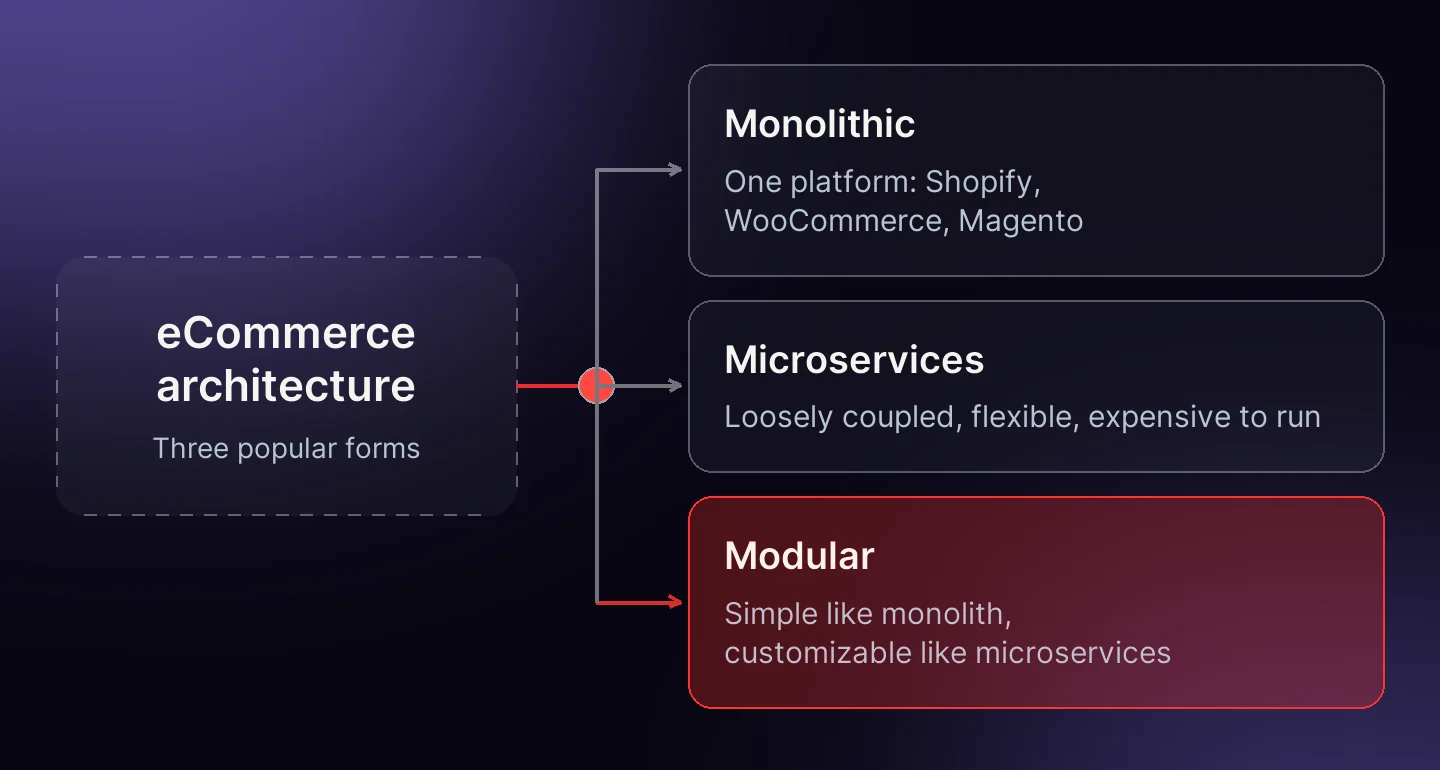
Most ecommerce brands run on one of 3 architectures: monolithic, microservices or modular.
- Monolithic architecture runs the whole store on one platform, as Shopify, WooCommerce and Magento do by default. A monolithic platform is simple and fast to launch, but its parts are interconnected, and an established brand can outgrow its customization options. As of November 2026, Shopify also offers headless and composable options on top of its platform.
- Microservices architecture runs the store on many loosely coupled services. A microservices stack is flexible, and a failure in one service doesn’t take down the others. A microservices stack is also expensive and management-heavy, because each service adds a point of failure, a monthly subscription and technical debt.
- Modular architecture is the middle ground. A modular architecture treats ecommerce products as a toolbox rather than a whole platform, combining much of a monolith’s simplicity with the customization of microservices, at a mid-tier price.
No formula decides the right architecture by revenue. A company at Netflix’s scale can justify microservices, and a store doing a few hundred thousand dollars a year in revenue does fine on a monolithic platform. For a brand in between, 3 questions decide the fit:
- How much customization does your brand need, compared with how much simplicity?
- What budget does your brand have to build and run the architecture?
- How many developers can your brand dedicate to the store?
Whatever the architecture, avoid trading overreliance on one platform for overreliance on another. Moving from one monolith to another monolith solves nothing, so weigh how much each new module adds to the overall architecture.
Headless CMS vs. Traditional CMS
For most mid-market DTC brands, the most important quality in a content management system (CMS) is that marketing can use it without developer support, and modern ecommerce platforms are modular enough that a purely headless CMS is often unnecessary.
A CMS is software for creating, managing and editing website content. A CMS stores content in a back-end database and displays that content through a front-end presentation layer. A CMS can be traditional or headless:
- A traditional CMS couples the back end, where content is stored, with the templates that display the content on a website.
- A headless CMS delivers content through an API, so the same content can serve a website, an app and other channels with a consistent experience.
The main difference between a headless CMS and a traditional CMS is flexibility. A headless CMS lets marketers update, organize and localize content without affecting the rest of the site, and lets developers add features without rebuilding the site. A headless CMS also lets developers use their preferred frameworks and connect third-party tools, such as customer relationship management (CRM) and product information management (PIM) software.
| Factor | Headless CMS | Traditional CMS |
|---|---|---|
| Flexibility | Content and front end change independently, in any framework | Content is tied to the platform’s templates |
| Cost to maintain | Higher | Lower |
| Integrations | Fewer ready-made integrations | More integrations with third-party tools |
| Reliability | More moving parts, so more risk of bugs and breaks | Fewer moving parts, tested as one product, so usually more consistent |
| Accountability | Your team is accountable for how the CMS, storefront and integrations work together | One vendor is accountable for the whole system |
A brand doesn’t have to choose all or nothing. A headless CMS such as Prismic or Builder.io can sit inside a Shopify Plus build: developers create swappable content blocks, called slices, and marketers assemble those slices into landing pages and product pages. Anatta integrated Prismic into Aventon’s Shopify Plus build, giving Aventon a component-based content strategy that cut weeks off deployment for promotions and campaigns.
Who Should Go Headless?
Headless commerce makes sense for a brand that has outgrown what Shopify can do and has the team to run a second system; for every other brand, Shopify is usually the better choice.
- If your brand has scaled its design and development team and ships many new features, and being at the front of new technology is central to the brand’s success, a headless framework can let that team do more than one Shopify store allows.
- If your brand is technology-first and ecommerce-second, and can fund the team to maintain a headless build, your brand can get the full benefit of headless commerce.
- If your brand has no development agency on retainer and no dedicated in-house developers, headless commerce is probably not for you yet. The same is true for a young brand still proving its products, and for a brand whose revenue can’t yet fund ongoing engineering.
What If Your Brand Is Already Headless?
If your brand is already headless and the headless build is working, stay headless, but stop investing further in the architecture. Spend on customer experience and international expansion instead.
If your headless build is limiting your roadmap, consider moving back to Shopify. 3 brands have made that move with Anatta:
- Thesis moved from a fragile headless architecture to Shopify with no gap in brand experience, keeping its signature product quiz.
- Good Ranchers moved off a headless Next.js and Node.js stack onto Shopify Horizon in 8 weeks, cutting total cost of ownership by 45%.
- Nuts.com left the commercetools composable stack it had run for 9 years and moved to Shopify Plus, keeping 5 custom product builders while cutting custom code by an estimated 85%.
When Not to Go Headless
Don’t go headless if Shopify can solve the problem that made you consider it. Mid-market and enterprise brands should first ask whether that problem can be solved without going headless. Going headless rarely levels up a tech stack; more often, a headless build creates a parallel tech stack that distracts the team from the customer experience.
Shopify has expanded its integrations, performance and native features, including the Hydrogen framework, to the point that going headless can cost more and deliver less than expected, even for an enterprise brand.
Anatta’s own view of headless commerce changed with experience. Nirav Sheth, Anatta’s Chairman and CTO, advocated headless commerce in 2019 and worked on headless builds for AG1 and Rothy’s. In March 2022, Nirav gave a talk called “Confessions of a Headless Advocate” about the costs that headless implementations tend to hide, and concluded that most brands don’t need to go headless.
Stakeholders and investors sometimes push a brand toward headless to “future-proof” its technology. Before agreeing, ask what building and maintaining a headless store will really cost. Be wary of any agency or developer that recommends headless to every brand just to make a website load faster. Anatta has seen DTC brands leap into headless commerce and end up unable to maintain the storefront, let alone scale it.
Questions to answer before going headless:
- Is your brand a technology company first and an ecommerce company second?
- Does your brand have the engineering resources to maintain a headless storefront?
- What is Shopify Plus missing that a headless build would provide?
Where to Invest Instead of Going Headless
Instead of going headless, invest in the parts of the business customers notice. A parallel tech stack moves a brand sideways, while these 5 investments move it forward:
- Improve usability and user experience: a clearer path to checkout lifts conversion on the store you already have.
- Launch a growth team: a growth team turns analytics into tested storefront changes every week.
- Expand into international markets: Shopify Markets now handles the currency and translation work that once required a headless build.
- Invest in retention: subscriptions, loyalty programs and post-purchase flows grow revenue from the customers you already have.
- Improve the mobile experience: a storefront designed for phones serves the shoppers who browse and buy on mobile.
Headless Commerce FAQs
What is headless commerce?
Headless commerce is an ecommerce architecture that separates the front-end presentation layer (the storefront) from the back-end commerce functions (inventory, orders, payments and admin). In a headless commerce build, the storefront and the back end communicate through API calls, so each can be changed without redeploying the other.
When should a DTC brand go headless?
A DTC brand should go headless only when it has a specific need Shopify can’t meet and the engineering team to maintain a second system. Headless commerce offers design and technology flexibility, but a headless build takes more technical expertise to build and maintain than a traditional ecommerce platform. A headless store built outside a platform’s own framework, such as Shopify Hydrogen, is harder still to maintain.
What are the benefits of headless commerce compared with a monolithic platform?
Flexibility is the main benefit of headless commerce over a monolithic platform. Headless commerce lets marketing and development teams work on the storefront and the back end independently, and lets a brand choose best-of-breed applications instead of relying on a platform’s core features. The trade-off is more systems to build, host and maintain.
Should I use Shopify Hydrogen or a custom Next.js build on Vercel?
Shopify Hydrogen is the lower-maintenance path for most brands that want to go headless on Shopify, because Shopify hosts and maintains Hydrogen. A custom Next.js build on Vercel gives your team more control over the framework and hosting, at the cost of owning more of the engineering. Most mid-market brands are better served by neither, and by a composable or Horizon-based Shopify build instead.
Get a Second Opinion Before You Go Headless
Anatta built headless storefronts for Rothy’s and AG1 before headless commerce had a name. AG1’s headless storefront carried the brand from $15M to $150M in annual revenue, across 47 countries on one domain. Anatta has also moved brands the other way: Thesis, Good Ranchers and Nuts.com each left a headless or composable stack for Shopify.
Headless and composable builds
Need a headless or composable build?
Anatta’s composable commerce team builds custom components where they pay for themselves, and keeps Shopify underneath everywhere else.
Bring us one thing you’ve been waiting on. We’ll come back with a preview, not a proposal.

“Following Anatta’s work, our conversion rate went from 4.1% to 6.2%, which is insane in the e-commerce industry.”
Tran Ngo, VP Digital & Growth
Read Success Story
Free, no call required
Rethinking the architecture? Price the move honestly.
Send us your storefront URL. We'll send back a written read of where your migration is most likely to break, before anyone quotes you a number. No fee, no call.
Related Reading
-
 Architecture & Tech Stack
Building the Best eCommerce Tech Stack in 2026: Tools for Each Layer
The 13 layers of an eCommerce tech stack, the best tools for each in 2026, and how to build, evaluate, and consolidate a stack that scales.
Nirav Sheth Chairman & CTO -
Success Story · AG1
“I really enjoy working with the Anatta team. Over time, I have found it to be very similar to having an in-house team.”
Anatta has helped us make good choices for our tech stack.
Sushni TumuVice President of Product - Explore the service
Services & Solutions
Technology Stack
Find out what your commerce stack actually costs you. Stack audits, vendor selection and consolidation.