




















Architecture & Tech Stack14 minute read
Shopify Speed Optimization: What Slows Your Store and How to Fix It
Shopify speed optimization is the work of making a Shopify store’s pages load and respond faster by reducing the code that the theme, apps, and third-party tags add on top of Shopify’s own infrastructure. Google measures it with 3 Core Web Vitals: Largest Contentful Paint (LCP) of 2.5 seconds or less, Interaction to Next Paint (INP) of 200 milliseconds or less, and Cumulative Layout Shift (CLS) of 0.1 or less, for at least 75% of visits.
Last verified Published Last updated
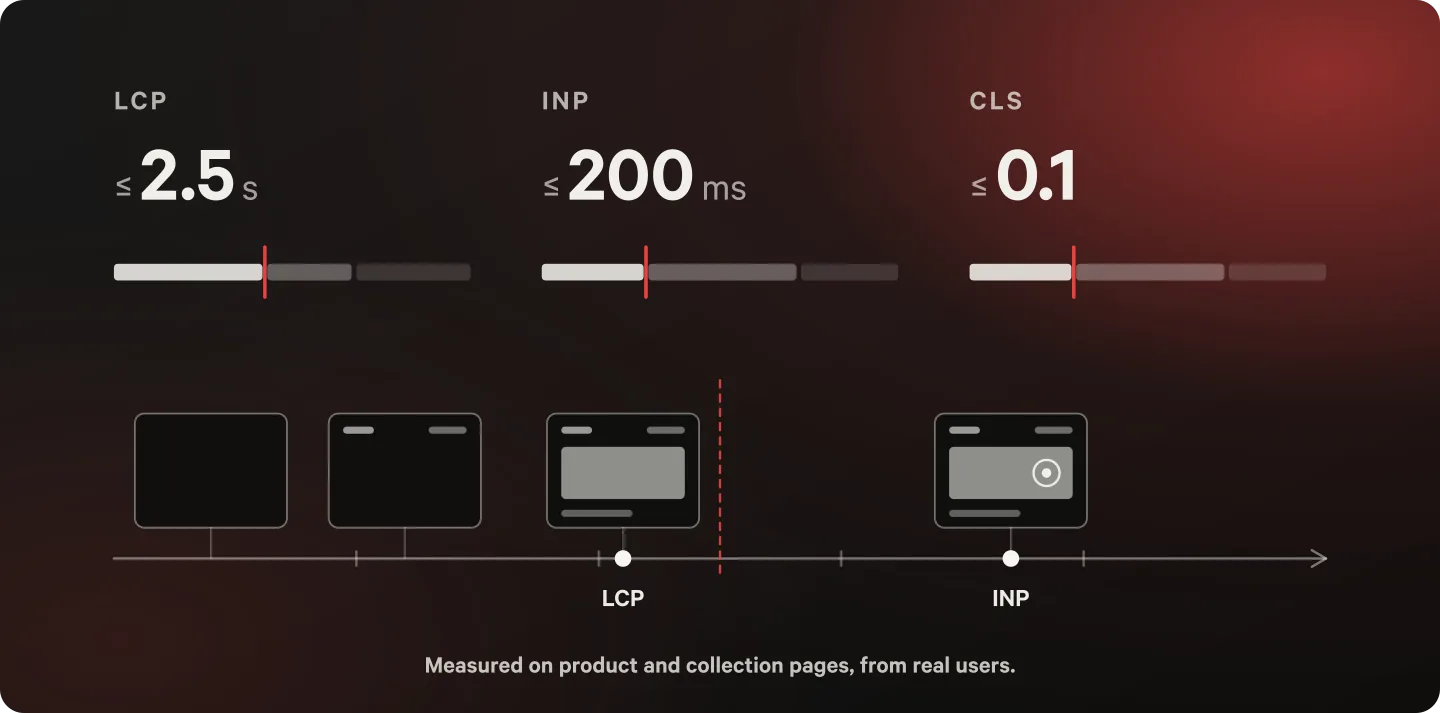
Shopify speed optimization is the work of making a Shopify store’s pages load and respond faster by reducing the code that the theme, apps, and third-party tags add on top of Shopify’s own infrastructure. Shopify handles the servers, the content delivery network (CDN), and the caching. The slow parts are usually the ones a merchant added.
A store’s speed is judged on real visits. Google measures it with 3 Core Web Vitals: Largest Contentful Paint (LCP) of 2.5 seconds or less, Interaction to Next Paint (INP) of 200 milliseconds or less, and Cumulative Layout Shift (CLS) of 0.1 or less, for at least 75% of visits.
Here’s what you’ll find on this page:
- What Shopify already handles for speed, and what Shopify leaves to you
- The 5 causes that slow a Shopify store, with how to spot and fix each one
- How to find which cause applies to your store
- Results from named Shopify stores, with the figures as published
- Whether a move to a Horizon theme is the right fix
- How to keep a store fast, and when to bring in Shopify speed optimization services
What Shopify Already Handles for Speed
Shopify handles the infrastructure layer of speed for every store: hosting, the CDN, caching, compression, and image delivery. A merchant does not need to configure any of it.
As of November 2026, Shopify’s documentation lists these as built in:
- Hosting: Shopify hosts Shopify stores on its own cloud-based infrastructure. According to Shopify, its servers have a 99.99% uptime on average.
- CDN: Shopify equips its stores with the global CDN from Cloudflare.
- Caching: Shopify’s browser caching keeps a store’s cacheable files for up to 1 year. Cacheable files include images, PDFs, and CSS and JavaScript files.
- Compression: Shopify minifies CSS and JavaScript files and compresses them with Brotli and gzip before the browser downloads them.
- Image delivery: Shopify’s image CDN resizes and compresses each image and serves the best format the shopper’s browser supports.
- Rendering: Shopify renders each page on its own servers, streams the top of the HTML while the rest renders, and tells the browser which files to fetch first.
This is why a speed scanner’s advice to add a CDN, enable compression, or change server settings does not apply to a Shopify store. Shopify’s help center says those optimizations are already implemented.
Shopify’s managed infrastructure shows in the data. As of July 2025, 76% of Shopify store origins passed all 3 Core Web Vitals on mobile, compared with 35% of WooCommerce and Magento store origins, according to the 2025 Web Almanac ecommerce chapter. The remaining work is in the theme, the apps, and the tags.
What Slows a Shopify Store Down
A Shopify store slows down because of the code that sits on top of Shopify’s infrastructure. Shopify’s help center names the 3 biggest factors: the theme, the installed apps, and third-party code added by hand, including tag managers and the tags inside them. Media and fonts complete the list.
Each of the 5 causes below follows the same order: how the cause slows a page, how to spot it, and the fix.
1. App scripts, app embeds, and leftover app code
How app code slows a Shopify page. Every app that shows something on the storefront, such as reviews, a subscription widget, or a pop-up, adds its own JavaScript and CSS to the page. That code competes with the shopper’s taps for the browser’s main thread, which is the usual reason a store fails INP. Shopify’s help center says a store with poor INP most likely has “too much JavaScript” from theme code, app code, or tags.
Uninstalling an app does not always remove the app’s code. According to Shopify’s developer documentation, apps built on theme app extensions are removed from the theme automatically. Older apps that edited theme files directly leave their code behind, and the leftover code keeps loading.
How to spot app weight. These 3 checks find it:
- App embeds: Open the App embeds panel in the theme editor, which lists every app embed and whether the embed is active.
- Theme code: Search
theme.liquidand the snippets folder for the names of apps the store no longer uses. - The timeline: Shopify’s web performance reports mark app installs on each Core Web Vital’s chart, so a drop that follows an install points to that app.
The fix. Turn off the app embeds the store no longer uses, uninstall the apps that do not earn their cost in speed, and remove leftover code from the theme files. When the leftover code is hard to identify, Shopify’s guidance is to ask the app’s developer for removal instructions.
2. Theme and Liquid architecture
How the theme slows a Shopify page. The theme decides how much Liquid Shopify has to render and how much CSS and JavaScript the browser has to process before the browser can paint. A pre-Horizon theme that has carried years of edits usually loads stylesheets and scripts for features the store no longer uses. Each render-blocking file in the page head delays the first paint.
Two theme details also switch off speed features that Shopify provides. Shopify streams the top of a page’s HTML only when the page renders from a JSON template and the layout’s content_for_header tag sits unmodified inside the head. Shopify’s help center adds that a high number of sections on a template can lower web performance.
How to spot theme weight. These 3 checks find it:
- Page types: In Shopify’s web performance reports, compare each Core Web Vital by page type. A metric that fails on every page type points to code that loads everywhere, which is usually the theme or a site-wide app embed.
- Render-blocking files: Run a product page through PageSpeed Insights and read the list of render-blocking resources.
- Templates: In the theme code, check whether the templates folder holds
.jsonfiles or.liquidfiles.
The fix. Remove the sections, features, and animations no one uses, defer the JavaScript that the first screen does not need, and reduce the number of stylesheets in the head. Move .liquid templates to JSON templates so those pages qualify for streaming. When the theme itself is the limit, the choice is a rebuild or a move to Horizon, which the Horizon section below covers.
3. Third-party tags
How tags slow a Shopify page. Analytics, ad pixels, chat, reviews, and heatmaps each load JavaScript from another company’s servers. Every tag adds a connection, a download, and work on the browser’s main thread. A tag manager hides the count, because one container can load dozens of tags. Shopify lists tag managers and the tags inside them among the biggest factors in store performance.
How to spot tag weight. These 3 checks find it:
- The tag manager: List every tag in the container with the tag’s owner and purpose. A tag with no owner is a candidate for removal.
- Theme code: Search
theme.liquidfor script tags pasted in by hand, which sit outside the tag manager’s list. - Third-party time: PageSpeed Insights reports third-party code by the main-thread time each provider uses.
The fix. Delete the tags with no owner first. Move tracking pixels into Shopify’s Customer events. According to Shopify’s developer documentation, app pixels there run in web workers, which keeps the pixel code off the page’s main thread, and custom pixels run in a sandboxed iframe. Load chat and survey tools after the shopper’s first interaction, and load the remaining scripts with async or defer.
4. Images, video, and the LCP element
How media slows a Shopify page. LCP usually measures an image: as of July 2025, an image was the largest element on 76% of mobile pages, according to the 2025 Web Almanac. Shopify’s image CDN handles the format and the compression. The theme still decides which size to request, how early the browser fetches the image, and whether the image waits behind a slideshow script or a video.
Three faults delay the LCP element on a Shopify theme: a hero image that is lazy-loaded, a hero image inside a slideshow that waits for JavaScript, and an autoplaying video with no poster image.
How to spot a slow LCP element. These 3 checks find it:
- The element: PageSpeed Insights names the LCP element for any URL.
- The attributes: Inspect that image in the browser.
loading="lazy"on the LCP image is a fault, and a missingfetchpriority="high"is a missed gain. - The size: Compare the width in the image URL with the width the image displays at on a phone.
The fix. Shopify’s theme guidance rates 2 changes as high impact for LCP: never lazy-load the LCP image, and mark the LCP image with fetchpriority="high". Shopify’s image_url and image_tag filters generate the responsive sizes and set each image’s width and height, so use both filters for every image. Make the first screen a single image, or keep the first slide in the HTML, and give every video a poster image.
5. Fonts and icon fonts
How fonts slow a Shopify page. Each custom font family and weight is a separate file, and the browser cannot draw text in that font until the file arrives. Until then, the text is hidden or drawn in a fallback font and then swapped, which shifts the layout and counts against CLS. A font hosted on another company’s domain also needs a new connection before the download starts.
Icon fonts add a full font file for a handful of icons. Inline SVG (Scalable Vector Graphics) icons need no font file. An icon font, by contrast, can show blank boxes or shift the layout while the font file loads.
How to spot font weight. These 3 checks find it:
- The count: Open the browser’s network panel on a product page, filter by font, and count the files.
- The host: Check whether each font loads from the store’s own domain or from a third party.
- Icon fonts: Look for a font file that exists only to draw icons.
The fix. Keep the font families and weights the design uses and remove the rest. Serve fonts from Shopify’s CDN, where fonts from the Shopify font library load from the store’s own domain, and set font-display: swap so text shows at once. Preload only the font the first screen needs: Shopify’s guidance is to keep preload hints to 1 or 2. Replace icon fonts with inline SVG icons.
Free, no call required
Is speed really the leak?
Get a free read of where each channel loses people.
How to Find What’s Slowing Your Store
To find what is slowing a Shopify store, start with field data to see which pages fail, then test one failing page with lab data to see why. Field data comes from real shoppers on real devices and networks. Lab data comes from a single simulated page load. Core Web Vitals pass or fail on field data.
These 4 steps find the cause of a slow Shopify store:
- Read the field data. Open Shopify’s web performance reports, which use real-visitor data, or the Core Web Vitals report in Google Search Console.
- Find the failing page type. Shopify’s reports break each Core Web Vital down by page type and by page URL. Note which metric fails and on which template.
- Test one failing URL. Run the URL through PageSpeed Insights, which names the LCP element, the render-blocking files, and the third-party code on that page.
- Match the finding to a cause. A slow LCP element points to media or the theme. A failing INP points to JavaScript from apps, tags, or the theme. Layout shift points to fonts, images without dimensions, or app content that loads late.
After a fix ships, wait before judging it. Google’s Chrome User Experience Report (CrUX) supplies the field data in both Google tools. CrUX reports a rolling 28-day window, so a fix takes up to 4 weeks to show in full.
Our guide on how to improve ecommerce site speed covers each metric and measurement tool in full.
Shopify Speed Fixes, With Named-Store Results
Two Anatta clients have published speed results from Shopify work, and both results came from rebuilding the theme layer on Shopify Horizon. Neither figure isolates one of the 5 causes above. Each shows what changed when the code on top of Shopify was replaced.
Good Ranchers: mobile product pages 67% faster
A headless build is not a speed fix by default. The pros and cons of headless commerce covers when headless earns its cost, and the Good Ranchers success story has the full account.
BRUNT Workwear: 20 points on Google Lighthouse
The BRUNT success story covers the 4 years before the rebuild.
Should You Move to a Horizon Theme for Speed?
Not for speed alone. A pre-Horizon theme that passes Core Web Vitals in field data has no speed reason to move. As of November 2026, Shopify’s help center still lists its pre-Horizon themes alongside the Horizon family as optimized for web performance.
The answer changes in 4 situations:
- If the theme is the cause: When field data fails and the checks above trace the weight to the theme’s own code, a move to Horizon replaces that code. BRUNT’s move lifted its Lighthouse lab score 20 points.
- If a redesign or re-theme is already planned: Build the new theme on Horizon. The disruption is already budgeted, so the foundation can change in the same project.
- If the store is headless and speed was the reason: Measure the headless build against a Horizon build before renewing the investment. Good Ranchers’ mobile product pages loaded 67% faster after the move off headless.
- If apps and tags are the cause: A new theme will not fix them. The same apps and tags slow a Horizon theme the same way, so clean them up first.
Horizon vs. Dawn vs. a custom theme covers the full decision, including when a custom theme is still the right call.
Keep a Shopify Store Fast After Launch
A Shopify store stays fast when the team treats speed as a standing rule with 3 parts: a performance budget, an approval rule for apps and tags, and a monthly field-data check.
- A performance budget: Set the limits before the build and hold every release to them. Anatta held Shinesty’s Horizon build to green Core Web Vitals, a mobile Lighthouse score of 90 or better, LCP at or under 2.5 seconds, and a total JavaScript budget under 170KB. These are the standards the build was held to, not measured results.
- An approval rule for apps and tags: Give every new app and tag an owner, a reason, and a speed check before and after the install. On the Shinesty build, each app had to justify its place on the new theme.
- A monthly field-data check: Test field data monthly and after every release, theme change, or new app.
A JavaScript budget cannot be met by tuning at the end of a build. The budget has to shape which apps the store installs from the first sprint.
Stores without a team to run these checks can hand the routine to a retained partner. Anatta’s Managed Services assigns 2 named senior people to an account for a monthly fee, with no annual lock.
Shopify Speed Optimization Services: When to Bring In Help
Bring in Shopify speed optimization services when field data still fails after the store has cleaned up its apps, tags, and media, or when no one on the team can change theme code safely. Shopify speed optimization services are the paid work of finding and removing what slows a Shopify store.
The work has 4 parts:
- An audit: Field data read by page type, then lab tests on the templates that fail.
- A cleanup: Unused apps, leftover app code, and tags with no owner removed.
- Theme work: Render-blocking files, the LCP image, fonts, and templates fixed in the theme code.
- A re-test: Field data checked again once the 28-day window has passed.
Anatta treats speed as one conversion lever among several. On Dollar Shave Club, performance engineering took the testing program from 1 test a month to 4. Our CRO & Experimentation programs test which change moves revenue and report the losses alongside the wins.
Frequently Asked Questions
What is a good page speed for a Shopify store?
A good page speed for a Shopify store is a pass on all 3 Core Web Vitals in field data. Google sets the thresholds: Largest Contentful Paint (LCP) of 2.5 seconds or less, Interaction to Next Paint (INP) of 200 milliseconds or less, and Cumulative Layout Shift (CLS) of 0.1 or less, for at least 75% of visits. As of July 2025, 76% of Shopify store origins passed all 3 Core Web Vitals on mobile, compared with 35% of WooCommerce and Magento store origins, according to the 2025 Web Almanac ecommerce chapter.
Do Shopify apps slow down my store?
Shopify apps slow a store when the apps load JavaScript and CSS on the storefront, and most apps that show something to shoppers do. Shopify’s help center says too many apps loading assets on the storefront can slow performance. Uninstalling an app does not automatically remove the app’s code from the theme, so leftover code can keep loading after the app is gone.
Does Shopify handle site speed automatically?
Shopify handles the infrastructure side of site speed automatically: hosting, a global CDN, caching, compression, and image delivery. Shopify does not control the theme, the apps, or the tags a merchant adds, and Shopify’s help center names those 3 as the biggest factors in store performance.
Is a speed optimization app enough to fix a slow Shopify store?
A speed optimization app is rarely enough to fix a slow Shopify store, because the app adds code of its own and cannot remove the causes. The causes are other apps, leftover code, tags, and theme files, and each has to be removed or changed at the source. Shopify already compresses files, optimizes images, and serves both from a CDN, which overlaps with what many of these apps offer.
What do Shopify speed optimization services include?
Shopify speed optimization services include an audit of field data by page type and a cleanup of unused apps, leftover app code, and tags. The services then change the theme’s code and media, and re-test after 28 days. The results should be reported in Core Web Vitals from real visitors, with lab scores as supporting evidence.
Bring us one thing you’ve been waiting on. We’ll come back with a preview, not a proposal.

“It’s all behind the scenes and the website generally looks like it did, but it performs much faster and is easier to work with. It’s a discipline project.”
Eric Girouard, Founder & CEO
Read Success Story
Free, no call required
Is speed where your visitors drop, or just where you looked?
We map your three highest-volume traffic channels end to end and size every leak in dollars. A written read, free, no call.
Related Reading
-
 Architecture & Tech Stack
How to Improve Ecommerce Site Speed for Maximum Performance
Ecommerce site speed in 2026: the 3 Core Web Vitals thresholds, how to measure real-shopper speed, and 10 fixes that improve LCP, INP, and CLS on any platform.
Jamie Smith Director of Technical Solutions -
 Shopify Platform Changes
Horizon vs. Dawn vs. Custom Theme: A Decision Framework
Horizon, Dawn, or a fully custom theme — the right choice depends on how much native flexibility you need versus how much bespoke functionality you're building regardless. Here's the decision framework.
Jamie Smith Director of Technical Solutions -
 Architecture & Tech Stack
How To Use Lighthouse to Improve Website Speed
Learn exactly how to use lighthouse to improve your website's speed, mobile-friendliness & more. Benefit from Google's Lighthouse tool beyond search today!
Jamie Smith Director of Technical Solutions - Explore the service
Services & Solutions
Technology Stack
Find out what your commerce stack actually costs you. Stack audits, vendor selection and consolidation.