












Which Third-Party Systems Should Survive Your Shopify Migration
September 5, 2026
Not every system connected to your current platform needs replacing during a migration. A third-party tool that already works well with both your old platform and Shopify is a strong candidate to keep — fewer moving parts during cutover means less risk, not more.
Last verified: September 6, 2026.
Why replace everything is the wrong default
A replatform is already a complex project with real risk concentrated into a cutover window. Every additional system replaced alongside the core platform migration is another variable that can fail during that same compressed timeline: another integration to test, another team to retrain, another point of failure at the highest-risk moment of the project.
It is also, in a quieter way, the same mistake the hub of this series warns about. Replacing a working integration because it came from the old platform is treating the origin system as contaminated rather than as a source of a few things worth keeping.
The instinct behind "replace everything" is usually good — a migration is a rare moment when budget and attention exist to fix things, and nobody wants to carry a bad tool into a new system. The problem is that the moment budget and attention exist is also the moment risk is highest, and those two facts pull in opposite directions. The resolution is to separate the decisions in time, not to make them all at once.
The three-question framework
- Does it already have a native or well-supported Shopify integration? If yes, that's a strong signal to keep it. Building or vetting a replacement when a working option already exists is unnecessary risk.
- Is it actually causing problems today, independent of the migration? Be honest here. A system that's merely unglamorous but functionally fine is not a good replacement candidate just because a migration is already underway.
- Would replacing it require your team to learn a new tool at the same time they're learning Shopify? Stacking two learning curves during one transition is a real and frequently underestimated cost.
Two yeses and a no is a keep. Three noes is a genuine replacement candidate. Anything in between is a decision to make deliberately and write down, because an undocumented keep-or-replace call is the one that gets quietly reversed mid-build by whoever happens to be scoping that integration that week.
Systems most commonly worth keeping
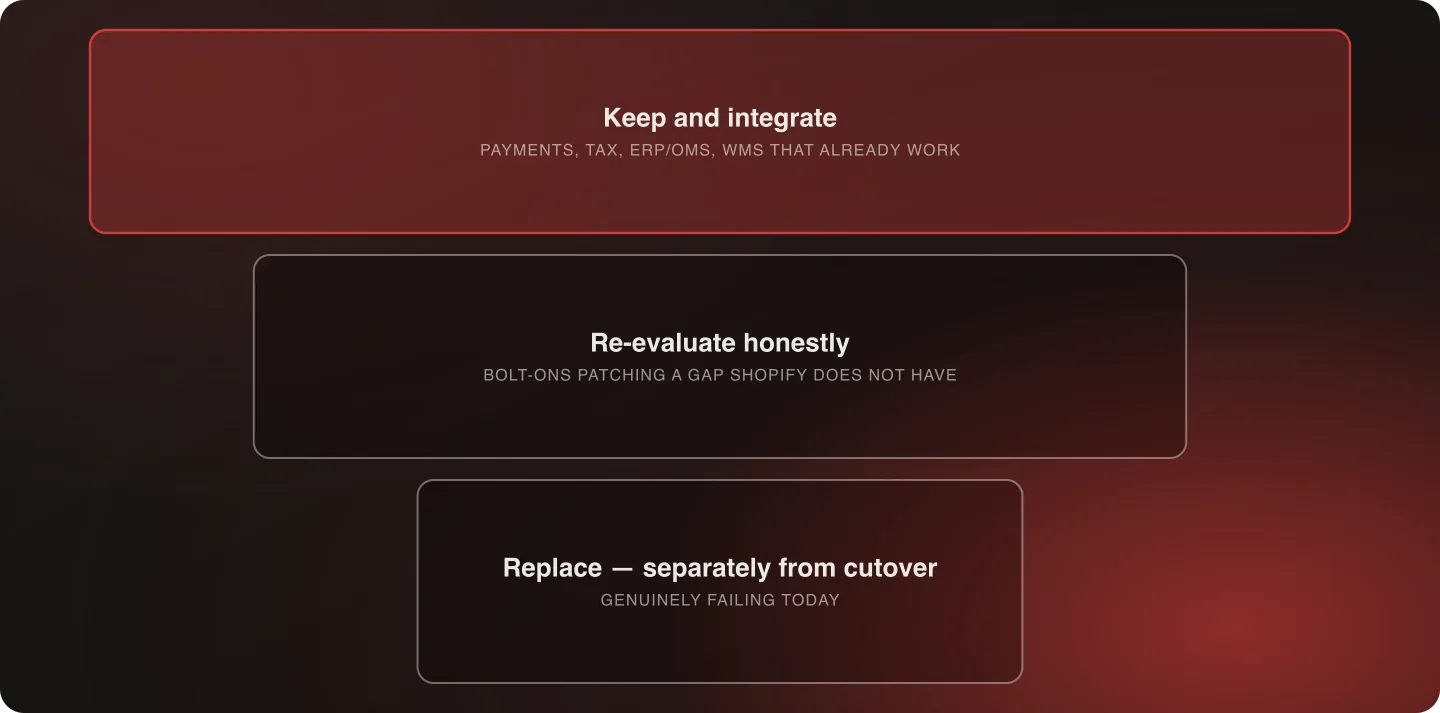
Payment gateways, tax engines, ERP and OMS systems, and fulfillment or WMS platforms that already integrate cleanly with Shopify. These are exactly the systems where "it's not broken" is a legitimate and sufficient reason to leave it alone.
They also tend to be the systems with the deepest operational dependency — the ones a warehouse team or a finance team uses daily, and where a change in tooling means a change in someone's job on the same week the storefront changes. The technical switching cost is rarely the real cost here.
Systems worth genuinely re-evaluating
Anything that was a workaround for your old platform's specific limitations — a bolt-on tool that existed only because the old platform lacked a capability Shopify now provides natively.
This overlaps directly with the custom-to-custom trap. If a third-party tool exists to patch a gap Shopify doesn't have, it may not need to make the trip, and paying to integrate it is paying to preserve a workaround. The audit is the same one: state what the tool actually does in business terms, then check that against Shopify's current native capability rather than against an assumption formed years ago.
What this looked like for Nuts.com
The existing order management and warehouse management systems were integrated into the new Shopify Plus build rather than replaced. Both were genuinely working, and replacing them would have added migration risk without solving a real problem.
That decision, alongside adopting Shopify's native patterns everywhere else, is part of what drove an 85% reduction in custom code without sacrificing operational continuity — and it's worth noting that keeping two systems and cutting custom code by 85% are not in tension. The custom code that went away was the storefront logic. The systems that stayed were the ones doing real operational work. The full case study has the rest.
How to sequence the decision for each system
Don't evaluate every third-party tool at once, in a single meeting, under launch-timeline pressure. Start with the systems carrying the most operational weight — payment processing, order management, fulfillment — since getting those right matters more than the smaller, lower-stakes tools.
For each, run the three-question framework before the migration's technical scoping locks in. Keep-or-replace decisions made after a build has started are far more expensive to reverse, because the integration work has usually already been estimated, staffed, and in some cases begun.
A workable order of operations:
- Inventory every connected system first, including the ones nobody mentions because they've run untouched for years. A tool that surfaces at cutover is the expensive kind.
- Rank by operational weight, not by how annoying the tool is to use. Irritation and risk are different measures.
- Decide the top tier before scoping, so the build estimate reflects real integration work rather than a placeholder.
- Batch the long tail into a single review, and default it to keep unless something specific argues otherwise.
The systems people forget to inventory
The three-question framework only works on systems you know about, and every inventory has a blind spot in roughly the same places:
- Anything running on a schedule. Nightly feeds, cron jobs, scheduled exports to a partner or a marketplace. They're invisible precisely because they work, and they surface at cutover.
- Tools owned outside the ecommerce team. A finance reconciliation export, a customer-service macro that reads an order field directly, a merchandising spreadsheet fed by an API key someone generated years ago.
- Read-only consumers. Nothing writes to them, so nothing breaks visibly when they stop receiving data — until a report is wrong and nobody can say when it started.
- Integrations for partners who no longer exist, still running because switching them off was never anyone's task. These are the cheapest wins in the entire exercise.
Week one of discovery exists largely to find these, which is why it is the one part of discovery that doesn't compress.
Replacing a tool because a newer one exists
It's tempting to treat a migration as a natural moment to modernize every part of the stack, including tools that have nothing to do with the platform change. Resist this unless the tool is genuinely causing a problem today.
A newer, more fashionable alternative to a working tool is a project for another quarter, evaluated on its own merits — not a decision to bundle into an already complex migration because the timing feels convenient. The migration will not make the evaluation better. It will only make it faster and less careful.
What to do when a system genuinely needs replacing
If the framework surfaces a real case — the tool doesn't integrate well with Shopify, it's actively causing problems, and the switching cost is justified — sequence that replacement's testing separately from the core platform cutover where possible.
Bundling a risky third-party swap into the same go-live moment as the platform migration concentrates two sources of risk into one event, when spreading them across two smaller, separately tested changes is usually safer. If the sequencing genuinely can't be separated — a payment processor that must change at cutover, for instance — then it belongs in the cutover runbook as its own checkpoint with its own rollback, not as a line item inside the platform migration. The cutover runbook covers how those checkpoints work.
Frequently Asked Questions
Should I replace all my third-party tools when I migrate to Shopify?
No. Keep what already integrates well with Shopify and isn't causing real problems today. Replacing working systems during a migration adds risk without a corresponding benefit.
How do I decide which integrations to keep?
Ask whether it already works well with Shopify, whether it's actually a problem today independent of the migration, and whether replacing it would mean your team has to learn a new tool on top of learning Shopify itself.
Is it really safer to keep an older system than to modernize during a migration?
During the migration itself, yes — every system you swap is another variable tested on the same compressed timeline. Modernizing is a legitimate project; it just shouldn't share a go-live date with the platform change.
What if a system has to change at cutover and can't be sequenced separately?
Then it belongs in the cutover runbook as its own checkpoint with its own rollback trigger, rather than being treated as a line item inside the platform migration.
If you're staring at a list of connected systems and don't know which are keeps, talk to an architect — integration strategy is part of how we scope a systems replatform.
Talk to an architect about your integration strategy.

Related