












The Custom-to-Custom Trap: Why "We're Different" Is Costing You
September 5, 2026
The most expensive mistake in enterprise replatforming isn't a technical failure. It's the belief that your business is unique enough to require rebuilding your old platform's custom logic inside the new system. That moves the problem you're trying to escape onto a more expensive foundation rather than solving it.
Last verified: September 6, 2026.
The pattern, stated plainly
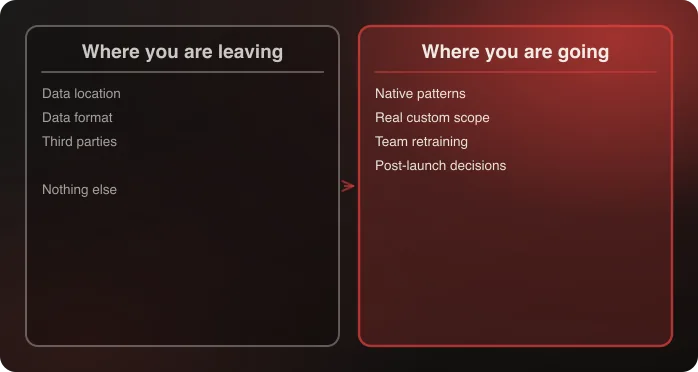
A team migrating to Shopify starts requirements-gathering by documenting everything their current, custom-built or heavily customized platform does. That list becomes the spec for the new build. The result: Shopify — a platform whose core value is reducing how much custom code a merchant needs — ends up carrying nearly as much custom logic as the system it replaced, at real cost, and often on a longer timeline than a native-first approach would have taken.
Why this happens even to smart, well-intentioned teams. It isn't laziness or poor planning. It's a reasonable-sounding but wrong assumption: that a business's current processes represent genuine, considered requirements rather than accumulated workarounds. Years of operating on a limited platform teaches a team to work around that platform's limitations, and those workarounds eventually get mistaken for business requirements, because nobody remembers a time before them.
This is the specific failure behind the argument that the destination platform matters more than the origin: the origin platform's behavior gets treated as the specification, and the destination platform's actual capabilities never get consulted.
The clearest tell is a requirements document written entirely in the vocabulary of the old system. If a requirement can only be stated using a term that exists in the platform you're leaving — a cartridge, a module, an extension, a specific admin screen — it hasn't yet been written as a business requirement at all. It has been written as a description of the current implementation.
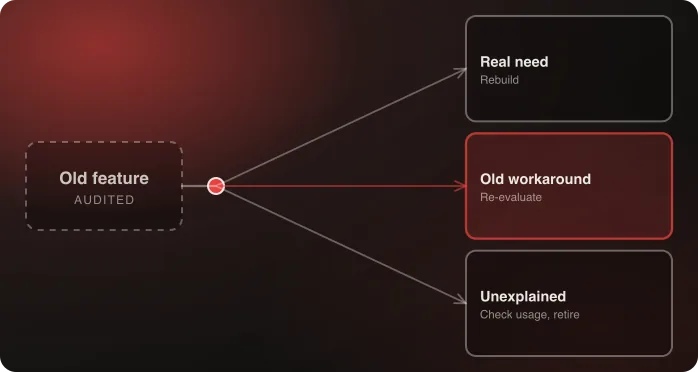
The audit that catches this, example by example
- "We need a custom pricing rules engine" → often really means "our old platform couldn't handle tiered discounts natively, so we built one." Shopify's native discounts and Functions frequently cover what was actually needed, once checked directly rather than assumed insufficient.
- "We need a custom account portal for B2B customers" → often really means "our old platform had no native B2B support at all." Shopify's native B2B functionality, extended to all plans as of April 2026, covers a meaningful share of what used to require fully custom development.
- "We need custom checkout logic for X" → worth checking against Shopify's current Checkout Extensibility capabilities before assuming custom Functions work is required. The native ceiling has risen substantially and continues to.
- "We need a bolt-on app for Y" → sometimes true, and sometimes the app exists only to patch a gap the old platform had. A third-party tool inherited unexamined is the same trap in a different shape — see which third parties should survive.
The pattern across all four: the requirement is stated as a conclusion ("we need a custom X") rather than as a need ("customers must be able to Y"). Restating each one as a need, in language a customer or a finance team would recognize, is most of the audit.
Nuts.com as the proof point
Rather than rebuilding a custom platform's logic wholesale inside Shopify, Nuts.com's migration integrated the existing order and warehouse management systems — which were actually working — while adopting Shopify's native patterns everywhere else. Custom code fell 85%, and total cost of ownership fell 28% in year one and 41% in year two.
The number worth sitting with is the 85%. The business did not become simpler between the old platform and the new one — the catalog, the customers, the orders, the subscriptions, and five custom product builders all came across. What changed is that the audit correctly separated genuine requirements from inherited workarounds, and only the first category got built.
A practical audit process
- List every piece of functionality assumed to require custom development.
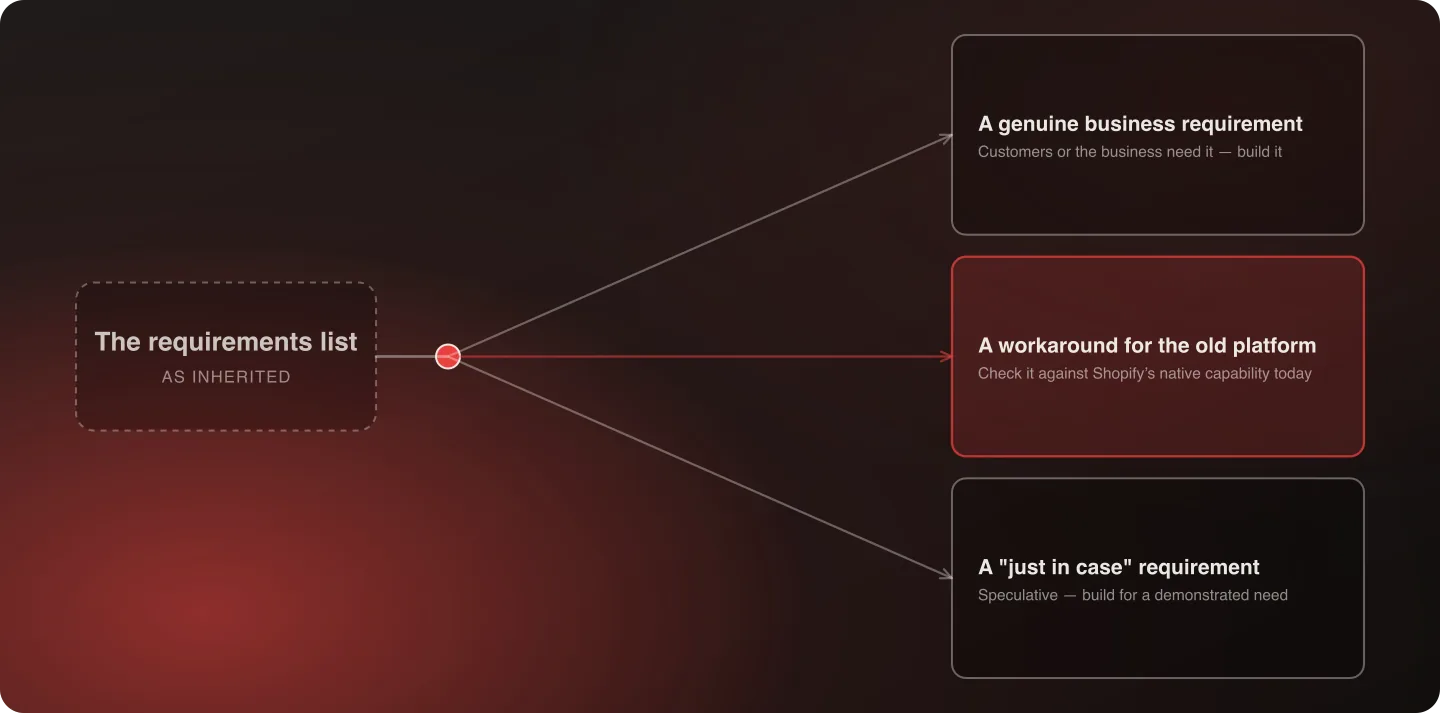
- For each, ask: is this a genuine business or customer requirement, or a workaround for the old platform's limitation?
- Check items in the second category against Shopify's current native capability — not against what Shopify could do three years ago.
- Reserve custom development for the genuine gap that remains, which is typically a fraction of the original list.
Step three is the one teams skip, and it's the one that does the work. The platform's native ceiling moves every release cycle, and an internal assumption about what Shopify can't do is frequently a year or two out of date. Checking is cheap; assuming is what gets quoted.
Who should run this audit, and when
This isn't a technical review to run once engineering is already scoping the build. It belongs in discovery, before requirements get locked, and it works best when run by someone who understands both the business's actual needs and Shopify's current native capability — rather than by whoever documented the old platform's behavior most thoroughly.
A person deeply embedded in the old platform's quirks is often the least equipped to distinguish "we need this" from "we built this because we had to," precisely because they've lived with the workaround long enough to stop seeing it as one. That isn't a criticism of them; it's an argument for pairing them with someone who has no history with the system. Discovery, week by week puts this audit in weeks two and three for exactly that reason.
A pattern worth watching for: the just-in-case requirement
Some custom requirements aren't workarounds for a past limitation. They're speculative, added because someone imagines a future need that hasn't materialized. These deserve the same scrutiny as inherited workarounds: build for a demonstrated need, not a hypothetical one.
Shopify's native capability set keeps expanding, which cuts both ways. A just-in-case custom build today can become unnecessary custom code maintained for years against a need that never showed up — and worse, code that now blocks you from adopting the native feature that eventually shipped to do the same job.
The team dimension
This isn't purely a technical decision. A team that has spent years mastering a custom system's quirks has real, hard-won expertise, and rebuilding that complexity in the new platform can feel like preserving its value.
The better path is to retrain that same team on Shopify's native patterns. Their underlying skill — understanding the business, solving operational problems — transfers directly. The platform-specific workarounds they've mastered don't need to, because the new platform doesn't require them. Framing retraining as respect for the expertise rather than as a demotion of it is, in practice, the difference between an audit that gets honest answers and one that gets defensive ones.
When custom actually is the right answer
This page argues hard in one direction, so it's worth being honest about the other. Some custom work genuinely earns its place, and treating "native only" as a rule rather than a default produces its own kind of bad outcome — a business contorting a real operational requirement to fit a platform pattern that wasn't designed for it.
The requirements most likely to survive an honest audit tend to share a few characteristics:
- It is visible to the customer and differentiating. A product configurator that is genuinely part of how the brand sells is not overhead. Nuts.com kept five custom product builders through its migration for exactly this reason.
- It encodes a real operational constraint — a fulfillment rule that reflects how the warehouse physically works, not how the old admin screen happened to be laid out.
- It has an owner who can state the business consequence of removing it in a sentence, without referring to the old platform.
- It has no native equivalent today, checked against the current release rather than remembered from a previous project.
A requirement that clears all four is a genuine one, and building it is the right call. The point of the audit was never to end with zero custom code. It was to end with a list where every item can survive those four questions, which is usually a much shorter list than the one that went in.
What the audit does to a timeline
The practical argument for running it is that the audit is the largest single variable in a migration estimate. Integration count is knowable early and doesn't move much. Catalog size affects the data work but rarely the build. The volume of genuine custom development is what actually sets the schedule, and it is the one number that a few weeks of honest checking can cut substantially.
Which is also why the audit belongs before the estimate rather than after it. An estimate produced against an unaudited requirements list is precise about the wrong thing, and every subsequent conversation about the timeline is a renegotiation of a number that was never real. Timelines by complexity covers how the ranges actually behave.
What happens when this audit doesn't happen
The requirements list goes into the RFP as-is. Every vendor quotes against a spec padded with inherited workarounds. The project that gets built faithfully reproduces the old platform's complexity on new, more expensive infrastructure. Months later, the same maintenance burden that made the old platform painful shows up again — because the actual source of that burden was never addressed, only relocated.
The cost isn't only the build. It's every subsequent year of carrying code nobody needed, on a platform you chose specifically to stop carrying code.
Frequently Asked Questions
Why do replatforms end up with so much custom code despite moving to a more capable platform?
Because requirements gathering often documents the old platform's workarounds as if they were genuine business requirements, then specifies rebuilding them custom in the new system — which defeats much of the point of migrating.
How do I tell if a requirement is real or an inherited workaround?
Ask whether it exists because customers or the business genuinely need it, or because the old platform made a simpler, native approach difficult. Then check it against the new platform's current native capability, not an outdated assumption of what it can do.
Does adopting native patterns mean my team's expertise doesn't matter?
No. Their understanding of the business and its operational needs transfers directly. What doesn't need to transfer is expertise in workarounds for a platform you're leaving specifically because it required them.
How much of a typical requirements list survives this audit?
It varies, but the direction is consistent: the list gets shorter. Nuts.com's migration ended with 85% less custom code than the homegrown platform it replaced, with no loss of operational capability.
If you have a requirements list and want to know how much of it is real, talk to an architect — the audit is the first thing we run on a systems replatform.
Talk to an architect about auditing your custom requirements.

Related