











Checkout Extensibility Migration Guide: Moving off checkout.liquid and What You Can Customize Now
August 4, 2026
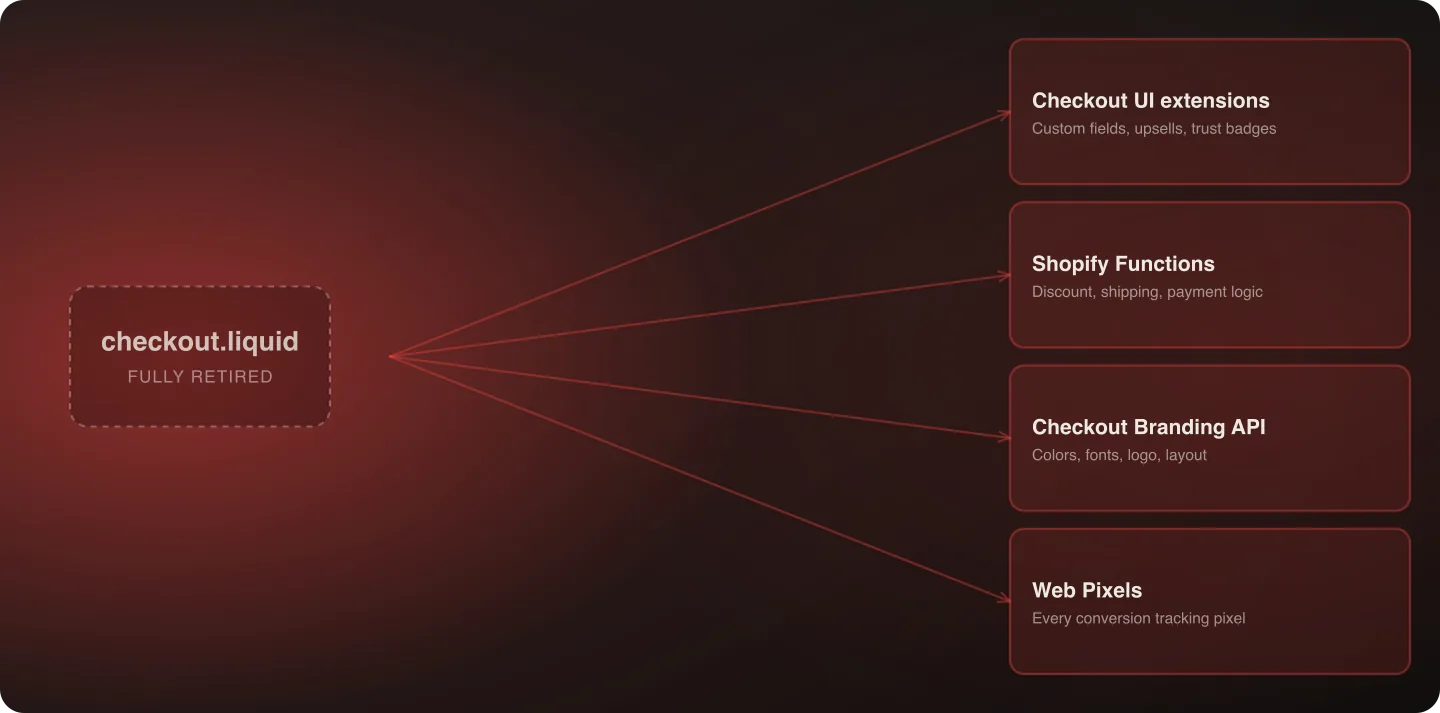
checkout.liquid is now fully retired — the last deadline (non-Plus Thank You/Order Status pages) passed August 26, 2026. Checkout customization now runs through four separate building blocks: Checkout UI extensions, Shopify Functions, the Checkout Branding API, and Web Pixels. Here's what moved where, and what's now possible that wasn't before.
Last verified: September 6, 2026.
If this migration is part of a wider platform move, the tracking that lived in checkout.liquid is the piece most likely to be lost in transit — see marketing tags & scripts: the replatform step that breaks silently.
The Full Deprecation Timeline
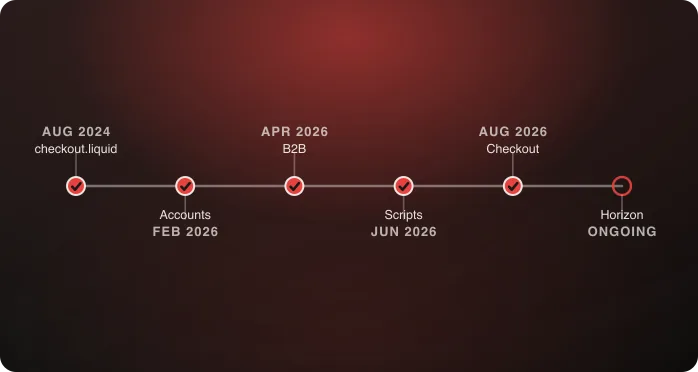
- Aug 13, 2024 — Information, Shipping, and Payment pages retired for all stores
- Aug 28, 2025 — Thank You/Order Status pages retired for Plus stores
- Aug 26, 2026 — Thank You/Order Status pages retired for non-Plus stores
Every store, Plus or not, is now past every checkout.liquid deadline. If your store hasn't migrated, Shopify has already auto-upgraded the affected pages and removed the old customizations for you — which means the practical starting point for a late migration is different from a planned one: you're rebuilding from “what used to be there” rather than migrating something currently live. → For how this fits with the other 2026 deadlines, see Shopify's 2026 Deadlines.
The Four Building Blocks, in Depth
Checkout UI extensions. Render custom components at defined checkout locations — order summary, delivery address step, payment step, thank-you page. This is a fixed set of extension points rather than free-form page editing, which is the biggest mental adjustment for teams used to checkout.liquid's flexibility. Common uses: custom fields (gift messages, delivery instructions), upsell offers, trust badges, loyalty point display. Each extension point has a defined purpose and layout constraints — designing around those constraints rather than fighting them is the difference between a clean implementation and a fragile one.
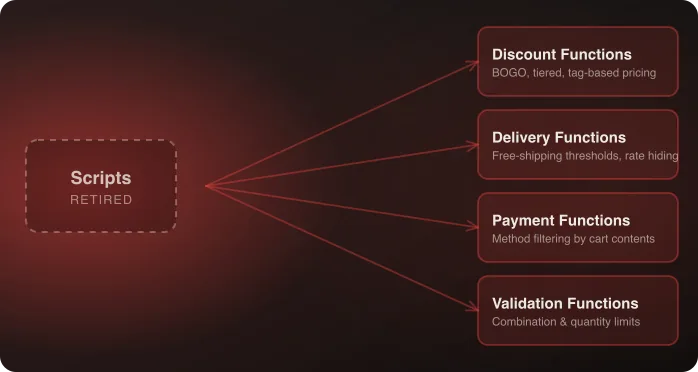
Shopify Functions. Server-side business logic — not visual. This is where checkout decisions happen: which discounts apply, which shipping rates show, which payment methods are available. Anything that used to be conditional logic in a Script or hand-coded into checkout.liquid now lives here. Functions run in a sandboxed environment, which is both the security improvement Shopify built this system for and the reason they can't do everything checkout.liquid's raw script access could — there's no direct DOM manipulation, only structured inputs and outputs.
Checkout Branding API. Pure styling — colors, fonts, logo, spacing, corner radius. Replaces CSS overrides that used to live directly in checkout.liquid. No-code brand customization is possible through the checkout editor for straightforward styling; deeper customization uses the API directly for things like conditional styling based on cart state, which the visual editor alone doesn't support.
Web Pixels. The direct replacement for tracking scripts and pixels that lived in the “additional scripts” field. Every conversion pixel — Meta, Google Ads, TikTok, any custom analytics — needs to move here specifically. This is usually the highest-volume, most overlooked piece of a migration, since a missing pixel doesn't break the storefront, it just silently stops reporting conversions, often for weeks before someone notices a reporting gap and traces it back.
What You Can Customize Now That You Couldn't Before
This is worth stating plainly, since “migration” framing undersells it: Checkout Extensibility isn't strictly a downgrade from checkout.liquid's flexibility.
- App-based customization without touching code — merchants can install checkout apps for common customizations (upsells, trust badges, custom fields) without developer involvement, something checkout.liquid never supported natively; this genuinely lowers the bar for smaller, common customizations
- Upgrade-safe customization — extensions survive Shopify's underlying checkout updates; checkout.liquid customizations broke on platform changes regularly, which was a recurring, unbudgeted maintenance cost under the old model
- A drag-and-drop checkout editor for branding and layout changes that used to require code, meaning smaller styling changes no longer require a developer request and deploy cycle
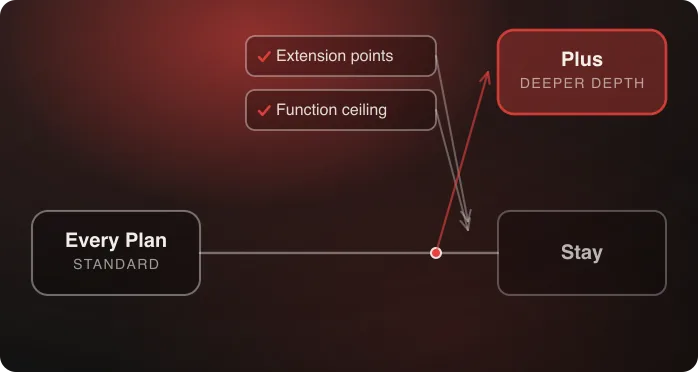
- Deeper checkout UI extension points on Plus specifically, beyond what's available on other plans, giving Plus merchants finer control over exactly where custom content renders
What's genuinely harder: fully bespoke, unconstrained page layouts. checkout.liquid let you rebuild the page from scratch; extensions render at fixed points. If your old checkout.liquid customization was highly unconventional — a completely custom checkout flow structure, for instance — expect to redesign around the extension model rather than porting it directly. This is the one area where “migration” undersells the actual work; it's closer to a redesign constrained by a new set of rules than a straightforward port.
Before and After: Common Patterns
To make the shift concrete, here's how a handful of typical checkout.liquid patterns map to the new model:
- A custom gift-message field on the cart/checkout page → a Checkout UI extension rendering at the appropriate step, storing the value as an order attribute
- CSS overrides changing the checkout's color scheme to match the brand → Checkout Branding API configuration, largely achievable through the no-code editor
- A Google Ads conversion pixel hard-coded into the thank-you page → a Web Pixel, configured once and applied automatically going forward rather than living in a page template that could be accidentally edited or removed
- Custom logic hiding a shipping method for international orders → a Delivery customization Function, evaluated server-side rather than as client-side script logic
- A post-purchase upsell offer → a Checkout UI extension at the thank-you page location, which is now a defined, supported extension point rather than a hand-coded addition
Migration Process
- Inventory what's in “additional scripts” on your Thank You/Order Status pages — this is almost always tracking pixels first, custom logic second. If you've already been auto-upgraded, reconstruct this inventory from your last known-good backup or from institutional memory rather than skipping the step.
- Move tracking to Web Pixels — highest priority, since this is invisible when broken and directly affects your ability to measure everything else about the migration's success
- Rebuild business logic as Functions — anything conditional (discounts, shipping, payment availability)
- Rebuild visual customizations as Checkout UI extensions — custom fields, upsells, trust badges
- Apply branding through the Branding API or checkout editor
- Test the full checkout flow end to end, not just each piece in isolation — extensions interact, and an extension that works alone can conflict with another at a shared render location
Testing Methodology
Test each of the four building blocks in isolation first, then together as a full checkout flow:
- Functions: verify each piece of logic against the specific scenarios it's meant to handle, plus boundary cases
- UI extensions: verify rendering across desktop and mobile, and confirm multiple extensions at the same render location don't visually conflict or render in an unexpected order
- Branding: verify styling holds up across every checkout step, not just the first page — it's common to test the initial page carefully and skip the thank-you page, where styling regressions are just as visible to the customer
- Web Pixels: verify firing by checking your ad platform's own event-testing tools, not just by assuming the pixel is configured correctly — a misconfigured pixel can appear to work in a cursory check while still failing to fire correctly in production
A Full Worked Migration: Mid-Size DTC Brand Example
To tie the four building blocks together, here's what a realistic migration looks like end to end for a mid-size DTC brand that had a fairly typical checkout.liquid setup — a gift-message field, a loyalty-points display pulled from a third-party app, three tracking pixels, and custom branding matching the storefront:
- Inventory: the team documents all four customizations before touching anything, working from the last known-good version of checkout.liquid in version control.
- Web Pixels first: all three tracking pixels (Meta, Google Ads, and a custom internal analytics pixel) are rebuilt as Web Pixels and verified firing correctly using each platform's own event-testing tools — done first, since this was invisible-when-broken and highest priority.
- Checkout UI extension for the gift-message field: built to render at the appropriate checkout step, storing the customer's input as an order attribute exactly as the old field did.
- Loyalty display extension: requires coordinating with the loyalty app vendor to confirm their Customer Account UI Extension (built for the related customer-accounts migration) also covers the checkout-side display — a good example of how the different 2026 migrations can share dependencies.
- Branding: applied through the Checkout Branding API, largely achievable through the no-code editor since this brand's checkout styling was straightforward color and font matching, not conditional logic.
- Full-flow testing: the team tests the complete checkout with all four pieces active together, catching one issue — the gift-message extension and the loyalty display extension were both targeting a similar render location and needed to be repositioned to avoid visual crowding.
- Launch and monitoring: rolled out with two weeks of close conversion-tracking monitoring to confirm no reporting gaps emerged post-launch.
This kind of walkthrough is useful less for its specifics than for the sequencing pattern: tracking first, then structured logic and visual pieces, then branding, then full-flow testing before calling it done.
Working with Your Theme Developer or Agency
If checkout customization was originally built by an agency or a developer no longer engaged with your business, budget time to reconstruct institutional knowledge before starting the rebuild — old checkout.liquid code comments (if any exist) and version-control history are the best starting points. If no one currently on your team or vendor roster built the original customizations, treat the inventory step as closer to reverse-engineering than to a simple audit, and budget accordingly.
Auditing Before You're Forced To
If your store hasn't yet been auto-upgraded (unlikely at this point given the passed deadlines, but possible for edge cases), the ideal sequence is auditing and rebuilding proactively rather than waiting for Shopify's automatic removal to force the issue. A proactive migration lets you control the rollout timing, test thoroughly before customers see any change, and avoid the scenario where customizations simply vanish from a live storefront with no advance notice to your own team, let alone your customers. If you're reading this after already being auto-upgraded, the sequence is necessarily reactive — treat the current, stripped-down checkout as the honest starting point and rebuild from there, rather than trying to reconstruct exactly what existed before as an intermediate step.
SEO and Page Speed Considerations
Checkout pages themselves aren't typically SEO-relevant (checkout isn't indexed), but the migration is a reasonable moment to audit page speed on the pages that are affected — Web Pixels, in particular, can be a source of slowdown if too many fire synchronously rather than being configured to load asynchronously. Since you're already touching this part of the site, confirming the rebuilt implementation doesn't introduce new performance regressions is a relatively low-cost addition to the testing process.
Common Gotchas
- Missing tracking pixels are the most common oversight — they don't show up in visual QA, only in a drop in reported conversions weeks later
- Multiple extensions targeting the same render location can conflict or render in an unexpected order — test the full page, not each extension individually
- Custom logic that depended on direct DOM access in checkout.liquid has no direct equivalent — Functions operate on structured data, not the rendered page, which sometimes requires rethinking the logic rather than porting it
- Assuming an already-auto-upgraded store has “nothing to migrate” — an auto-upgrade removes old customizations, it doesn't rebuild them; a store that's been running for months without its old checkout customizations may not realize how much was quietly lost
- Treating app-vendor-dependent extensions (like a loyalty display) as a pure internal engineering task — some pieces of this migration depend on a third-party vendor's own extension being ready, which is a coordination dependency, not just a build task
- Skipping a page-speed check because “it's just a migration, not a redesign” — new extensions and pixels are new code on the page regardless of framing, and are worth the same performance scrutiny as any other addition
Frequently Asked Questions
Is checkout.liquid completely gone now?
Yes, as of August 26, 2026, all deadlines have passed for all store types. Any remaining checkout.liquid customizations have been automatically removed by Shopify.
What was in the “additional scripts” field, typically?
Most commonly: conversion tracking pixels (Meta, Google, TikTok), tag manager containers, and custom post-purchase logic. All three need to move to Web Pixels or Checkout UI extensions depending on function.
Can I still build a fully custom checkout page layout?
Not in the way checkout.liquid allowed — extensions render at fixed points rather than allowing free-form page rebuilding. Highly unconventional past customizations typically need to be redesigned around the extension model rather than directly ported.
How do I know if I'm missing tracking after migrating?
Compare reported conversions before and after migration closely in the weeks following, and verify directly in your ad platform's event-testing tools rather than assuming configuration equals correct firing — missing pixels don't show up in visual QA, only in reporting gaps.
If Shopify already auto-upgraded my store, have I lost my old customizations permanently?
The auto-upgrade removes the old checkout.liquid customizations from the live checkout, but doesn't restore them — you'll need to rebuild anything that mattered using the new building blocks, working from your own records of what used to be there.
Does this migration affect checkout page speed?
It can, depending on how many Web Pixels and extensions are added and whether they're configured to load asynchronously. Since you're already touching this part of the site, it's a reasonable moment to confirm the rebuilt implementation doesn't introduce new performance regressions.
What if a customization depends on a third-party app vendor's own extension?
Treat this as a coordination dependency, not purely an internal engineering task — confirm the vendor's extension timeline explicitly rather than assuming it will be ready when your internal work is.
Confirm nothing's missing from your checkout migration — talk to an architect.

Related