


















Shopify Platform Changes12 minute read
Shopify Canvas, Explained: What You Can Change Yourself Now
Shopify Canvas is a workspace inside the Shopify admin where merchants change the design of store pages by clicking page elements or chatting with Sidekick, Shopify’s AI agent. Shopify announced Canvas on October 1, 2026, in early access, for Shopify-developed and custom themes. Shopify says Canvas “turns the whole online store into a workspace for creativity and collaboration with Sidekick.”
Published Last updated
Picture the last time you wanted a small change on your store. A warmer product page. The reviews moved up. A new headline font. You wrote a ticket, waited, reviewed a staging link, asked for one more tweak, and two weeks later it shipped.
On October 1, 2026, Shopify announced Canvas, a new design surface built to make that whole loop take minutes, with you at the keyboard.
Here’s what you’ll find in this guide:
- What Canvas does today, and what it does not do yet
- How Sidekick makes changes, and why a Canvas change is a code change
- How to get value from Canvas without putting your live store at risk
- Why Shopify Horizon is the way in if your store runs a theme Canvas cannot open
Last verified: November 4, 2026. Canvas is in early access and Shopify says it will change quickly. We will keep this page current as Canvas changes. Updated November 4 for the Fall ’26 Edition; see “What Shopify plans to add to Canvas”.
How Canvas Differs From the Theme Editor
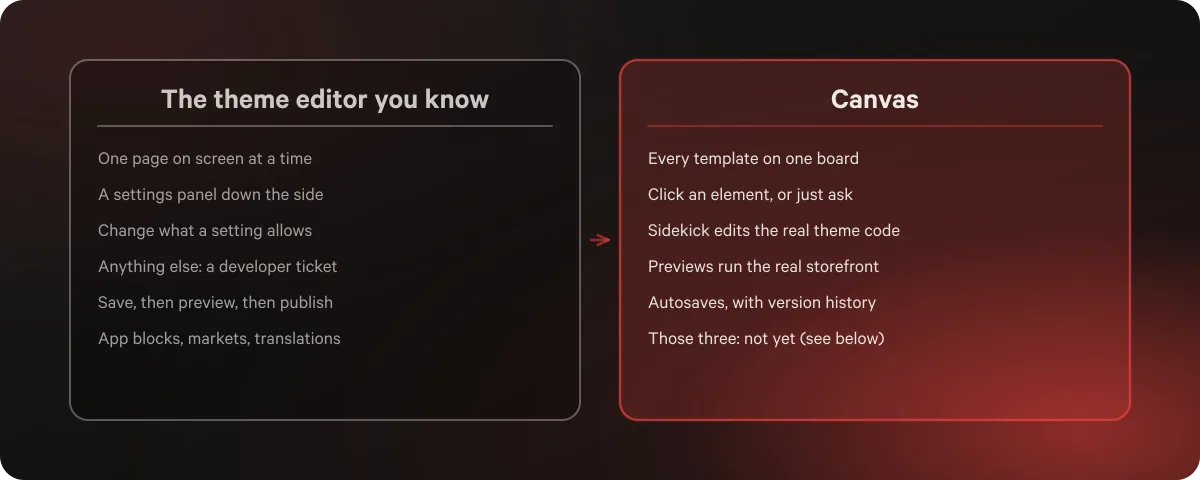
3 things make Canvas different from the theme editor:
- You see the whole store at once. Home, collection, product, cart, blog: every template sits side by side. You pan across them to feel the store as a whole, then zoom into one to work on detail. Shopify calls Canvas “an interactive, infinite workspace.”
- You are looking at the real thing, not a mockup. Canvas renders the actual code behind your store, so previews carry full interactivity and animation, and you can view a page with a different product or collection loaded, at desktop, tablet or phone width.
- Sidekick edits the theme itself. It is not pushing settings on your behalf. It works directly on the theme’s files and makes coordinated changes across every template a request touches. That is what lets it take on “work ranging from small section changes to store-wide redesigns.”
“When I built Kotn 12 years ago, I knew how to code and it still took me two weeks to get a rough store working. Today, an entrepreneur on Shopify can build a fully custom store in twenty minutes that’s head and shoulders above what I built then.”
Ben Sehl, Director of Product at Shopify and co-founder of Kotn, in the Canvas announcement
What You Can Do in Canvas on Day One
Everything below comes from Shopify’s help center documentation for Canvas, which went live with the announcement. If your store has access, this is the early-access feature set as it stood on November 4, 2026.
- Start a theme from a description. Click New on the Themes page and Sidekick opens a conversation about your brand and the store you want. It generates a theme from your answers and adds it to your library, unpublished, for you to keep shaping.
- Duplicate an existing theme into Canvas. Duplicate in Canvas copies a supported theme. The copy opens only in Canvas; the original stays in the classic theme editor, and the two are fully separate. This is how you experiment without touching what customers see.
- Jump between every template. The overview shows all templates zoomed out. A Jump to field takes you straight to one, and a template’s header lets you swap which product, collection or page it previews.
- Click to edit. Select a block and its settings appear, most-used first. Select an image block and the image picker opens. On most themes you edit text straight in the preview.
- Ask for anything a setting does not offer. Select a block, or nothing at all, and type the change into Work with Sidekick. Shopify’s own framing: use the chat “instead of navigating a settings panel.”
- Run more than one conversation. You can start a new chat to ask for a separate change while the first is still being worked on.
- Preview like a customer. Full-screen view runs the real storefront with its interactions, at Desktop, Tablet, Mobile or a custom width. An inspector toggle switches between editing the page and browsing it.
- Never lose work. Changes save automatically; there is no save button. Undo and redo cover your manual edits, a version history shows every edit alongside the last published version, and a single Publish button (Update on a live theme) makes it real.
Read that list again from a business owner’s chair. Duplicate the live theme, open it on the board, tell Sidekick the product page should feel warmer, watch it happen across every product template at once, check it on a phone width, and publish, all before the standup where you would normally have asked someone else to do it. That is the promise, and in early access it is already mostly real.
How Sidekick Makes Changes in Canvas
The part of the announcement worth understanding is not the chat box. It is what happens after you press enter. Sidekick is now, in Shopify’s words, “a coding agent designed for commerce.” It works directly on the theme’s files, “guided by instructions and skills for building stores,” and Shopify has simplified its theme architecture so that “the store’s structure, logic, and design” are easier for the agent to understand and change.
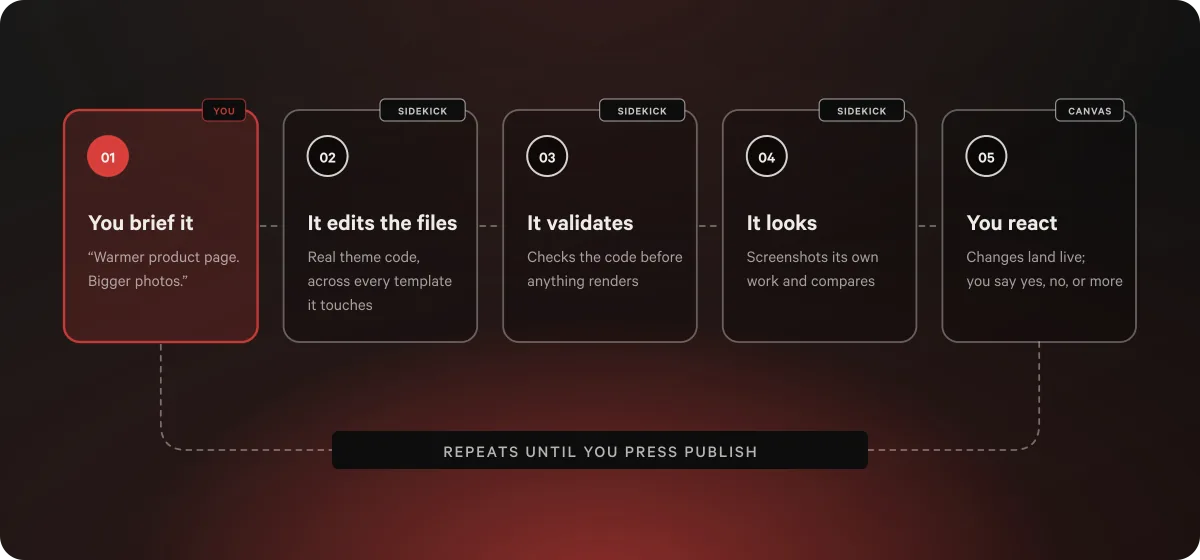
Then it checks itself. As it builds, Sidekick “validates its code and reviews screenshots to inspect how its changes landed on Canvas,” and uses both to refine its work before showing you.
It also “remembers preferences and carries earlier design decisions into its work,” so a conversation about the product page does not start from zero when you move to the collection page. This is not a brand-new capability dropped in overnight: Shopify says Sidekick made “more than twenty-five million edits to themes in the first half of 2026.” Canvas is the first time that work has had a proper room to happen in.
Shopify’s design director, Austin Knight, is candid about the hard part: “Getting Sidekick to write code was easy, but guiding it to make good design decisions took a great deal of time and attention.” Each theme now carries what he calls a design contract and a curated set of patterns, so that what Sidekick proposes reads as a direction rather than a random layout.
Why this matters to you: a Canvas change is a code change. That is the good news, because it means Canvas can do things a settings panel never could. It is also the thing to respect. Sidekick inspects the change it made. It does not run your checkout, your subscription flow or your loyalty widget afterwards to see what else moved. The four controls further down cover that gap.
Where Canvas Still Needs a Developer
Shopify has been transparent about the gaps. Ben Sehl’s closing line in the announcement: “We’re early here and Canvas is not replacing the existing editor yet. Things will change quickly, and there are gaps we still need to close.” The help center lists the gaps precisely. Here they are, with what each one means in practice.
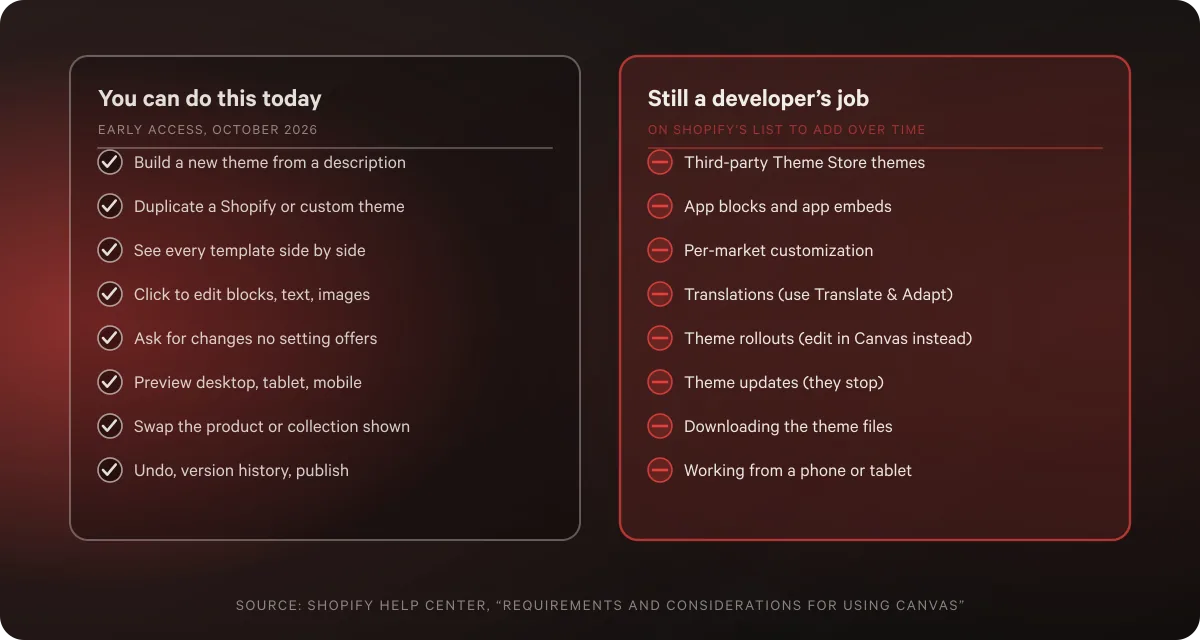
Third-party themes are not supported
Canvas works with themes developed by Shopify (Horizon and its family, Dawn) and with custom themes. A theme bought from the Theme Store will not open in it. Shopify told theme developers this is “not an intentional omission” and that it is working toward compatibility “before Canvas begins to become the default editor,” so expect this to change. Until it does, a store on a purchased theme is on the sidelines. If you have been weighing a move, our Horizon vs. Dawn vs. custom theme framework is the place to start, and Canvas now adds a point in Horizon’s column. If you want the answer for your own store rather than in general, the 5-Day Horizon Readiness Audit gives it to you in writing.
App blocks and app embeds cannot be added or configured
App blocks are the gap that bites an established store hardest. Reviews, subscriptions, loyalty, size guides, bundles, chat widgets: most of what makes a mature storefront work arrives as an app block or an app embed, and Shopify says plainly that “you can’t add or configure app blocks or app embeds in Canvas.” You can redesign the page around them, but the moment a change involves an app, you are back in the theme editor, or back to a developer.
Markets and translations stay where they are
You cannot customize a theme per market in Canvas, and you cannot translate theme content inside it. Translations still run through the Translate & Adapt app against the default theme content. If you sell in several regions with different storefronts, Canvas is a single-storefront tool for now.
Rollouts: the theme can be in one, but you cannot edit it there
A Canvas-edited theme can be added to a rollout as the replacement for your main theme, but you cannot open or edit it from the rollout. Shopify’s instruction is to edit it in Canvas instead. Workable, but it is one more thing for whoever manages your release schedule to know.
Theme updates stop, and the files cannot be downloaded
Two help-center sentences matter most here. A theme edited in Canvas no longer receives theme updates, and after it has been edited in Canvas you cannot download its theme files.
The first means a stock Horizon theme you customize in Canvas stops getting Shopify’s bug fixes, speed improvements and new features through the update channel.
The second means the theme can no longer be pulled out as files, which is how agencies version it in Git, review it, and keep a copy. If your theme lives in a repository today, talk to whoever owns it before a Canvas copy becomes the live theme.
The smaller print
- Desktop only. No phone, no tablet.
- A permission is required. Staff need Online Store > Themes > Edit code to open Canvas. That is the same permission you would give a developer, which tells you how Shopify sees it.
- Sidekick clears your undo history. Undo and redo cover your own manual edits. When Sidekick makes a change, the undo stack resets; the version history is your way back.
- Adding a block means asking. To add a new block to a template you ask Sidekick; there is no add-block control yet.
- Older themes lose inline text editing. On legacy themes you edit text through the block settings rather than in the preview.
- Metaobject templates do not appear in Jump to. If you run metaobject-driven pages, finding them takes an extra step.
- Plan dependency. Canvas needs a plan that includes theme customization. Move to a plan without it and you can view a Canvas-edited theme, but not edit or publish it.
Can You Use Canvas Today? A Two-Minute Checklist
| Requirement | What you need | How to check |
|---|---|---|
| Rollout | Early access. Shopify is enabling it “only to certain stores,” rolling out “over the coming days” from October 1. | Online Store > Themes. Look for a New button that opens Sidekick, a Duplicate in Canvas option, or a Canvas badge on a theme. |
| Plan | Any Shopify plan that includes theme customization. | If you can open the theme editor today, you qualify. |
| Permission | Online Store > Themes > Edit code for each staff member who will use it. | Settings > Users and permissions. |
| Device | A desktop browser. | Phones and tablets will not open it. |
| Theme | A Shopify-developed theme (Horizon, Dawn and their variants) or a custom theme. Not a Theme Store purchase. | Online Store > Themes. The theme’s developer is listed under its name. On a Theme Store theme? The next section is for you. |
If every row is a yes and you still do not see Canvas, you are simply not in the first wave. Shopify has not published a date for general availability.
What Canvas Adds to the Horizon Decision
Read the requirements table once more and one line decides everything: Canvas opens Shopify-developed themes and custom themes. Horizon is Shopify’s current theme architecture, the one every new Shopify theme is built on, and the one the announcement is really describing when it says the theme architecture was simplified so Sidekick can understand and change it.
If your store already runs Horizon, Canvas is a button away the moment your store is in the rollout. If it runs a theme from the Theme Store, or a Dawn-era theme buried under years of custom code, Canvas is on the other side of a decision you may already have been circling.
That decision used to be argued on Horizon’s own merits, and they still stand: expanded sections and blocks, deep metaobject support, and more of what used to need custom Liquid configurable natively, so a merchandiser can do what used to take a developer. Dawn vs Horizon walks through the architecture, and what breaks when you migrate to Horizon is honest about the cost.
Canvas changes the weight of the argument. The AI design surface Shopify is building toward making the editor lands first on Horizon, and third-party themes join on no published date. Waiting is a choice to let competitors on Horizon redesign in minutes while your changes stay on a ticket.
- Already on Horizon? You are in the first wave of eligible stores. Duplicate your theme into Canvas this week and start on the product page.
- On a Theme Store theme? Canvas will not open it until Shopify ships third-party support, and Shopify has not said when. A move to Horizon gets you there now, and brings the rest of Horizon with it.
- On a heavily customized Dawn or custom theme? A custom theme technically qualifies, but years of custom sections are exactly what makes an agent’s changes risky. A Horizon rebuild that retires custom code in favor of native blocks is often a net simplification, and a cleaner theme is a theme Sidekick does better work on.
- Not sure which you are? That is what the 5-Day Horizon Readiness Audit is for: five days, a written read of what a Horizon migration involves for your store, what breaks, what it costs and whether to do it at all. $2,500, credited in full against a Horizon Sprint booked within 30 days.
One line from Shopify’s help center to weigh before you move: a Horizon theme you then edit in Canvas stops receiving Shopify’s theme updates. That is a trade, and for most brands a good one, since the whole point of Canvas is that the theme becomes yours.
Make it knowingly, on a duplicate, with the playbook further down this page. What a Horizon migration costs and what the migration involves are both published, so the numbers are not a mystery either.
Five days, in writing
On a theme Canvas can’t open?
Find out in five days what moving to Horizon would take for your store.
What Canvas Means for Plus Brands
For a Shopify Plus brand, Canvas changes who can make visual changes to the storefront and leaves the Plus-specific layers of the store where they were: apps, markets, checkout, expansion stores and the theme’s release process. Six things decide what a Plus brand can do with Canvas today.
- Plan. Canvas needs a plan that includes theme customization, which every Plus plan does. Plus adds nothing to eligibility: the gates are the early-access rollout, the Edit code permission, a desktop browser and a Shopify-developed or custom theme.
- Apps. The subscription, loyalty, reviews and bundle apps that make a Plus storefront work arrive as app blocks and app embeds, and Canvas cannot add or configure them. A Plus brand can redesign the page around those apps in Canvas; the moment a change touches an app, the work moves back to the theme editor or to a developer.
- Markets and expansion stores. Canvas cannot customize a theme per market or translate inside it. A Plus brand selling through Shopify Markets keeps that work in the theme editor and Translate & Adapt, and each expansion store is its own store, with its own theme and its own Canvas copy.
- Checkout. Canvas does not touch checkout. Checkout Extensibility customizations stay where they are, and a Canvas change to a shared template still needs the money paths tested afterwards, because Sidekick inspects the change it made and not the rest of the store.
- Rollouts and the release process. A Canvas-edited theme can sit in a rollout but cannot be edited from it, stops receiving theme updates, and cannot be downloaded. A Plus brand that versions its theme in Git keeps Canvas on a duplicate until Shopify closes that gap.
- Permissions. Edit code is the gate. On a Plus store with a long staff list, that one permission decides who can change the live store from Canvas.
Canvas is the second AI design surface Shopify has tied to its own themes. The first was AI theme block generation in the Horizon editor, which produces one block from a prompt, works best on simple, self-contained components, and is available on every plan, Plus included; what AI theme blocks do and don’t do covers where that generator stops.
The theme line is the same for both: Sidekick in the admin works on any theme, AI theme block generation needs a block-based theme such as Horizon, and Canvas opens Shopify-developed and custom themes. A Plus brand on Horizon has all three. For the Plus-scale assessment of a move to Horizon, see Horizon for Shopify Plus merchants.
Four Controls Before Canvas Touches a Seven-Figure Store
We think Canvas is good news, and not in a hedged way. A large share of the tickets that cross an agency’s desk are small visual changes that a brand owner understood perfectly well and simply had no safe way to make. Canvas gives them one.
The agencies that lose from this are the ones billing for hero-image swaps. The brands that win are the ones whose teams can now spend their design conversation on decisions rather than requests.
The 4 controls to put in place before letting Canvas near a store that does seven figures:
- Decide who presses Publish. Canvas autosaves and publishes in one click. The Edit code permission is the gate; grant it to the people who should be able to change the live store, and no one else.
- Treat every Canvas change as a code change, because it is one. Sidekick validates what it wrote and screenshots what it changed. It does not regression-test the rest of your store. The money paths (search, product, cart, checkout, account, subscription management) need a run-through after any change that touches shared templates or theme-wide settings, on every width.
- Know where your theme lives. If it is versioned in Git and reviewed before release, a Canvas-edited copy sits outside that process and cannot be downloaded back into it. Until Shopify closes that gap, keep Canvas on a duplicate and let your delivery team decide how changes get reconciled.
- Protect the design system. Sidekick remembers preferences within its work, and Shopify says each theme carries a design contract. Your brand still needs its own: the type ramp, the color tokens, the spacing rules, written down. Give them to Sidekick in the brief and you get a store that stays one store across forty pages; leave them out and you get forty well-made pages.
Does Canvas Help Agentic Delivery?
Yes, in three ways. Anatta delivers Shopify work through Agentic Delivery: agents do the building and testing, people own the judgment. Canvas is Shopify making the same bet inside the admin, for the merchant. The two meet in three places.
- Shopify just made themes easier for agents to read. The announcement says the theme architecture was simplified so that a store’s structure, logic and design are easier for Sidekick to understand and change. Nothing about that is Sidekick-specific. A theme that is more legible to one agent is more legible to every agent, including the ones that build and test inside our delivery system. The whole platform gets easier to work on by machine, and that compounds.
- It takes the small change off the ticket queue, which is where the queue was dying. When a brand team can move a block or change a font themselves, what is left for a delivery team is the work Canvas cannot see: app blocks and integrations, markets, subscriptions, checkout, data, and the regression testing across the whole store that no single change ever triggers. That is exactly the work Agentic Delivery was built around. Our write-up of a theme migration run this way shows what that looks like end to end, including the test suite that runs after every build.
- The loop is the same loop. Brief, plan, build, validate, look at the result, hand it back for a human to accept: that is how an implementation run works in our system, and it is now how Shopify describes Sidekick in Canvas. Shopify shipping that loop into the admin of every store, after 25 million Sidekick theme edits in 6 months, is the strongest validation yet that this is how storefront work gets done now.
Where it does not help yet is the handoff. A Canvas-edited theme cannot be downloaded, so for the moment it cannot flow into a version-controlled pipeline the way a developer’s change does.
Our advice to our own clients is the same as the advice above: run Canvas on a duplicate, keep the live theme on the delivery pipeline, and let the two converge as Shopify closes the gap. We expect that to be months, not years. We put Canvas and a developer’s Git-based workflow through the same week of jobs in Shopify Canvas vs. how themes are actually built, if you want the side-by-side.
How to Try Canvas Safely
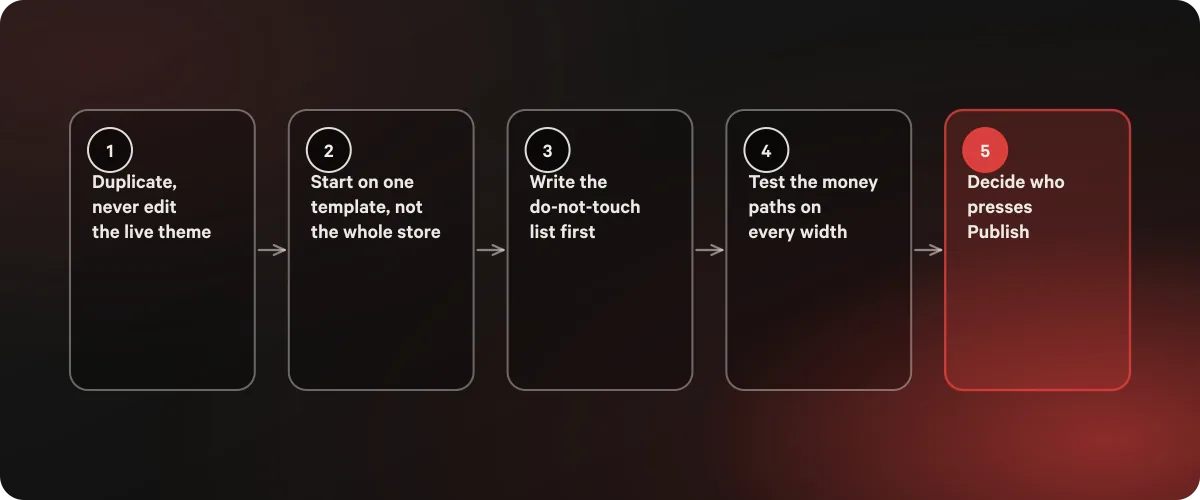
- Duplicate, never edit the live theme. Duplicate in Canvas gives you a separate copy that opens only in Canvas. The live theme stays in the editor, untouched, with its updates intact. Everything else on this list happens on the copy.
- Start on one template. Pick the page where a design change would move a number: usually the product page. Give Sidekick a tight brief and judge the result before you widen the conversation to the whole store.
- Write the do-not-touch list first. Checkout, the header and footer, anything built by an app, anything legal. Tell Sidekick what is off limits at the top of the brief, the same way you would tell a new designer.
- Test the money paths on every width. Search, product, add to cart, cart, checkout, account. Canvas lets you preview at Desktop, Tablet and Mobile; use all three, and click through, do not just look.
- Decide who presses Publish. Agree in advance who reviews a Canvas theme before it goes live, and what they check. Then publish from the copy, and keep the previous theme in your library for a one-click rollback.
What Shopify Plans to Add to Canvas
Shopify has said what it intends to add rather than when. The announcement and the launch coverage name third-party theme support, app blocks and extensions, markets, translations, rollouts and theme updates as “things the company plans to support over time,” and Shopify told theme developers it is working toward third-party compatibility “before Canvas begins to become the default editor.”
Read those two statements together: the plan is for Canvas to become the editor, and the current gaps are the roadmap to get there.
In the meantime, the classic theme editor is not going anywhere, and nothing you have built in it is affected unless you choose to duplicate it into Canvas.
The right posture for an enterprise brand is curiosity on a copy, not caution from the sidelines, and if your theme is what keeps you on the sidelines, the move to Horizon is the first step rather than the last. The owners who learn to brief an agent well in the next six months will be the ones whose stores look like themselves when everyone has the same tool.
Update, November 4, 2026. Shopify’s Fall ’26 Edition on October 28 rebuilt Sidekick to write code and apply multi-step changes, and listed Canvas as part of that release, still in early access. The same release added Sidekick storefront suggestions that are staged on an unpublished copy of the theme and tested against the live theme in simulated shopping sessions before Sidekick recommends them, on themes eligible for Canvas. Shopify has not announced a general-availability date for Canvas or a date for third-party theme support.
Frequently Asked Questions
What is Shopify Canvas?
Shopify Canvas is a workspace inside the Shopify admin where merchants change the design of store pages by clicking page elements or chatting with Sidekick, Shopify’s AI agent. Shopify announced Canvas on October 1, 2026, in early access, for Shopify-developed and custom themes. Sidekick edits the theme’s real code and the changes appear in Canvas as it works.
Is Shopify Canvas replacing the theme editor?
Not yet. Shopify says Canvas “is not replacing the existing editor yet” and runs alongside it as an optional, early-access experience. Shopify has also said it is working toward third-party theme compatibility “before Canvas begins to become the default editor,” which signals the long-term intent.
Who can use Canvas right now?
Stores in Shopify’s early-access rollout, on a plan that includes theme customization, using a desktop browser, with the Online Store > Themes > Edit code permission, and on a Shopify-developed or custom theme. Third-party Theme Store themes are not supported yet, as of November 4, 2026.
Does Canvas work with Horizon?
Yes. Horizon is a Shopify-developed theme, which is one of the two theme types Canvas supports (the other is a custom theme). Horizon’s block-based architecture is also the kind of structure Shopify says it simplified to make themes easier for Sidekick to understand and change.
What can’t Canvas do yet?
According to Shopify’s help center: no third-party themes, no adding or configuring app blocks or app embeds, no per-market customization, no in-Canvas translation, no editing a theme from within a rollout, and no downloading theme files after editing. A theme edited in Canvas also stops receiving theme updates. It is desktop-only, and when Sidekick makes a change your undo history is cleared.
Will a Canvas edit break my live store?
Not if you work on a duplicate. Duplicate in Canvas creates a separate copy that opens only in Canvas while the original stays in the theme editor; nothing reaches customers until you press Publish. Treat a Canvas change like any code change and test your checkout, cart and account flows at every screen width before publishing.
Should I move to Horizon to get Canvas?
If your store runs a Theme Store theme, moving to Horizon is currently the only way to use Canvas, since third-party themes are not supported and Shopify has given no date. Horizon also brings expanded sections and blocks and deep metaobject support in its own right. The 5-Day Horizon Readiness Audit tells you in writing what the move would involve for your store, for $2,500 credited against a Horizon Sprint booked within 30 days.
Does Canvas mean I no longer need an agency or developer?
For small visual changes on a supported theme, increasingly no, and that is a good thing. For anything involving apps, integrations, markets, subscriptions, checkout, data, or testing across the whole store, yes for now. Canvas also cannot export its theme files, so a version-controlled delivery pipeline still needs to own the live theme.
Is your theme the thing standing between you and Canvas? The 5-Day Horizon Readiness Audit tells you in five days what a move to Horizon involves for your store, in writing. Or talk to an architect first.
Five days, in writing
Canvas opens Horizon. Is your store ready to move?
The 5-Day Horizon Readiness Audit tells you what a Horizon migration involves for your store: what breaks, what it costs, and whether to do it at all. $2,500, credited in full against a Horizon Sprint booked within 30 days.
Related Reading
-
 Shopify Platform Changes
Horizon vs. Dawn vs. Custom Theme: A Decision Framework
Horizon, Dawn, or a fully custom theme — the right choice depends on how much native flexibility you need versus how much bespoke functionality you're building regardless. Here's the decision framework.
Jamie Smith Director of Technical Solutions -
 Agentic AI
Agentic Delivery on a Fixed-Date Shopify Theme Migration
Dropps’ Horizon rebuild had four weeks and a fixed launch date. What the delivery loop did with the scope, the changes and the risk — and what it didn’t.
Prasenjit Paul Chief AI Officer - Explore the service
Horizon Migration
Migrating to Shopify Horizon
Canvas works on Shopify-developed and custom themes. If yours is neither, here is what a move to Horizon involves, what breaks, and what it costs, with published pricing.