












How to Preserve SEO During an Ecommerce Migration
August 12, 2026
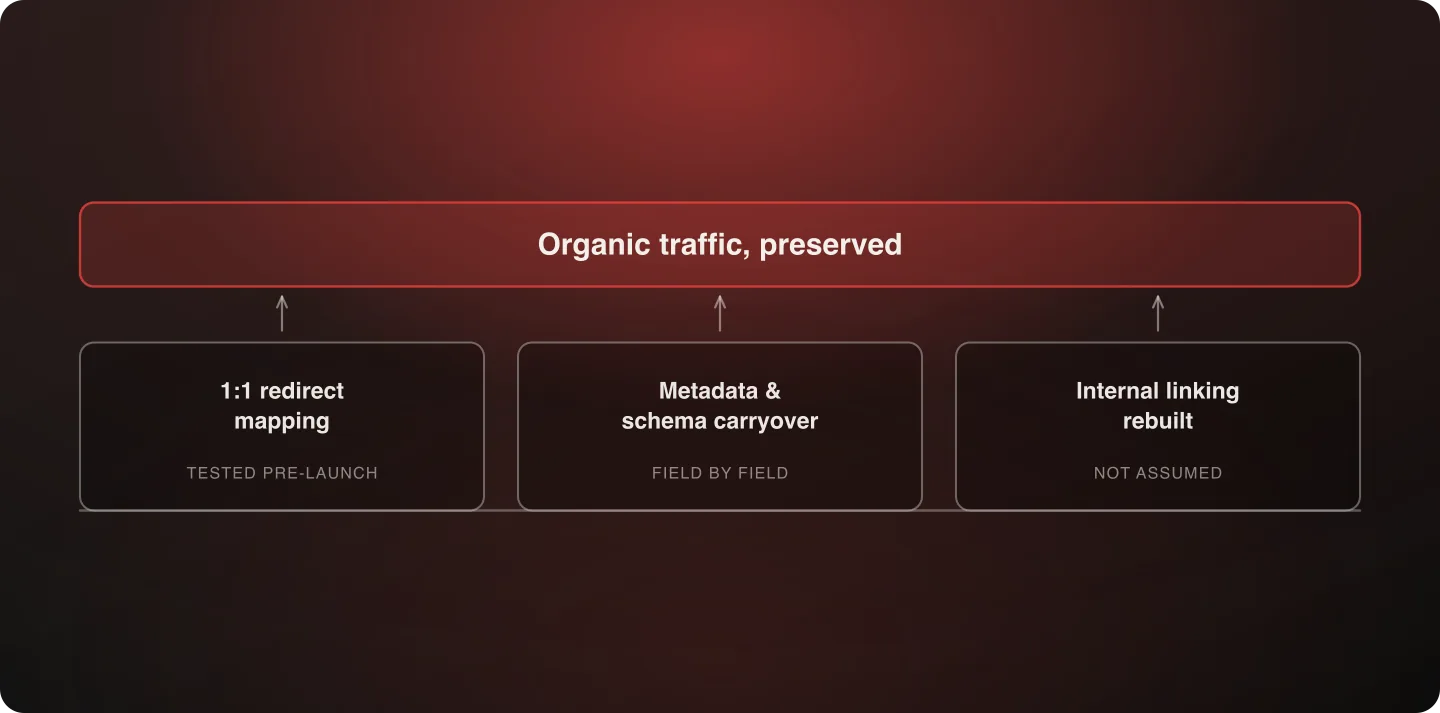
SEO preservation during a replatform comes down to three disciplines done rigorously: 1:1 redirect mapping rather than blanket homepage redirects, metadata and schema carryover verified field by field, and internal linking rebuilt rather than assumed to transfer. Get those three right and organic traffic loss stops being an expected cost of migrating.
Last verified: September 6, 2026.
Why organic traffic loss isn't inevitable
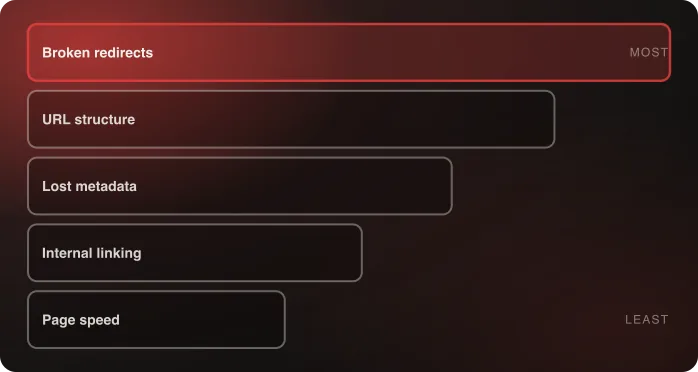
Every cause of post-migration traffic loss traces back to one of three preventable gaps: broken redirects, lost metadata, or changed internal linking that orphans previously well-linked pages. None of these require exotic technical solutions. They require discipline and a real audit, not a rushed launch-week check.
The reason they get skipped is scheduling, not difficulty. SEO preservation work has no visible output — nobody looks at a redirect map and sees a finished feature — so it competes badly against work that produces something demonstrable. Treating it as a migration-phase requirement with its own owner, rather than a launch-week cleanup task, is most of what separates a migration that holds its rankings from one that doesn't.
The redirect mapping process
This is the single highest-leverage activity in the whole discipline, and the one most often done at 80%:
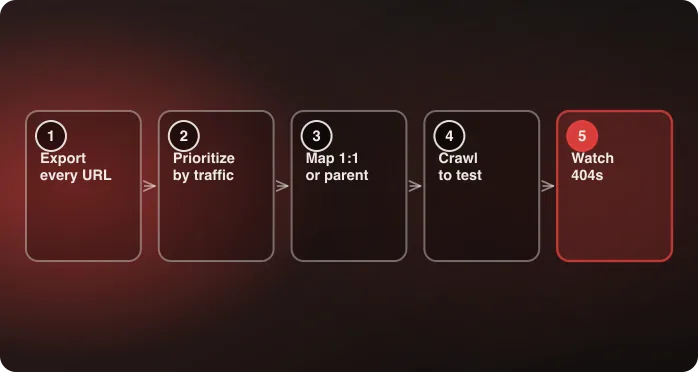
- Export a full URL inventory from the old platform, including pages with real organic traffic even outside primary navigation.
- Cross-reference against Search Console to prioritize by actual traffic value rather than treating every URL as equally important.
- Map every URL to its most relevant destination — a true 1:1 match where one exists, a parent-category redirect where it doesn't, and never a blanket homepage fallback.
- Test the redirect map before launch with a full crawl, not a spot-check of the top pages.
- Monitor 404 reports closely for the first 30 days post-launch, when real traffic surfaces the edge cases an audit missed.
The redirect mapping deep-dive walks through each step, including how to handle the URLs with no equivalent on the new platform.
Metadata and schema carryover
Title tags, meta descriptions, and structured data need field-by-field verification against the old platform. The failure mode here is specific and easy to miss: a new platform's default output can silently override custom values that took real effort to build. A product page that had a hand-written title tag on the old CMS can arrive on the new platform with a templated one generated from the product name, and nothing about the page looks wrong.
Verify a representative sample across every template type — product, collection, blog post, and static page — rather than checking the homepage and assuming the pattern holds. Templates fail independently.
Schema markup deserves the same treatment, and for the same reason: platforms generate their own by default, and that default can conflict with or replace custom markup rather than adding to it. Product schema and taxonomy mapping covers the structured-data half of this discipline in full, including shopping feeds.
Internal linking
A site's internal link structure is itself a ranking signal. Rebuilding it deliberately — rather than assuming a new platform's auto-generated navigation replicates the old link equity — protects pages that depended on that structure for their position.
Two specific things to check after a migration: whether previously well-linked pages are still linked from anywhere at all, and whether the pages doing the linking are the same ones. A category page that used to be linked from twelve product pages and is now linked only from the main nav has lost something real, even though it isn't orphaned.
Page speed as an independent factor
Site speed is a ranking factor on its own, separate from redirects and metadata. A migration that inadvertently slows the site costs rankings even when every other part of the SEO preservation checklist was done correctly. Measure Core Web Vitals on the new platform before launch, against the old platform's numbers on the same templates — not against a generic benchmark.
Canonicals, sitemaps and robots.txt
Three settings decide whether search engines can find and correctly attribute the new site at all, and all three are easy to get wrong in ways that no visitor would ever notice.
Canonical tags. A new platform generates canonicals automatically, and its defaults may not match what the old site declared. The specific risks are a canonical pointing at the staging domain (which survives launch surprisingly often), a canonical pointing back at the old domain, and parameterized URLs each declaring themselves canonical rather than pointing at the clean version. Check a sample of each template type in the page source after launch, not before.
XML sitemaps. Submit the new sitemap in Search Console on launch day. Keep the old sitemap accessible and submitted for a period after launch too — it gives search engines a list of the URLs that now redirect, which speeds up the re-crawl considerably compared to waiting for them to be rediscovered organically.
robots.txt and staging noindex. The single most damaging launch-day mistake in this category is shipping the staging environment's `Disallow: /` or a site-wide `noindex` into production. It is also the easiest to check and the fastest to fix, so check it within the first hour of launch rather than assuming the deploy handled it.
A pre-launch SEO checklist
Everything above, in the order it's worth working through before go-live:
- Full URL inventory exported from the old platform, from the platform export, the XML sitemap and a crawl — each catches URLs the others miss.
- Search Console impressions and clicks joined to that inventory, so the map is prioritized by real traffic value.
- A redirect map with a destination for every URL, tested with a full crawl rather than a spot-check.
- Title tags and meta descriptions verified against the old values on a sample of every template type.
- Structured data compared field by field, including whatever the new platform emits by default.
- Canonical tags checked for staging domains, old domains, and parameterized duplicates.
- Internal linking crawled and compared — not just "is the page linked" but "from how many places."
- Core Web Vitals measured on the new platform against the old numbers, template by template.
- robots.txt and any site-wide noindex confirmed correct in production, within the first hour.
What to measure after launch, and when
Days 1–7. Coverage and crawl errors in Search Console, and server logs for 404s. This window is about mechanical correctness, not rankings — rankings haven't moved yet in any meaningful way, and reading them now produces noise rather than signal.
Weeks 2–4. Indexed page count against the pre-migration baseline, and impressions by page type. A page-type-specific gap here is the earliest reliable signal of a structural problem.
Weeks 4–8. Positions and clicks, compared against the same period last year rather than against last month — seasonality otherwise gets read as migration damage, or the other way round.
Set the baseline before launch. Export Search Console performance data by page and by query for at least the preceding twelve months while the old site is still live, because the comparison you'll want in week six is much harder to reconstruct afterwards.
A realistic recovery timeline
Even a well-executed migration shows some temporary ranking volatility as search engines re-crawl and re-index the new URLs. That's normal, and typically resolves within four to eight weeks for a well-mapped migration. A migration with real redirect gaps can take months longer to recover, if it recovers fully at all.
Knowing that in advance matters for a practical reason: it stops a team from panicking at week two and making changes that muddy the diagnosis. If traffic hasn't stabilized by week eight, that's the signal to start diagnosing which cause is behind the drop.
Scale doesn't change the discipline, only the volume. buybuy BABY's migration moved a 30,000+ SKU catalog, which is a large URL inventory to map and a correspondingly large amount of ranking signal to protect.
Content, and the pages that quietly get dropped
Redirects protect a URL that still has a destination. The related failure is a page that simply doesn't get rebuilt, which no redirect strategy catches because nothing was mapped to it in the first place.
The usual casualties are pages that live outside the main content types: buying guides, size charts, shipping and returns pages, care instructions, landing pages built for old campaigns, and location or store pages. Individually none looks important. Collectively they can carry a substantial share of long-tail organic traffic, and they're the pages most likely to be missing from a content inventory built from the navigation rather than from a crawl.
The check is straightforward: take the URL inventory, sort by impressions, and confirm that every page in the top few hundred has a corresponding page on the new site — not merely a redirect target, but a page with the same content on it.
Who owns SEO during a migration
This discipline fails more often through ownership than through technical difficulty. It spans engineering (redirects, page speed, canonical output), content (metadata, the pages themselves), and analytics (the baseline and the measurement), which means each group can reasonably assume another has it.
Name one person accountable for SEO preservation across the whole migration, with the standing to hold a launch date if the redirect map isn't tested. Without that authority the role becomes advisory, and advisory roles lose to launch dates every time.
Give them a defined gate, too: the redirect map crawled clean, metadata verified across every template type, and the analytics baseline exported, all before go-live is called. A gate with named criteria is much harder to waive under pressure than a general expectation that someone was paying attention.
Where this sits in the wider method
SEO preservation is the first of the seven disciplines in Anatta's replatforming method, and it's first for a reason: it's the one whose failures are hardest to reverse after the fact. A broken integration can be fixed in a week. Rankings lost to a bad redirect map can take quarters to rebuild. The discipline immediately after it shares the same shape of risk and none of the same symptoms — see marketing tags & scripts.
If your move is a theme migration rather than a full platform change, the risk profile is different and narrower — see protecting SEO through a Shopify theme migration.
Frequently Asked Questions
How long does it take to recover SEO rankings after a replatform?
A well-executed migration typically shows temporary ranking volatility that resolves within four to eight weeks. Gaps in redirect mapping can extend recovery significantly, or prevent full recovery.
What's the single most important thing for SEO preservation?
A complete, tested 1:1 redirect map, prioritized by actual traffic value from Search Console data. It's the highest-leverage activity and the most common source of failure when skipped or rushed.
Does metadata really get lost during a migration?
Routinely. A new platform generates its own title tags and meta descriptions by default, and that default can silently replace custom values rather than being overridden by them. Verify a sample across every template type, since templates fail independently.
Is some ranking volatility after a migration normal?
Yes. Search engines need to re-crawl and re-index the new URLs, and positions move while that happens. Volatility that hasn't settled by around week eight is the signal to start diagnosing a real problem rather than waiting.
Does page speed on the new platform affect SEO independently?
Yes. Site speed is a ranking factor on its own, so a migration that slows the site costs rankings even when redirects and metadata were handled correctly. Compare Core Web Vitals on the same templates before and after, not against a generic benchmark.
Which pages most often get dropped entirely during a migration?
The ones outside the main content types — buying guides, size charts, shipping and returns, care instructions, old campaign landing pages, store locators. Individually minor, collectively a meaningful share of long-tail traffic, and usually missing from an inventory built from the navigation rather than a crawl.
Who should own SEO preservation during a replatform?
One named person with authority across engineering, content and analytics — and the standing to hold a launch date if the redirect map isn't tested. Without that authority the role is advisory, and advisory roles lose to launch dates.
Talk to an architect about preserving your SEO through a migration.

Related