












How to Replatform Without Losing Revenue: The Anatta Method
August 10, 2026
Most ecommerce replatforms lose revenue somewhere — organic traffic, cutover downtime, or data that doesn't carry over cleanly. Anatta's method treats all three as solvable rather than inevitable: preserve SEO equity through disciplined redirect mapping, cut over with zero downtime, and migrate data with parity testing rather than hope. This is the methodology behind moves like buybuy BABY's $1.5B migration in 31 days.
Last verified: September 6, 2026.
Why most replatforms lose revenue somewhere
Ask any team that's been through a platform migration what went wrong, and the answers cluster into the same handful of categories every time: organic traffic dropped and took months to recover, the cutover had downtime nobody budgeted for, or data didn't migrate cleanly and someone spent weeks reconciling orders by hand. None of these are inherent to replatforming — they're the predictable result of treating a migration as a technical lift-and-shift rather than a revenue-protection project with technical requirements.
The pattern holds across company size and platform combination. The failures aren't caused by unusual technical difficulty; they're caused by predictable planning gaps — a redirect map that covers 80% of URLs instead of 100%, a cutover plan tested against average traffic instead of peak load, a data migration verified by spot-check instead of systematic reconciliation. Each of those gaps is closeable with the right discipline, which is the whole premise of the method below.
This method assumes the destination is already decided. If it isn't — or if you're still weighing how much your current platform should shape the new build — the enterprise guide to migrating to Shopify covers that decision, with a dedicated guide for each of the five origin platforms we see most.
The Anatta Method, at a glance
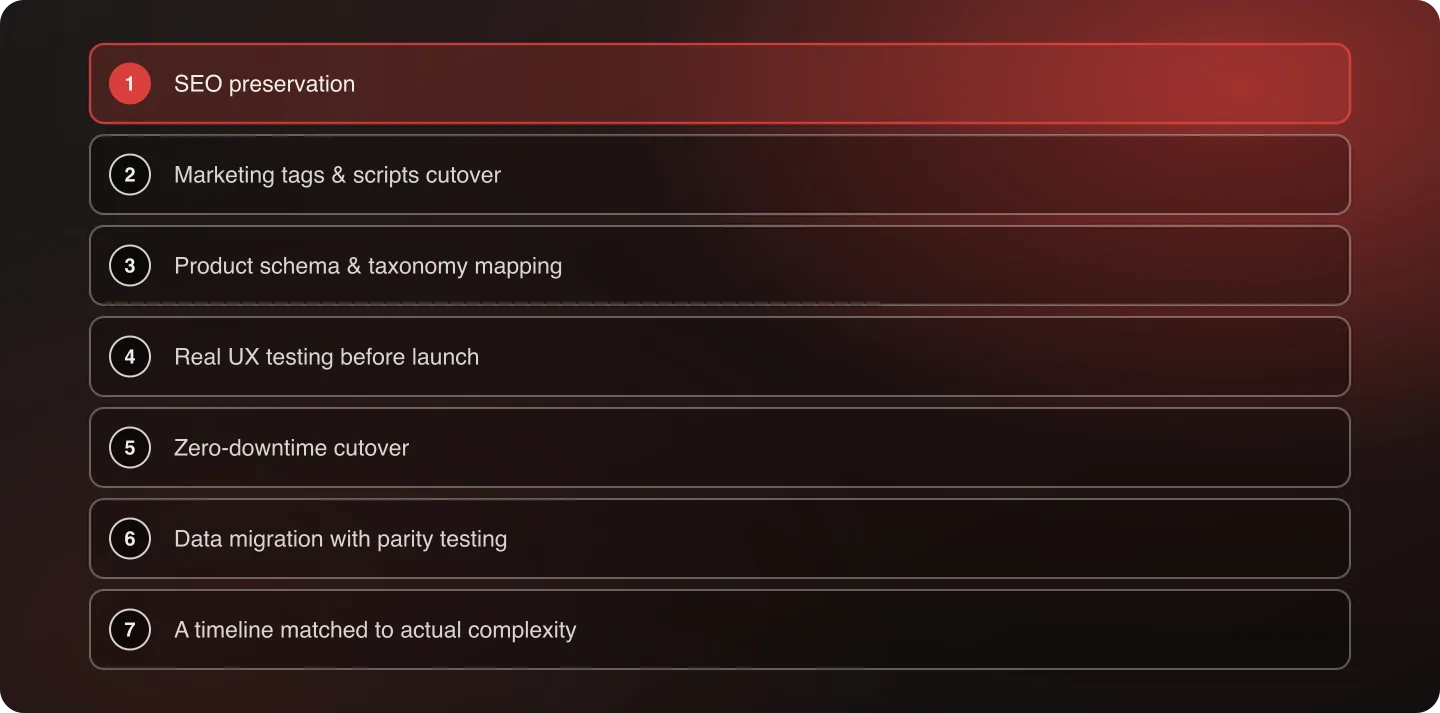
Seven disciplines run through every replatform, in this order of priority:
- SEO preservation — treated as a first-class requirement from day one, not a post-launch cleanup task
- Marketing tags & scripts cutover — the data lifeline to every downstream marketing system, verified before launch rather than discovered broken after
- Product schema & taxonomy mapping — structured so Google Shopping, marketplaces, and AI shopping agents can read your catalog correctly from day one
- Real UX testing before launch — not pushed to a post-launch fix cycle
- Zero-downtime cutover — the standard, not the upsell
- Data migration with parity testing — verified against the source system, not assumed correct
- A realistic timeline matched to actual complexity — not a vendor's best-case estimate
Each discipline below has a dedicated deep-dive. Read this page for the shape of the method; follow the links for the working detail.
1. SEO Preservation: The Playbook
Organic traffic loss after a replatform is not inevitable — it's what happens when redirect mapping, URL structure, and page-level SEO signals are treated as launch-week cleanup instead of migration-phase requirements. The full version of this discipline lives in how to preserve SEO during an ecommerce migration.
The redirect mapping discipline. Every URL on the old platform needs a mapped destination on the new one — not a blanket redirect to the homepage, and not "most of them, we'll catch stragglers later." A 1:1 mapping, tested before launch, is the single highest-leverage SEO-preservation activity in a replatform. Where an old page genuinely has no equivalent — a discontinued product line, for instance — redirect to the most relevant parent category rather than leaving a 404 or defaulting everything to the homepage. A homepage-only fallback strategy is one of the most common and most damaging mistakes we see. The five-step redirect mapping process covers this in full.
What causes organic traffic to drop, in order of how often we see it:
- Broken or missing redirects (by far the most common cause)
- URL structure changes that weren't mapped 1:1
- Lost metadata — title tags and meta descriptions that didn't carry over from the CMS
- Changed internal linking structure that orphans previously well-linked pages
- Slower page speed on the new platform, which is a ranking factor independent of content
Diagnosing which of those five is behind a specific decline is its own exercise — see why organic traffic drops after replatforming.
Structured data and technical SEO carryover. Schema markup, canonical tags, and sitemap structure all need to be verified on the new platform, not assumed equivalent to the old one just because the content itself migrated correctly. A new platform often generates its own schema by default, which can silently override or conflict with custom schema that took real effort to build on the old system — verify the new platform's default output rather than assuming it's additive to what you had.
A realistic redirect mapping process, step by step:
- Export a full URL inventory from the old platform, including pages with meaningful organic traffic even if they're not part of the primary navigation — old blog posts, discontinued product pages, and legacy category pages are the most commonly missed.
- Cross-reference against Search Console to identify which URLs are actually driving impressions and clicks today, so redirect-mapping effort is prioritized by real traffic value rather than treated as uniformly important.
- Map each URL to its most relevant new-platform destination — a genuine one-to-one match wherever a true equivalent exists, and a parent-category redirect (never a blanket homepage redirect) where the exact page no longer has one.
- Test the redirect map before launch, not after. A spot-check of the highest-traffic 20% of URLs catches most critical errors, but a full automated crawl against the redirect map is worth the time given how expensive a missed redirect is to discover after launch.
- Monitor 404 reports closely for the first 30 days post-launch, since real-world traffic patterns surface edge cases — old bookmarked URLs, external backlinks pointing at unexpected pages — that a pre-launch audit won't catch.
2. Marketing Tags & Scripts: The Cutover Nobody Budgets For
Most replatform planning concentrates entirely on functional parity — does the storefront work, do the features work, does checkout work. What gets treated as an afterthought, if it's addressed at all, is whether every marketing tag and tracking script survived the move. This is a mistake with consequences that compound silently: marketing tags are the data lifeline that keeps every downstream marketing system running. Miss a conversion tag, a product-click event, or an audience-building pixel, and the damage isn't visible on the storefront — it shows up weeks later as unexplained gaps in ad platform reporting, broken retargeting audiences, and attribution models running on incomplete data. The dedicated deep-dive is marketing tags & scripts: the replatform step that breaks silently.
Why this gets missed. Tags and scripts don't have a visual presence the way a broken page layout does. QA processes built around "does the site look and function correctly" have no natural checkpoint for "is Meta's conversion pixel still firing correctly on the order-confirmation page." Without a dedicated audit, this category of breakage passes every conventional pre-launch test while silently failing at the one thing it exists to do.
What a real tags-and-scripts migration audit covers:
- Full inventory before touching anything — every conversion pixel (Meta, Google Ads, TikTok, Pinterest), every analytics tag, every tag-manager container, and any custom tracking script, documented before migration begins
- Verification against each platform's own event-testing tools, not just visual confirmation that a script tag exists in the page source — a tag can be present and still misconfigured
- Testing the full funnel, not just the homepage — product-page view events, add-to-cart events, and checkout/conversion events each need independent verification, since a tag can fire correctly at one funnel stage and silently fail at another
- A defined verification window post-launch — comparing reported conversions and audience sizes before and after migration for at least two to four weeks, since some tracking gaps only become visible once enough post-migration data accumulates to compare against historical baselines
The downstream cost of getting this wrong. A broken conversion pixel doesn't just mean bad reporting — ad platforms use conversion data to optimize delivery. A pixel that stops firing correctly can degrade an ad account's performance well beyond the missing data itself, because the platform's own optimization is now working from a corrupted signal. This is a business-revenue problem wearing a technical-migration costume, not a reporting inconvenience. The full audit process covers how to inventory, rebuild and verify every tag before launch.
3. Product Schema & Taxonomy: Making Your Catalog Legible
Closely related to tags and scripts, but distinct enough to deserve its own discipline: product schema, category structure, and taxonomy need to migrate in a form that shopping feeds, marketplaces, and increasingly AI shopping agents can actually parse. This is the structured-data half of a replatform, and it's just as easy to under-invest in as tracking scripts, for the same underlying reason — it doesn't show up as a visible defect on the storefront itself. The dedicated deep-dive is product schema & taxonomy mapping in an ecommerce replatform.
What needs explicit mapping, not just migration:
- Product schema markup — the structured data identifying price, availability, reviews, and variant information. Verify the new platform's default schema output, since platforms often generate their own automatically, which can silently override or conflict with custom schema built on the old system.
- Category and collection taxonomy — the hierarchy connecting products to categories needs to carry over in a structure both search engines and shopping feeds can traverse, not just one that happens to render correctly in the storefront's navigation.
- Product feed compatibility — Google Shopping, Meta Catalog, and similar feeds depend on consistent, correctly-mapped product data. A taxonomy that changes structure during migration can silently break feed ingestion even when the storefront displays products correctly.
Why this increasingly matters beyond traditional search. As AI-driven shopping tools and shopping agents become a more common way products get discovered and evaluated, having product data structured cleanly enough for a machine to parse correctly — not just for a human browsing the storefront — is a growing part of what "SEO preservation" actually means in practice. A catalog that's visually fine but structurally messy underneath hides the problem from the only person likely to look — the shopper sees a working page, while every machine reading the catalog sees nothing usable.
4. Real UX Testing Before Launch, Not After
A pattern worth naming directly: most replatforms do rigorous functional testing (does the feature work) and comparatively little experiential testing (does the flow actually convert) before launch. UX evaluation routinely gets pushed to a post-launch fix cycle, treated as an optimization task rather than a pre-launch requirement. This is backwards. A conversion-funnel problem shipped on launch day costs real revenue for every day it takes to notice, diagnose, and fix — the same cost profile as any other pre-launch defect, just less visible to a functional QA checklist.
Why a dedicated UX review catches what functional testing doesn't. Functional QA answers "does this work as specified." It doesn't answer "does a real customer understand what to do next," "does this checkout step introduce unnecessary friction," or "does this page layout bury the information a buyer actually needs to decide." Someone who evaluates conversion funnels as their core discipline sees these problems immediately, in ways that a feature-completeness checklist structurally can't surface — the two kinds of review are looking for genuinely different failure modes.
How Anatta handles this. Every Anatta replatform gets a pre-launch UX review from Matt Bass, Anatta's Director of Optimization, before go-live — not as a nice-to-have, but as a standing part of the launch process. The full argument, and what that review actually looks at, is in why UX testing belongs before launch, not after.
5. Zero-Downtime Cutover
Anatta treats zero-downtime cutover as the standard, not a premium add-on. Nuts.com moved a full homegrown platform — catalog, customers, orders, and live subscriptions — onto Shopify Plus without interrupting trading. That's achievable with the right cutover sequencing, not a lucky exception. The zero-downtime deep-dive covers the runbook in full.
Parallel run vs. big bang. Two cutover strategies exist, and the right choice depends on risk tolerance and system complexity, not habit:
- Parallel run — old and new systems run simultaneously for a defined window, with traffic gradually shifted and both systems kept in sync. Higher coordination overhead, lower risk of a hard failure.
- Big bang — a single cutover moment, old system fully retired. Lower coordination overhead, but every risk is concentrated into one event rather than spread across a window.
For most enterprise replatforms, a carefully sequenced big bang with a well-tested rollback plan outperforms a parallel run's ongoing complexity — but this is a real decision requiring an honest risk assessment, not a default. Parallel run vs. big bang works through the tradeoff.
The cutover runbook. A real cutover plan is hour-by-hour, not day-by-day: DNS propagation timing, the exact sequence of database freezes and syncs, who owns the go/no-go decision at each checkpoint, and a documented rollback trigger with a clear owner authorized to pull it.
What a real runbook actually specifies:
- The exact freeze window for the old system — when it stops accepting new orders, and how that's communicated to customers if at all
- The data-sync sequence — which system is the source of truth during the transition window, and in what order orders, inventory, and customer data sync
- Named go/no-go checkpoints with a specific person authorized to make the call, not a committee
- A rollback trigger defined in advance ("if X fails, we roll back") rather than decided in the moment under pressure
- A communications plan for customer-facing issues if the cutover window runs long
Peak traffic and load testing. A cutover plan tested against average traffic isn't tested against the traffic pattern most likely to expose a problem. Spike testing against realistic peak load before the actual cutover catches capacity issues that a quieter test window would miss entirely.
6. Data Migration: Parity, Not Assumption
Every data migration needs parity testing — a systematic comparison between what existed on the old system and what landed on the new one, not a spot-check of a few records that happened to look fine. Data migration for ecommerce covers the reconciliation process in detail.
What needs parity testing, specifically:
- Order history — every order, not a sample, reconciled against the source system
- Customer records — including saved payment methods, addresses, and any loyalty or subscription status
- Product catalog — pricing, variants, inventory counts, and custom attributes
- Historical analytics continuity — so year-over-year reporting doesn't break at the migration boundary
Nuts.com's migration — a custom platform to Shopify Plus — is the clearest public proof point of this discipline done right: five custom product builders preserved, a custom OMS and WMS integrated rather than replaced, and an 85% reduction in custom code without losing the business logic that made the original system work. Read the Nuts.com case study.
What parity testing actually looks like in practice. Not a manual spot-check, but a systematic reconciliation: export the full order history from both systems and compare record counts, then compare a statistically meaningful sample of individual records field-by-field, not just count totals. A count match with individual-record discrepancies is a common false-confidence trap — totals can match while individual records are subtly wrong in ways that only surface later, often when a customer disputes an order.
Integration continuity, not replacement, as the default posture. The instinct on many replatforms is to replace every existing integration with whatever the new platform's native or most-popular option is. Nuts.com's approach — integrating the existing OMS/WMS rather than replacing it — reflects a more disciplined question: does this system actually need to be replaced, or does it just need to be connected differently? Replacing a working system introduces new risk for no guaranteed benefit; integrating one preserves institutional knowledge and existing staff familiarity.
7. Realistic Timelines by Complexity
Replatforming timelines vary enormously by complexity, and most of the variance comes from four factors: catalog size, number of system integrations, degree of custom functionality to preserve, and how much historical data needs migrating. A single-storefront brand with a clean catalog and no ERP integration moves faster than a multi-brand estate with custom OMS logic — treating both as the same category of project is how timelines slip. Replatforming timelines by complexity tier breaks down the four real drivers.
A pattern worth naming: buybuy BABY's 31-day migration is real and is Anatta's clearest proof point, but it reflects a specific profile — a defined scope, strong internal readiness, focused priorities — rather than a universal timeline every replatform should expect. Use it as evidence the method works, not as a default estimate for every project. The full buybuy BABY story is worth reading for what didn't get sacrificed to hit that date.
What actually determines a realistic timeline
Beyond the general "catalog size, integrations, custom functionality, data volume" framing, four questions predict timeline more reliably than revenue size alone:
- How many systems does the new platform need to talk to? Each integration — ERP, OMS, WMS, CRM, subscription platform — adds real time, and not linearly, since integrations can interact with each other in ways that create complexity beyond the sum of individual connections.
- How much custom functionality exists on the old platform with no native equivalent on the new one? This is where feature-parity audits directly affect timeline — every feature rebuilt rather than retired is real development time.
- How clean is the underlying data? A catalog with years of accumulated inconsistencies — duplicate SKUs, inconsistent categorization, orphaned records — takes longer to migrate cleanly than an equally large but well-maintained catalog.
- How available is the internal team for decisions? A replatform with a single, empowered internal decision-maker moves faster than one requiring committee sign-off at every checkpoint. That's an organizational factor, not a technical one, but it affects timeline as much as any technical factor above.
Common mistakes that blow the budget
- Treating redesign and replatform as one project by default. A redesign during a replatform is sometimes the right call, but it should be a deliberate decision, not an assumption — bundling them without discussing the tradeoff is a common source of scope creep. See should you redesign while you replatform?
- Feature parity as an unexamined requirement. Not every feature on the old platform deserves to be rebuilt on the new one. Some existed because the old platform made the right solution hard, not because merchants actually need that exact feature — auditing for this before scoping saves real budget.
- Underestimating peak-season risk. Replatforming during a peak season multiplies the cost of any mistake. If the timeline allows, sequencing a cutover outside peak season is worth the schedule tradeoff.
- Treating the RFP process as a formality rather than a scoping tool. A vague RFP produces vague, incomparable vendor responses. A detailed one — specifying integration count, data volume, and customization requirements explicitly — is what makes vendor quotes actually comparable, and surfaces scope gaps before a contract is signed rather than mid-project. The replatforming RFP template covers what to include.
- Underinvesting in post-launch monitoring. The first 30 days after launch are when most real-world issues surface — traffic patterns, edge-case data problems, and integration hiccups that pre-launch testing didn't catch. Treating launch day as the finish line rather than the start of a monitoring period is a common source of problems that could have been caught and fixed quickly instead of festering.
Every one of those is a scoping failure rather than an execution failure — which is the through-line in why replatforms go over budget.
Should you redesign while you replatform?
This deserves its own answer rather than being buried as a mistake to avoid, since it's a genuinely common question. The honest framework: a redesign makes sense when the current design has a documented, specific problem — poor conversion data, an outdated visual identity actively hurting brand perception, known usability issues. A redesign does not make sense as a default "since we're already touching everything" bundling decision. That reasoning treats design change as free when it's actually adding scope, risk, and testing surface to an already complex project. If a redesign is genuinely warranted, sequence it as a clearly-scoped addition to the replatform plan, not an assumed default.
Go deeper
The disciplines above each have a dedicated deep-dive. These cover the parts of a replatform that cut across all seven — the planning artifacts, the timing decisions, and the failure patterns:
- The ecommerce replatforming checklist — the working list, with a free template
- The 8 principles that separate a successful replatform from an expensive one
- The replatforming business case template — what actually gets a migration funded
- The replatforming RFP template — how to get comparable vendor quotes
- The 31-day migration — how Anatta moved buybuy BABY's $1.5B business to Shopify Plus
- Should you redesign while you replatform?
- Feature parity is a trap
- Replatforming during peak season
- Why replatforms go over budget
If your move is a theme migration rather than a platform migration, the mechanics differ enough to be worth a separate read: see protecting SEO through a Shopify theme migration.
Frequently Asked Questions
How do I preserve SEO during an ecommerce replatform?
Map every old URL to a new destination before launch, verify metadata and schema markup carried over correctly, and rebuild internal linking rather than assuming it transfers automatically. Redirect mapping is the single highest-leverage activity for preventing organic traffic loss.
Why do marketing tags break during a replatform, and how do I catch it?
Tags and scripts don't have a visual presence, so they can be completely broken while every functional and visual QA check passes. Verify every conversion pixel and tracking tag against its own platform's event-testing tools, at every funnel stage, not just by confirming the tag exists in the page source.
Does product schema and taxonomy really need special attention during a replatform?
Yes — this is the structured-data equivalent of the tags-and-scripts problem. A catalog can look correct on the storefront while its underlying schema, category structure, or product feed compatibility is broken, which is invisible to a human shopper but a real problem for search engines, shopping feeds, and increasingly AI shopping agents that depend on cleanly structured data.
When should UX testing happen in a replatform — before or after launch?
Before. Pushing UX evaluation to a post-launch cycle means shipping conversion-funnel problems on day one and paying the cost of every day it takes to notice and fix them. Anatta has Matt Bass, Director of Optimization, review every replatform before go-live specifically to catch this category of issue pre-launch.
Can a replatform really happen with zero downtime?
Yes — it requires a carefully sequenced cutover plan, parallel run or a well-tested big bang, with a documented rollback trigger, not a hope that nothing goes wrong. Nuts.com's move off a homegrown platform, subscriptions included, is a real example of this done at scale.
How long does a typical ecommerce replatform take?
It depends heavily on catalog size, integration count, custom functionality, and data volume — not on GMV alone. A single-storefront brand with minimal integrations moves faster than a multi-brand, ERP-integrated estate, regardless of revenue size.
Should I redesign my site while replatforming?
Only as a deliberate decision, not a default. Bundling a redesign into a replatform without discussing the tradeoff is a common source of scope creep and budget overrun.
What causes replatforms to go over budget most often?
Unexamined feature-parity requirements — rebuilding features that existed only because the old platform made better solutions hard — plus redesign scope creep and underestimated data migration complexity are the most common causes we see.
Is parallel run or big bang cutover better?
It depends on risk tolerance and system complexity. Big bang has lower ongoing coordination overhead but concentrates risk into one event; parallel run spreads risk across a longer window at the cost of more coordination complexity. Neither is a universal default.
What does real data parity testing involve?
A systematic field-by-field reconciliation between old and new systems on a statistically meaningful sample of records, not just a comparison of total record counts. Matching totals with individual-record discrepancies is a common false-confidence trap that surfaces later, often when a customer disputes an order.
Should existing integrations be replaced or migrated during a replatform?
Integrated, by default, unless there's a specific reason to replace a working system. Replacing a functioning integration introduces new risk for no guaranteed benefit; integrating it preserves institutional knowledge and existing staff familiarity with the tool.
What should a replatforming RFP actually specify?
Integration count, data volume, and customization requirements in enough detail that vendor responses are genuinely comparable to each other. A vague RFP produces vague quotes that look comparable on price but aren't actually scoped against the same requirements.
Planning a replatform? Talk to an architect about protecting revenue through the move.

Related